



A structure moves, the energy updates, and a geometry that looked awkward starts to settle. That kind of immediate feedback is useful—but it raises an important question for molecular modelers: does a structure that relaxes under a machine-learning force field represent a result you can trust?
The practical answer is to treat interactive relaxation as a way to explore and refine structures, not as automatic validation. A reliable workflow starts by matching the model settings to the system, checking the inputs that matter, and deciding in advance what conclusions need confirmation.
Start by matching the task to the system
UMA offers several task options for different application domains: OMOL for molecules, OMAT for inorganic materials, ODAC for MOFs and adsorption workflows, OC20 for catalysis, and OMC for molecular crystals. Choosing the closest match is a useful first check: the task is part of how the system is presented to UMA, so it should reflect the kind of structure you are evaluating.
For a first pass, the documentation recommends UMA-S. The extension also offers a lighter legacy UMA-S model and the larger UMA-M model. A larger model is not automatically the right starting point for every exploratory task; begin with the default fast option unless you already have a reason to choose otherwise.
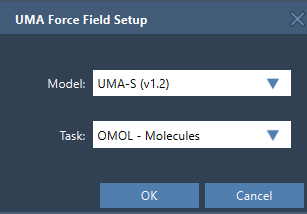
Check the settings that change the scientific question
For molecular systems using OMOL, total charge and spin multiplicity are inputs to the UMA request. Confirm that both describe the system you intend to model. If they do not, the simulation may be answering a different question from the one you meant to ask.
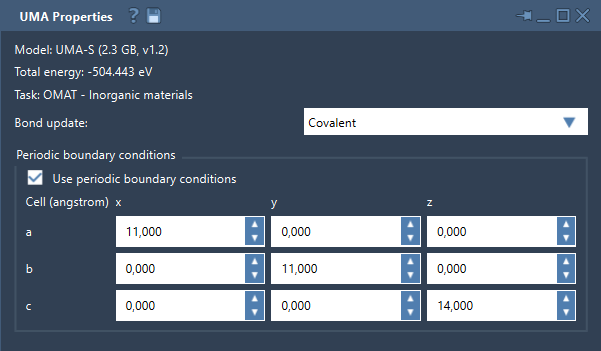
Periodic calculations need a similar pause. The UMA properties window includes a periodic-boundary-conditions control and a 3 × 3 cell matrix in angstroms. Before interpreting a periodic result, check whether periodic boundaries should be enabled and whether the cell matches your intended setup. The cell is not just a display detail: it defines the periodic context in which the structure is evaluated.
Use bond updates as a diagnostic, not a verdict
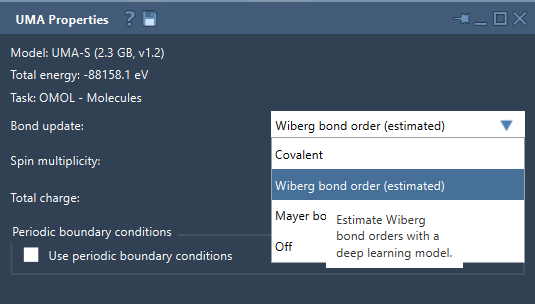
The Bond update setting determines how the bond graph is handled while the simulation runs. Covalent mode recomputes covalent bonds from the current structure; Off leaves the existing graph unchanged. Wiberg and Mayer modes estimate bond orders with a deep-learning model.
Those estimated bond orders can help you explore how bonding may change as atoms move. But an interactive visualization is not, by itself, evidence that a proposed bonding interpretation is definitive. If a bond-order change matters to your conclusion, treat it as a prompt for further checking with an appropriate reference method.
Make the first evaluation a checkpoint
On first use, UMA prepares a dedicated Python environment and may request access to the models. Package installation and model setup can take time, and SAMSON may ask you to create the interaction model again after setup. Once the UMA Properties window appears, start the simulation and wait for the first evaluation to finish. The energy may briefly be unavailable at startup; wait for a successful evaluation before using the displayed value to guide your next decision.
Then use the interactive response for what it is good at: rapid feedback while moving atoms or refining a structure. Keep track of the choices that frame that feedback—the task, model, molecular charge and spin where applicable, and periodic cell where applicable. This makes it easier to reproduce the setup and to understand what a change in the result might mean.
A simple decision rule
Use UMA to screen, refine, and explore. Before relying on a result, ask:
- Does the selected task fit the system?
- Are the molecular charge and spin multiplicity appropriate, if using OMOL?
- Are periodic boundaries and the cell set appropriately for a periodic system?
- Are estimated bond orders being interpreted as exploratory indicators rather than final confirmation?
- Does the conclusion need confirmation with a higher-accuracy reference method?
This turns interactive modeling into a more deliberate workflow: fast feedback helps you decide what to investigate next, while validation remains tied to the needs of the scientific question.
For setup instructions and the complete list of controls, see the UMA Force Field tutorial.
Note: SAMSON and all SAMSON Extensions are free for non-commercial use. Get SAMSON.