



A molecular structure can look different from one frame to the next, but visual inspection alone makes it difficult to tell whether the whole selected group is becoming more compact, expanding, or simply changing shape. The radius of gyration offers a useful first check: it follows the overall compactness of an atom-containing group along a path or trajectory.
This is especially helpful when you want to turn a series of structures into a simple, interpretable signal. Instead of comparing frames one by one, you can see whether compactness changes over the path and inspect the range of values the group visits.
What the measurement can tell you
Radius of gyration is a classic measure of overall compactness. A decreasing value is consistent with the selected group becoming more compact; an increasing value is consistent with it expanding. The result is reported in A (angstroms).
That makes it a useful starting point for investigating folding, compaction, or swelling. It is a summary of the group as a whole, though—not a description of every local change. Two structures can have similar compactness while differing in the way their shapes are arranged. A radius-of-gyration plot therefore helps answer “How compact is this group?” but not, on its own, “What shape is it?” or “Which part moved?”
Build a plot in Path Analyzer
- Open Path Analyzer.
- Select Radius of gyration under Observable.
- Choose the Path you want to examine.
- Define the atom-containing Group to analyze.
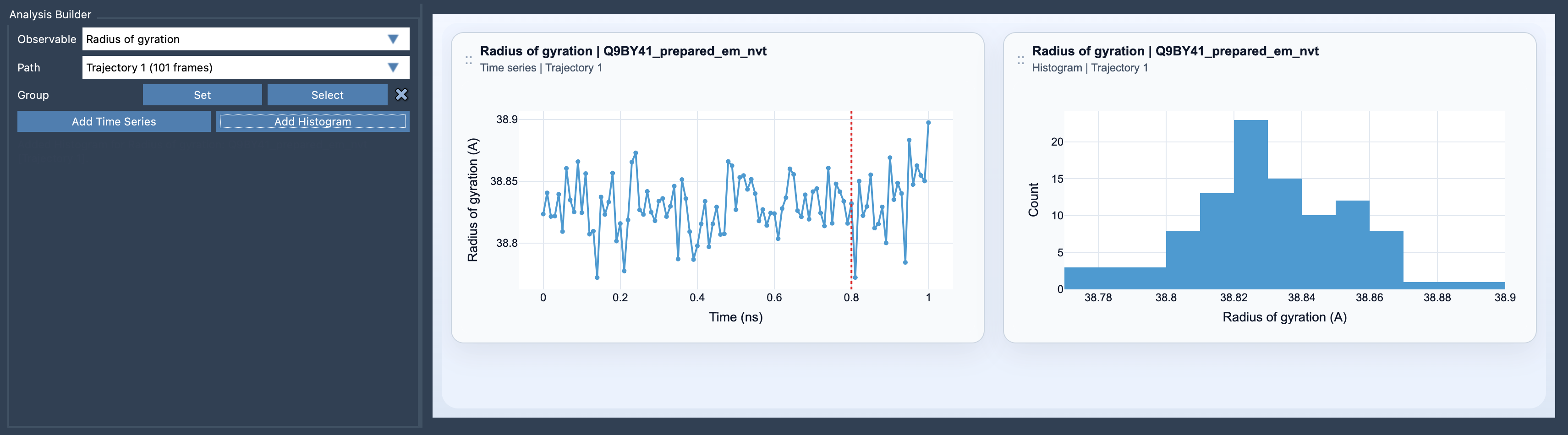
- Choose Add Time Series to follow compactness along the path, or Add Histogram to inspect the range of compactness values.
Choose the view that fits your question
A time series is useful when the order of structures matters. It can help you spot when compactness changes along the path and whether the change is gradual or concentrated in a particular part of it. A histogram is useful when you want an overview of the values observed, without focusing on their order.
Before interpreting either plot, check that the selected group matches the question you are asking. The measurement describes the group you define, so changing that selection can change the result. For a meaningful comparison across a path, use a consistent group and compare like with like.
Pair compactness with shape information
If the radius of gyration changes, you know the overall compactness has changed—but that still may not explain how the structure changed. If you also care about shape, pair this analysis with Asphericity or Shape parameter. Together, these observables can provide a more informative picture than compactness alone.
In practice, start with radius of gyration as a broad diagnostic, then use additional shape measures when the result raises a more specific question. This keeps the first pass straightforward while making it easier to decide what to investigate next.
For the setup details, see the Radius of Gyration documentation.
Note: SAMSON and all SAMSON Extensions are free for non-commercial use. Get SAMSON.