



A molecular trajectory can tell very different stories depending on what you choose to measure. Imagine a binding pocket opening: the average positions of two regions may move farther apart, even while one pair of atoms remains in close contact. Or a single atom pair may approach while the groups as a whole barely shift. If a distance plot seems not to match what you see in the structure, the issue may be the definition of distance—not the trajectory.
SAMSON’s Path Analyzer offers several ways to measure the separation between two atom-containing selections along a path. Choosing the right one helps turn a visually complex motion into a signal that answers a specific question.
First decide what “far apart” means
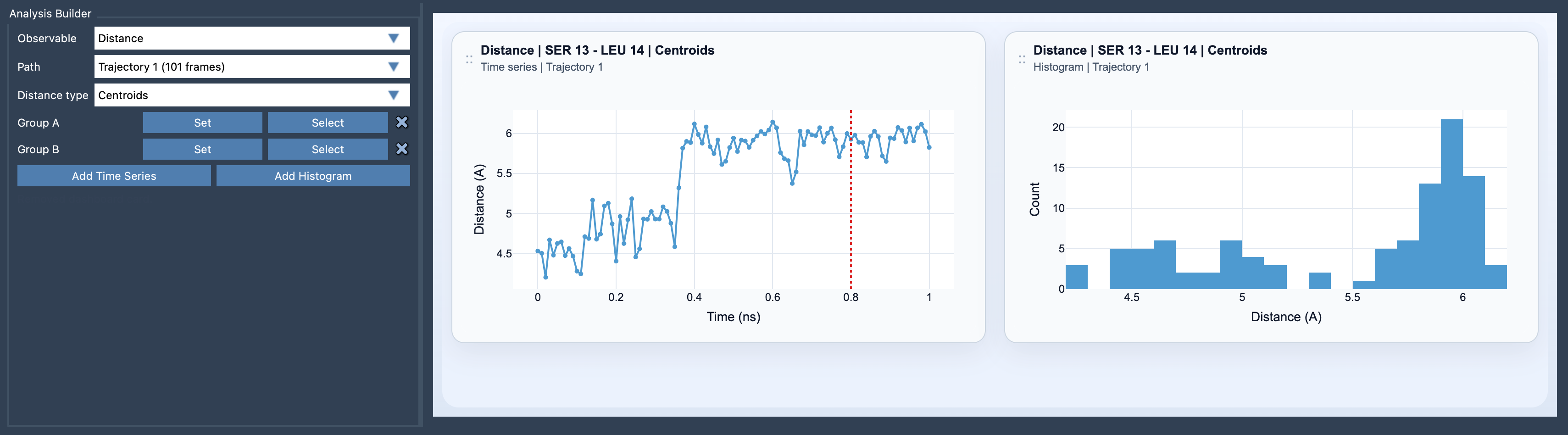
For Centroids, each selection is represented by its centroid: the simple geometric average of the positions of its atoms. The plotted value is the distance between those two average positions. This is useful when you want a broad, easy-to-read description of how two groups move relative to one another—for example, tracking the separation of two domains or the opening and closing of a larger feature.
A centroid is not a center of mass. Each atom contributes to the geometric average, rather than being weighted by its mass. That distinction matters when interpreting the result, especially if you are comparing Distance with analyses such as Angle or Dihedral, which use centers of mass for multi-atom groups.
For Minimum, the selections are not reduced to representative points. Path Analyzer checks the atom pairs across Group A and Group B and reports the smallest pairwise separation. In practical terms, this answers a different question: “What is the closest contact between these groups at this point along the path?” It can be more informative than centroid distance when you care about a contact, a local approach, or whether any part of one selection comes close to another.
Use the signal that matches the question
- Choose Centroids to follow overall group displacement or a coarse-grained opening and closing motion.
- Choose Minimum to follow the closest approach between the selected atoms.
- Choose Minimum along X, Y, or Z when you want the minimum separation measured along a particular coordinate axis.
The axis-specific options are not simply the ordinary three-dimensional distance with a different label. They use the absolute difference between atom coordinates along the selected axis—for example, the X-coordinate difference—when searching for the minimum. So use them when motion along that direction is the feature you want to isolate, and interpret them as an axis-specific measurement rather than a full spatial separation.
A quick setup and interpretation routine
- Open Path Analyzer and select
Distanceas the observable. - Choose the path you want to inspect, then define atom-containing Group A and Group B.
- Select a distance type based on whether your question concerns average group motion, closest contact, or a preferred axis.
- Add a time series to see how the measurement changes along the path, or add a histogram to inspect the distribution of sampled values.
Before drawing a conclusion, check that the selections reflect the scale of your question. Small selections are useful for chemically specific contact tracking; residues, domains, or chains can provide a more interpretable, coarse-grained view. A centroid plot and a minimum-distance plot can differ substantially without either being incorrect: one summarizes group-level motion, while the other follows the closest atom pair.
It can also help to consider both views. A changing centroid distance alongside a fairly steady minimum distance may indicate that the groups are rearranging while retaining a close approach. A changing minimum distance can reveal a local contact change that a broad group-level measure might smooth over. These are clues to investigate in the structures, not automatic explanations of the underlying mechanism.
Distance analyses can also be saved and used with Path Analyzer’s Custom scatter, 2D density map, or Energy landscape tools, making it possible to compare the distance signal with other saved analyses.
For the full options and equations, see the Distance analysis documentation.
Note: SAMSON and all SAMSON Extensions are free for non-commercial use. Get SAMSON.