



A trajectory can look busy in an animation while telling you very little about how much its atoms are moving. Conversely, a system may appear nearly still even as a selected region undergoes a brief, important burst of motion. The challenge is separating visual impression from a measurable pattern across the path.
Path Analyzer’s Average velocity observable provides a simple way to track motion in a selected atom group. It follows the mean velocity magnitude along a path, making it useful for spotting intervals that are comparatively active or quiet. That can help you decide where to inspect more closely instead of relying on a quick visual scan of the trajectory.
What the number represents
For each frame, the analysis takes the magnitude of each selected atom’s velocity and averages those magnitudes across the group:
mean speed at frame t = (1 / number of selected atoms) × sum of |velocity of atom a at t|
This detail matters: the result is an average of individual speed magnitudes, not the magnitude of one group-wide average velocity vector. In practical terms, it summarizes how fast the selected atoms are moving, without showing their directions. Opposing directions therefore do not cancel in this measure.
Use the plot to find questions, not conclusions
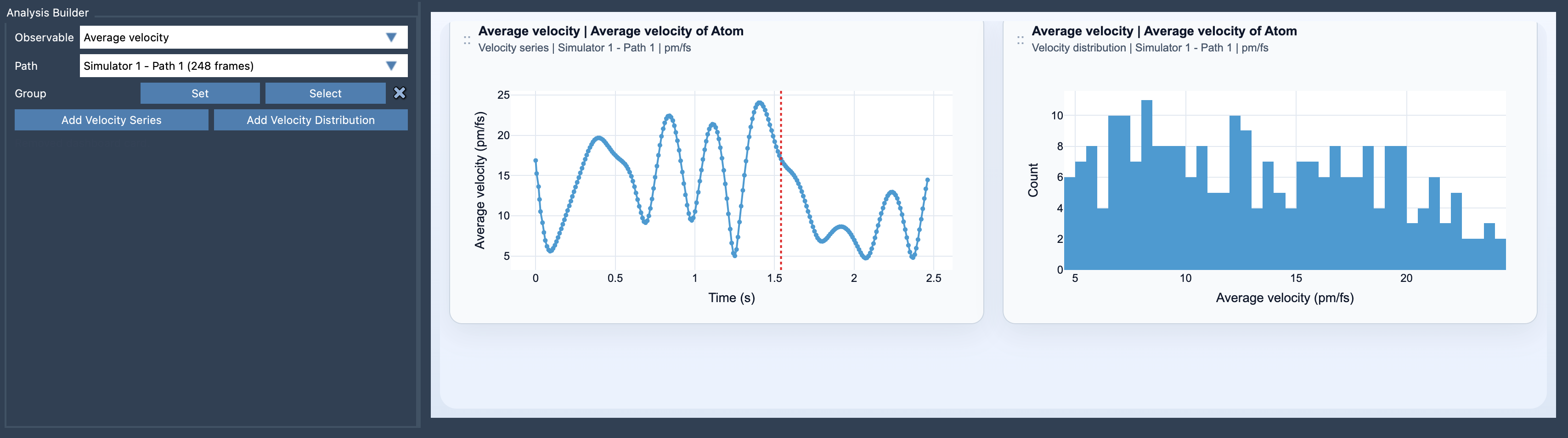
A velocity series gives you a frame-by-frame view of the mean velocity magnitude. A sudden rise can point to a burst worth investigating; a low region can identify a comparatively quiet stretch. Neither pattern, by itself, explains why the motion changed. Treat the plot as a guide to where to look next, and review the corresponding part of the path in the context of your model and other analyses.
You can also choose a velocity distribution to inspect the sampled values as a distribution rather than following them along the path. The two views answer different practical questions: the series emphasizes when motion changes, while the distribution helps summarize the values sampled across the path.
Set up a useful comparison
Open Path Analyzer, select Average velocity under Observable, choose a path, and define the group you want to analyze. The group must be an atom-containing selection, and the chosen path must provide velocity data for those atoms. Then select Add Velocity Series or Add Velocity Distribution.
Be deliberate about the group: a mean over a broad selection can hide what is happening in a smaller region. If a localized feature is the reason you are investigating the trajectory, consider analyzing an appropriate atom-containing selection for that feature, provided the path has the required velocity data. When comparing plots, keep the selected group and path in mind; a change in either can change what the reported average describes.
Keep units and interpretation in view
After creation, the card’s units can be changed between Auto, pm/fs, A/ps, and m/s. Choose a unit that makes the values readable for your comparison, and check the unit before interpreting or sharing a plot.
Average velocity is especially relevant when the path contains meaningful dynamical information. If you also want to examine driving forces alongside the resulting motion, the documentation suggests comparing this analysis with Average force. The comparison can help frame a more focused question, but the velocity plot alone does not establish the cause of a motion pattern.
For the full setup details, visit the Average Velocity documentation.
Note: SAMSON and all SAMSON Extensions are free for non-commercial use. Get SAMSON.