



A molecular structure can shift as a whole, while the part you care about barely changes. Or it can look almost stationary overall while a loop, domain, or binding-site region rearranges. A single visual comparison can make these situations hard to distinguish—and an RMSD value can be misleading if you do not know what was aligned and what was measured.
Path Analyzer’s RMSD analysis helps separate overall rigid-body motion from internal structural change by using two selections for two different jobs: a Fit set and a Measured set. The fit set aligns each frame to the first frame. After that alignment, the measured set is compared with its position in the first frame. In other words, your result reflects the movement of the measured atoms relative to the alignment defined by the fit atoms.
Choose the question before the selections
Before building the plot, decide what you want to learn. If the question is whether a flexible loop moves relative to the protein core, use a stable core as the fit set and the loop as the measured set. The core alignment removes much of the structure’s overall translation and rotation, making the loop’s deviation easier to inspect.
If instead you want to track how an entire domain changes relative to another part of the molecule, fit on a stable scaffold outside the moving domain and measure the domain. If you include the moving region in the fit set, its movement will influence the alignment itself, which can make the result answer a different question than intended. There is no universally correct pair of selections: the useful pair depends on the biological or modeling question.
Read the plot as a comparison to frame zero
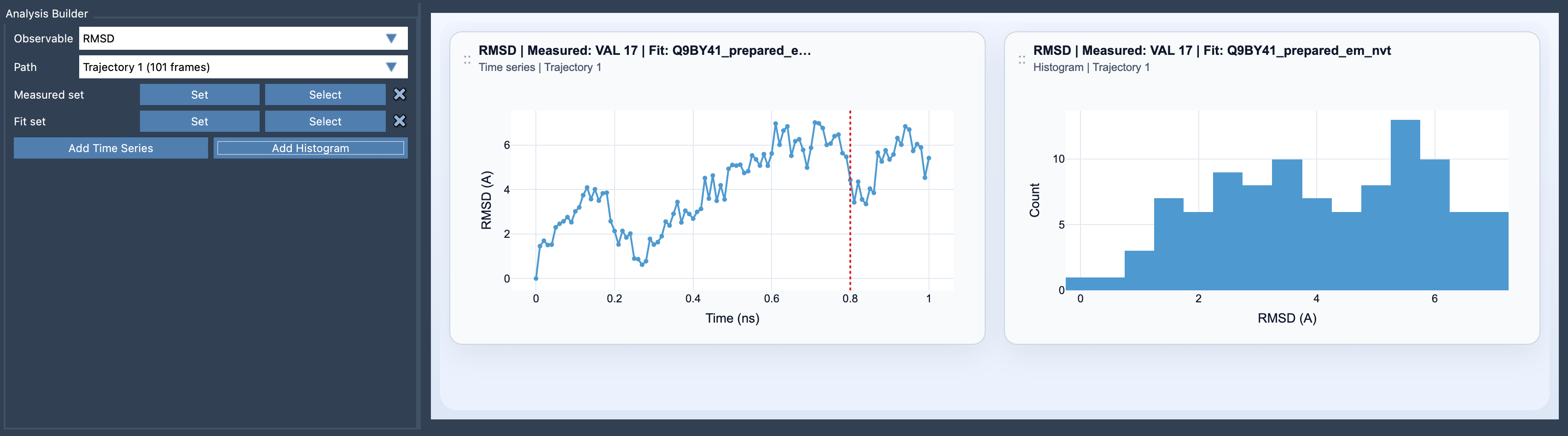
Each RMSD value compares the measured set in a frame with the measured set in the first frame, after fitting. It is not a comparison between neighboring frames. That distinction matters: a steadily increasing value suggests growing deviation from the starting structure, while a rise followed by a return suggests the measured set moved away and later came closer to its initial arrangement. The plot alone does not tell you why that happened, or whether the change is functionally important.
Use a time series when the order of frames matters and you want to follow deviations through the path. Use a histogram when you want to see how the sampled RMSD values are distributed. A histogram can show whether values cluster or spread out, but it does not preserve when particular values occurred. If timing or transitions matter, inspect the time series as well.
Make a large RMSD easier to interpret
A large excursion is a reason to investigate, not a verdict on its own. First check that the fit set is the stable reference you intended and that the measured set contains the atoms relevant to your question. Then click a point in the plot to move the path to its corresponding frame; double-click a point to select the measured features in SAMSON. This connects the plotted value back to the structure you are analyzing.
For a broader picture, compare RMSD with another observable. Radius of gyration can help you consider changes in overall compactness; a distance can track a chosen separation; and energy can provide another view of the sampled path. These measurements answer different questions, so agreement—or disagreement—between them is useful context rather than a substitute for examining the structure.
The practical takeaway is simple: an RMSD value is only as informative as its reference. Choose a fit set that represents what you want to hold steady, choose a measured set that represents what you want to monitor, and remember that every value is measured against the first frame. For setup details, see the RMSD documentation.
Note: SAMSON and all SAMSON Extensions are free for non-commercial use. Get SAMSON.