



A path can contain many energy values, but a plot of absolute energy is not always the easiest way to understand what is happening. If the values sit far above or below zero, the important changes along the path may be hard to spot. And if you compare different paths, their absolute offsets can distract from the energy changes you actually want to examine.
Path Analyzer’s Energy card addresses this by letting you change the energy component, display unit, and reference view after creating the plot. Knowing what each view means helps you choose one that answers your question—without rebuilding the analysis.
Start with the question
Before interpreting a curve, decide what you need to learn from it. Are you tracking energy as a path progresses? Comparing each value with the starting structure? Finding the lowest energy anywhere in the sampled path? Or watching how the best value seen so far changes? These questions correspond to different views, and the distinction matters.
- Absolute shows the energy values without a relative reference. Use it when the values themselves are important.
- Relative to first subtracts the first energy value from every value:
ΔEᵢ = Eᵢ − E₀. The first point is therefore the reference, and other points show their difference from it. - Relative to minimum subtracts the lowest energy in the full series:
ΔEᵢ = Eᵢ − minⱼ Eⱼ. This makes the lowest point the zero reference; other values show how far above it they are. - Running minimum reports the minimum energy encountered up to each point:
Eᵢ = minⱼ≤ᵢ Eⱼ. Unlike the two relative views, this is not a difference from a reference energy. It tracks the best (lowest) value reached so far.
A practical way to choose: use “relative to first” when the starting state is your comparison point; use “relative to minimum” when you want to compare the path against its lowest sampled value; and use “running minimum” when the question is how the best-so-far energy evolves. These views change how the series is expressed, so keep the selected view in mind when describing or comparing plots.
Check which energy you are looking at
The card can display Potential, Kinetic, Total, or All energies. If kinetic data are unavailable, Path Analyzer falls back to potential energy. That fallback is useful to know when a plot does not show the component you expected: check the available data and the selected component before drawing conclusions.
Units are another part of interpretation. The available choices are Auto, eV, kJ/mol, kcal/mol, and Hartree. When sharing a result, state the unit and view along with the component. “Energy rose by 5” is ambiguous; “potential energy rose by 5 kcal/mol relative to the first point” makes the reference and scale clear.
Series or distribution?
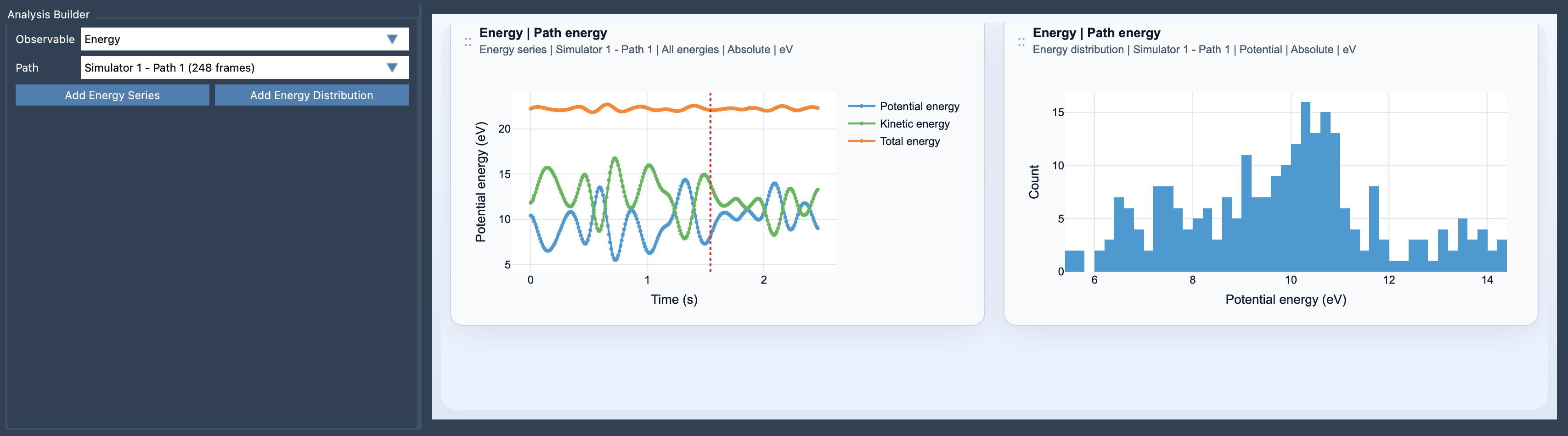
An energy series follows energy along a path or trajectory, making it the natural choice when you want to see how values change from point to point. An energy distribution instead helps inspect the distribution of sampled energy values. Choose the series for progression and the distribution for the spread of the samples; they answer related but different questions.
To create either view, open Path Analyzer, choose Energy under Observable, select a path that exposes energy data, then click Add Energy Series or Add Energy Distribution. No explicit atom selection is required.
For a fuller interpretation, pair energy analysis with a custom scatter plot or an energy landscape when those views suit your question. Learn more in the Energy documentation.
Note: SAMSON and all SAMSON Extensions are free for non-commercial use. Get SAMSON.