



Docking a single ligand is manageable. Screening a library is where small setup choices can become expensive: an oversized search region, an unprepared receptor, or results that were not saved in a reusable form can all make the process slower or harder to interpret.
AutoDock Vina Extended in SAMSON brings library setup, docking, result review, and export into one workspace. The workflow below focuses on the decisions that help keep a screening run organized and its output useful.
Start with a clean, consistent system
Before docking, check the receptor structure for alternate-location atoms and unnecessary small molecules. Water and monatomic ions can be removed; Vina Extended does not consider them. Make sure polar hydrogens are present, since they are needed to determine hydrogen bonds. If hydrogens already reflect a chosen protonation state, do not change them casually. For missing residues or heavy atoms, the PDBFixer extension can help repair the protein before docking.
Ligands also need attention. A library can contain multiple ligands in files such as MOL2 or SDF. If its structures are in 2D or otherwise need preparation, enable ligand minimization and select a preset. Add missing hydrogens when needed: they support bond-type detection during minimization and polar-hydrogen requirements for docking. If the library contains relevant cis-trans isomers, provide those forms explicitly; the docking workflow does not generate them.

Define the search around the question
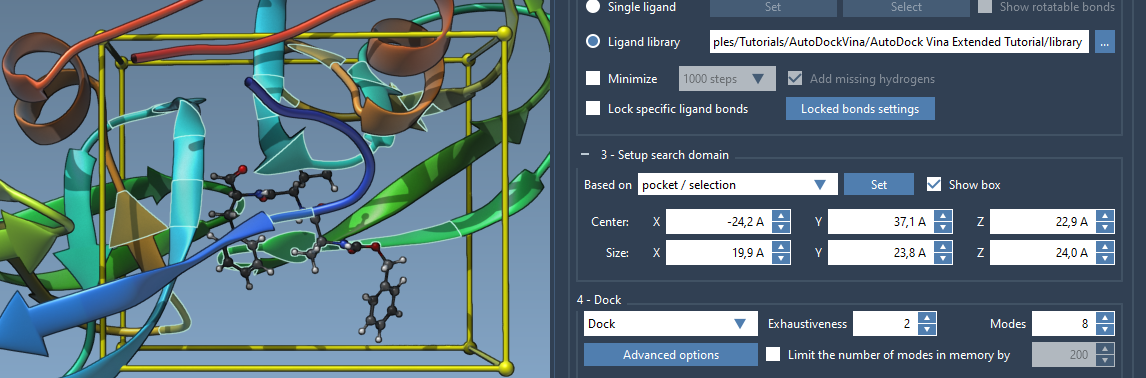
Once the receptor is set, Vina Extended creates a search domain based on the whole receptor by default. If the binding site is known, a tighter domain around the pocket can reduce the region being searched and the associated computation. In SAMSON, select the bound ligand, use Select > Biology > Binding sites to select nearby residues, then choose Based on pocket/selection in the search-domain controls and click Set.
You can also adjust the box by entering its center and size in the interface or dragging its corner controllers in the Viewport. The domain is defined in global XYZ coordinates, so check that it still surrounds the pocket if you have moved or aligned the system.
Choose flexibility deliberately
For a ligand library, all ligand rotatable bonds are active by default. You can lock selected bond types using Locked bonds settings and Lock specific ligand bonds. For a single ligand, rotatable bonds can also be toggled through the viewport controllers: green indicates rotatable, red indicates locked. More flexibility may represent more possible conformations, but it also increases docking time. Receptor flexible side chains are another option for a single receptor, with the same practical trade-off: they can make the setup more flexible while significantly increasing computation time.
Run a traceable screening job
Choose Dock to perform docking. The tutorial uses exhaustiveness 8 and a maximum of 20 generated binding modes as example settings; other parameters, including scoring function, can be adjusted in Options. Avoid changing scoring weights unless you have a reason, and use the restore-defaults control if needed.
Before starting, enable Save results and choose a destination. The project directory records receptor and ligand files, generated and docked PDBQT files, and MOL2 files for individual modes. Keep its folder hierarchy intact if you plan to reload the results later. For library runs, docking can be paused, resumed, or stopped, but those actions take effect after the current ligand finishes.

Review the output without loading everything
After docking, inspect the results table and plot to sort, filter, and compare ligands by available measures such as affinity and RMSD. A useful way to manage a large run is to load only the results table first, or load the top ligands or selected results, then bring in additional ligand poses when needed. This avoids loading every mode at once. The table can be exported as CSV, and the plot can be exported as an image or CSV.
Scores and poses are a starting point for prioritization, not a substitute for examining the binding context. Restore promising conformations in the document, inspect nearby residues, and use tools such as the Protein-Ligand Interaction Analyzer or Hydrogen Bond Finder to explore contacts and hydrogen bonds. These checks help turn a ranked list into candidates for further analysis.
For the complete walkthrough and interface details, see the AutoDock Vina Extended docking tutorial.
Note: SAMSON and all SAMSON Extensions are free for non-commercial use. Get SAMSON.