



A molecular structure can look ready to simulate and still produce confusing results: the wrong application task, an incorrect molecular charge, or an unchecked periodic cell can undermine the interpretation. The first energy may also take longer than expected while the UMA environment is being prepared. A few checks before and during a run can make interactive evaluation much easier to use responsibly.
This guide focuses on a practical question: How do you set up UMA so its energy and forces are useful for exploring a structure, without mistaking a quick result for a final answer?
Start with the system, not the model size
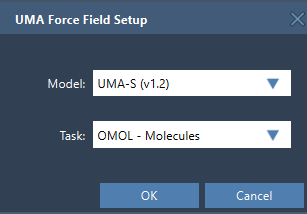
UMA offers several model choices: UMA-S v1.2 (2.3 GB), UMA-S v1.1 (1.1 GB), and UMA-M v1.1 (11.7 GB). For a first pass, the documentation recommends starting with UMA-S unless you already know you need the larger UMA-M model. This keeps the initial choice straightforward; the important first decision is selecting a task that matches the system.
- OMOL – Molecules: molecular systems. This is the task whose interface uses total charge and spin multiplicity.
- OMAT – Inorganic materials: bulk inorganic materials.
- ODAC – MOFs: MOF and direct-air-capture-style adsorption workflows.
- OC20 – Catalysis: catalytic surfaces and adsorbates.
- OMC – Molecular crystals: molecular-crystal systems.
Choosing by system type is more useful than choosing based on a model name alone. For molecular systems, check that the charge and spin multiplicity reflect the system you intend to evaluate. For periodic workflows, verify the cell rather than assuming the displayed unit cell is correct.
Expect a setup step before the first evaluation
Before creating a simulation, make sure the UMA Force Field and Python Scripting extensions are installed and up to date, and that the machine can install Python packages on first use. On first use, UMA prepares a dedicated Python environment and may request access to its models. Follow the instructions in SAMSON; the initial setup can take some time, and you may need to create the interaction model again after setup is complete.
To start, open the document containing the system, choose Edit > Simulate > Add simulator, select UMA Force Field, choose a state updater such as FIRE, and press OK. Then select the model and task in the setup window. When the UMA Properties window appears, start the simulation using Edit > Simulate > Start.
Do not interpret the brief “energy not available” state at startup as a result. The first UMA evaluation needs to complete before the total energy appears. After that, you can move atoms or refine the structure while UMA updates energy and forces.
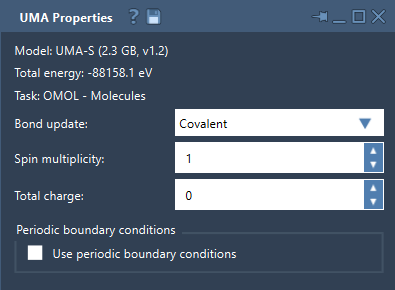
Three settings worth checking while you explore
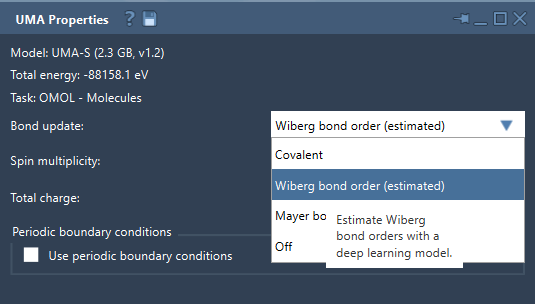
1. Bond update mode
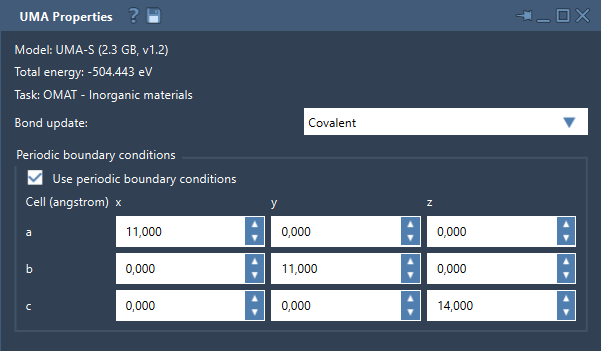
The bond graph can be recomputed from the current structure using Covalent, estimated with Wiberg bond order or Mayer bond order, or left unchanged with Off. Wiberg and Mayer modes are estimated bond-order visualizations. They can help with interactive exploration, but important conclusions should be checked with your reference method.
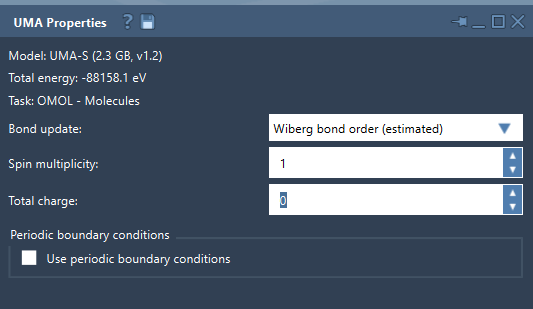
2. Charge and spin for OMOL
For OMOL – Molecules, set total charge and spin multiplicity to values consistent with the molecular system. These are part of the request sent to UMA, so they are not merely display preferences. If you are unsure what values describe your intended system, resolve that before interpreting the calculation.
3. Periodic boundary conditions
The properties window provides a periodic-boundary-conditions checkbox and a 3 × 3 cell matrix in angstroms. For periodic systems, inspect the matrix and confirm the intended cell before drawing conclusions from the result.
A useful way to interpret a UMA run
Think of UMA as a way to screen, refine, and explore structures interactively. A practical sequence is: match the task to the system; begin with UMA-S; set OMOL charge and spin carefully when applicable; check the unit cell for periodic systems; then use the resulting energies and forces to guide exploration. When a result will support an important conclusion, confirm it with a higher-accuracy reference method as needed.
This distinction helps avoid a common modeling trap: treating a convenient interactive evaluation as though it answers every question about a system. UMA can make it easier to see how a structure responds as you adjust it, while the appropriate reference method remains important for validating consequential conclusions.
For the complete setup instructions and model details, read the UMA Force Field tutorial.
Note: SAMSON and all SAMSON Extensions are free for non-commercial use. Get SAMSON.