



A docking run can produce a lot of output and still leave you with the same practical question: which poses are worth looking at? The challenge is not only launching the calculation. It is choosing a useful search region, making sure the input structures are suitable, and keeping the results organized so you can compare candidates afterward.
Here is a focused workflow for docking a ligand library with AutoDock Vina Extended in SAMSON, then turning the results into a shortlist for closer inspection.
Start with inputs you can trust
Before setting up the docking project, check the receptor and ligands. For the receptor, remove alternate-location atoms and unnecessary small molecules. Water and monatomic ions are optional to remove because AutoDock Vina Extended does not consider them. Make sure the receptor has the hydrogens needed for your system: polar hydrogens are important for identifying hydrogen bonds. If hydrogens are already present based on a chosen protonation state, do not casually replace them.
For a ligand library, files can use different supported formats, such as MOL2 or SDF, and a file can contain multiple ligands. If a ligand is in 2D or otherwise needs preparation, the minimization option can be useful. Add missing hydrogens when needed; they are relevant to bond-type detection during minimization and polar hydrogens are needed for docking.
One detail that can quietly affect a library: by default, its ligands are treated as fully flexible. You can lock selected bond types, but minimization does not respect those locks—the bonds can still rotate during minimization. Also, cis-trans isomers are not generated automatically, so include the relevant isomers in the library if they matter to your study.
Make the search box fit the question
Setting the receptor initially defines a search domain based on the whole receptor. If you already know the binding site, a smaller, site-focused box can reduce the search space and the amount of computation. Select the bound ligand, use Select > Biology > Binding sites to select nearby residues, then choose Based on pocket/selection in the search-domain controls and click Set. You can also adjust the box in the Viewport or enter its center and size in the interface.
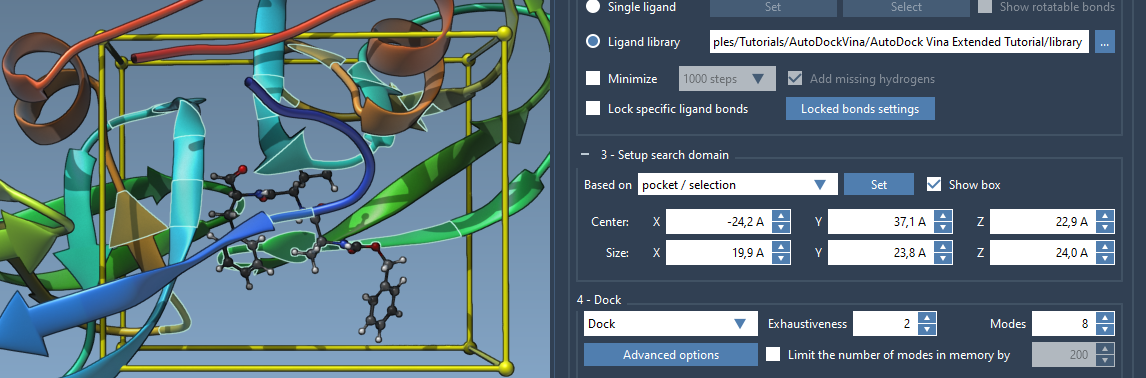
The domain is defined in global XYZ coordinates. If the box does not sit where you expect, check the system’s orientation as well as the selected pocket. A well-chosen box is a practical way to focus the calculation; it is not a substitute for checking that the binding site itself is the one you intend to study.
Choose settings, then save the project
Select Ligand library, browse to the library folder, and choose Dock for a docking run. In Options, the tutorial uses exhaustiveness 8 and a maximum of 20 generated binding modes. Exhaustiveness controls search effort: increasing it generally means a longer search. Other settings include the scoring function and energy range, but avoid changing scoring weights without a specific reason.
Turn on Save results and select an output directory. The project contains inputs and generated files, including docked PDBQT files and MOL2 files for modes. Keep its folder hierarchy intact and do not remove files if you want to load the project into AutoDock Vina Extended later. For a large library, loading only the results table or a selected set of ligands can be more manageable than loading every pose immediately.
Use scores to find candidates, not to skip inspection
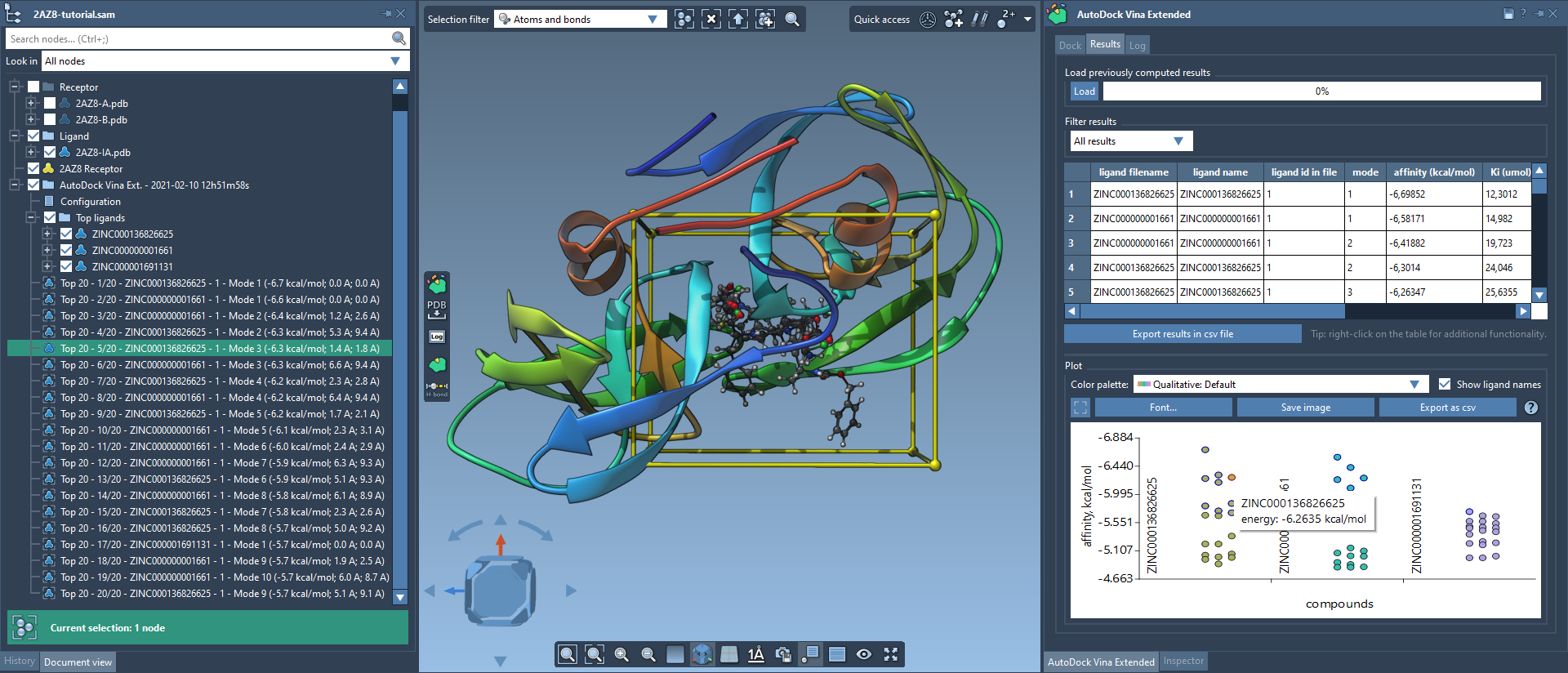
When the run finishes, use the Results tab to sort and filter the table by available properties such as name, affinity, or RMSD, and to explore the plot. A data point can select a corresponding conformation; double-clicking can restore it when it is present in the document. The results table also provides actions for loading or exporting ligands and conformations.
Start by narrowing the list, then inspect representative poses in the molecular workspace. Restore a conformation or create structural models from selected conformations to compare their placement. Check the ligand in the context of the receptor, and use available interaction-analysis tools to examine contacts or hydrogen bonds. A score is useful for organizing candidates, but a ranked list alone does not tell you whether a pose makes chemical sense or answers your biological question.
This approach keeps the workflow manageable: prepare the inputs, define a relevant search region, save the full project, and load or inspect results in stages. For the complete interface walkthrough and additional analysis examples, learn more in the AutoDock Vina Extended tutorial.
Note: SAMSON and all SAMSON Extensions are free for non-commercial use. Get SAMSON.