



A large protein assembly can be hard to reason about as a whole. Repeated subunits may be visible, but it is not always obvious which rotations organize them—or whether the structure matches the symmetry you expect. That uncertainty can slow down tasks such as comparing an assembly with an experimental model, choosing a representative region, or planning a symmetry-aware workflow.
SAMSON’s Symmetry Detection extension helps make that geometry easier to inspect by detecting and visualizing symmetry axes in biological assemblies. Rather than relying only on visual intuition, you can review candidate symmetry groups, examine their axes, and compare the reported RMSD values.
Start with the assembly, not just the protein chain
Before detection, load the biological assembly or multimeric complex you want to study. For structures fetched from the PDB, check the importer settings: depending on the importer, you may need to enable the option to import biological assemblies. A collection of individual chains is not necessarily the same object as the complete assembly, so confirm that the structure in the viewport represents the system you intend to analyze.
Once the assembly is open, launch Home > Apps > Biology > Symmetry Detection and click Compute symmetry. The extension supports cyclic groups such as C2 and C3, dihedral groups such as D2 and D3, and cubic symmetries including tetrahedral, octahedral, and icosahedral symmetry. More than one plausible group may be returned, particularly for a large complex.
Read candidate groups as hypotheses to inspect
When several results appear, avoid treating the first entry as an automatic answer. The tutorial recommends preferring higher-order groups with small RMSD values. Use those two pieces of information together: the group order describes the proposed repeating arrangement, while the RMSD provides a measure to compare the geometric fit of candidates. A lower RMSD is useful when comparing alternatives, but it is still important to check that the proposed symmetry makes sense for the assembly and the question you are asking.
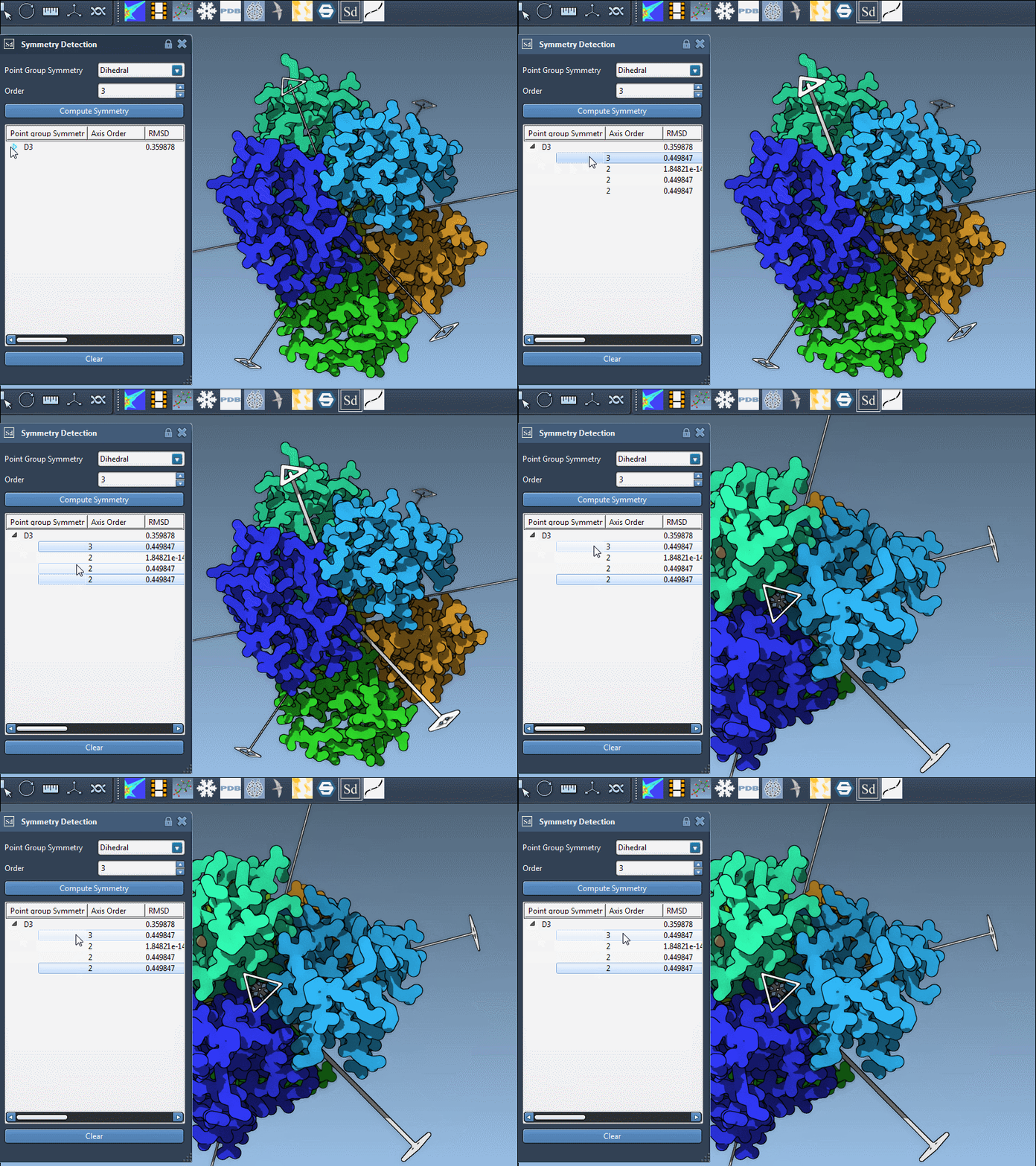
Click a group to highlight its primary axis in the viewport. This is a practical way to connect a label in the results to the structure itself. For a more specific test, you can choose a symmetry group and order manually when you already have an expectation—for example, D3 for the 1B4B system—and inspect how that choice fits.
Inspect individual axes, not only the group name
A symmetry group can contain several axes, each with its own RMSD score. Expand a group to see those axes. A single click highlights an axis in the viewport; a double-click aligns the camera so you look down it. This makes it easier to inspect the assembly from the axis’s perspective and understand how the repeated units are arranged.
What the visualization can help you decide
For an icosahedral capsid such as 3NQ4, the extension displays the 2-, 3-, and 5-fold axes. Seeing these together can help orient your inspection and identify a unique asymmetric unit for a later modeling workflow. In other complexes, the result may be less straightforward; comparing candidate groups and examining their axes helps you make a more informed choice instead of assuming that visible repetition tells the whole story.
The detected symmetry can also guide questions about repeated interfaces, expected structural organization, or possible targets for molecular design. Treat it as a structural aid: the geometry helps you investigate these questions, while biological and experimental context remains important when deciding what a symmetry result means.
For clearer figures, combine the axes with Ribbons or Surface visual models, and consider coloring chains differently to make repeats easier to distinguish. You can capture a viewport snapshot for a presentation or publication figure.
For the complete workflow and additional examples, including 3NQ4 and 1B4B, see the symmetry detection tutorial.
Note: SAMSON and all SAMSON Extensions are free for non-commercial use. Get SAMSON.