



Interactive molecular editing can run into a frustrating mismatch: you move an atom to explore a new arrangement, but the model still treats the original bonds as fixed. A bond that should break may keep pulling atoms together, while atoms brought into contact may not form the connection you are trying to investigate.
Interactive Modeling Universal Force Field (IM-UFF) is designed for this kind of topology-changing edit. It extends UFF so that, as atoms move, covalent bonds can form or break, bond orders can change, and atom typizations can update. Instead of stopping to rebuild the topology after every significant move, you can manipulate the structure while the model adjusts its connectivity along the way.
Set up a small test first
Start with a small or medium molecular system, where it is easier to see which changes are caused by your manipulation. Open the structure in SAMSON, then choose Edit > Simulate > Add simulator. Select Interactive Modeling Universal Force Field, choose a state updater such as FIRE, and confirm.
IM-UFF does not have a separate setup window. Its parameter window includes two options that are especially important when you are deciding whether connectivity should remain fixed.
- Static topology (UFF only): when checked, the model uses standard, non-reactive UFF behavior. When unchecked, IM-UFF can update topology during the simulation. If your goal is to explore bond formation or breaking, leave this option unchecked.
- Keep vdW for manipulated: this option applies to IM-UFF. When checked, van der Waals energies and forces are computed for all atoms. When unchecked, atoms you manipulate with the mouse are excluded from van der Waals interactions during those calculations. That can make it easier to bring atoms together when repulsive forces would otherwise hinder the movement.
For the interactive topology-changing workflow described here, leave both options unchecked, then choose Edit > Simulate > Start.
Move gradually, then watch what changes
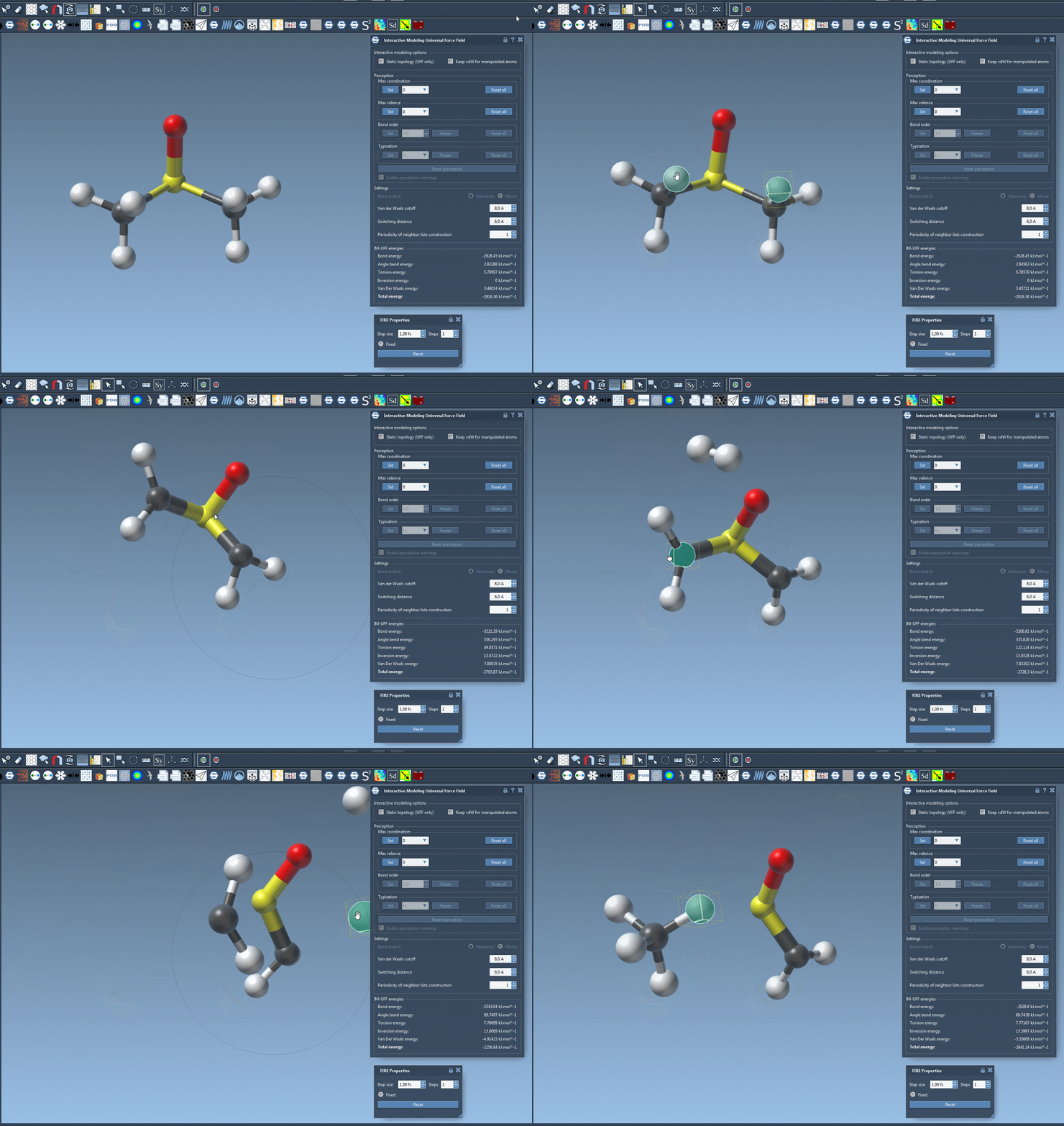
With the simulation running, select an atom and move it with the mouse. Small displacements generally let the existing bonds remain intact while the surrounding structure adjusts locally. Larger displacements can break bonds to neighboring atoms, and the topology is updated. Moving atoms close to one another can also allow new bonds to form.
This means a large drag is not just a way to reposition an atom: it may change the modeled connectivity. Make deliberate movements and keep an eye on the structure as well as the energy terms displayed in the parameter window. If the outcome is difficult to interpret, return to a smaller test system and repeat the manipulation more gradually.
Know what the model is doing
IM-UFF is useful when you want topology to respond to interactive edits; standard UFF is the appropriate mode when you want to keep topology static. The checkbox lets you switch between these behaviors within the IM-UFF interaction model. Be aware that the energy reference for the bond term differs between the standard UFF implementation in this interaction model and the separate UFF interaction model: in IM-UFF, the bond energy is zero at infinite separation. The tutorial’s cited paper discusses this distinction.
You can also adjust van der Waals cutoffs, switching distances, and neighbor-list construction periodicity. For automatic typization, the available controls depend on the mode: while IM-UFF is running, maximum coordination and maximum valence can be set, but bond order and typization are not directly fixed because they vary continuously with atom positions.
For a focused comparison, try the same small edit first with static topology enabled and then with it disabled. The contrast can help you see whether a change in behavior comes from atom movement alone or from topology being allowed to adapt.
For setup details and references, see the IM-UFF tutorial.
Note: SAMSON and all SAMSON Extensions are free for non-commercial use. Get SAMSON.