



A ligand library can quickly become difficult to manage: structures arrive in different files, each molecule may have several flexible bonds, and a docking run can produce more poses than you can review one by one. A useful workflow is not just to start the calculation. It is to prepare the system, keep the search focused, save the run, and make the results easy to inspect later.
In SAMSON, AutoDock Vina Extended supports docking a ligand library and reviewing the resulting poses in the same workspace. Here is a practical way to think through the steps—and the decisions that most affect whether the results will be useful.
Start with a docking-ready system
Before setting up the calculation, check the receptor and ligands. The tutorial’s preparation checklist includes removing alternate-location atoms and unnecessary small molecules, and adding hydrogens when they are missing. Water and monatomic ions can be removed if appropriate; the extension does not consider them. Be careful with protonation: if hydrogens have already been added based on a chosen protonation state, do not change them casually.
For a protein with missing residues or heavy atoms, the documentation points to the PDBFixer extension as an option for fixing the structure. Preparation is not a cosmetic step: incorrect or incomplete input can make later pose inspection harder to interpret.

Keep the search domain relevant
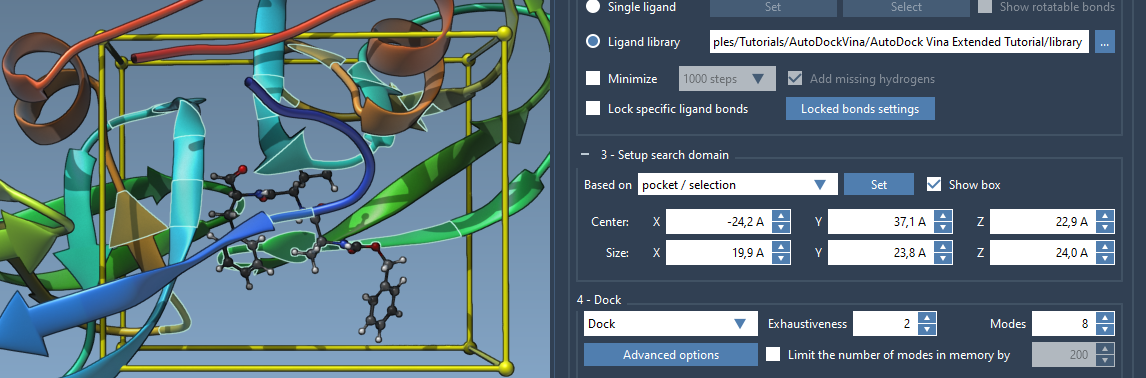
If the binding site is known, avoid searching the entire receptor by setting the search domain around the pocket. In SAMSON, you can define the box from a selection, use the bound ligand to select nearby residues, adjust the box in the interface, or drag its corner controllers in the Viewport. A smaller, appropriate domain reduces the amount of space the search needs to explore and can reduce computation time.
One practical route is to select the bound ligand, use Select > Biology > Binding sites to select nearby residues, then set the search domain using Based on pocket/selection. The search domain is defined in global XYZ coordinates, so consider the system’s orientation when positioning it.
Choose library flexibility deliberately
AutoDock Vina Extended can read ligand libraries containing different file formats, such as MOL2 and SDF, and multiple ligands per file. By default, library ligands are treated as fully flexible: all rotatable bonds are active. That may be appropriate, but more flexibility can increase docking time. You can lock selected bond types through Locked bonds settings and Lock specific ligand bonds.
Do not assume that locking bonds will fix ligand geometry during minimization: the tutorial notes that locked bonds remain rotatable during minimization. Also, cis-trans isomers are not generated by the docking workflow, so include relevant isomers in the library if they need to be considered.
If ligands are in 2D or need preparation, use the minimization option and choose a preset. Add missing hydrogens when needed; they are necessary for bond-type detection during minimization, and polar hydrogens are needed for docking. Minimization is controlled by stopping criteria and a maximum number of steps, so it is worth checking that the input structures are appropriate for the task rather than treating minimization as a substitute for preparation.
Make the run easier to reproduce
For a library screen, select Dock, then review the advanced options. The tutorial uses exhaustiveness 8 and a maximum of 20 generated binding modes as example settings. Higher exhaustiveness means a longer search; settings should be chosen with the size of the task and available compute time in mind. Other options include the scoring function and energy range.
Enable Save results and choose a directory before starting. The saved project includes input and generated files, docked PDBQT files, and MOL2 files for individual modes. Keep the directory structure intact if you expect to load the project back into AutoDock Vina Extended. For large libraries, you can pause, resume, or stop the run; those actions take effect after computation for the current ligand finishes.
Review poses, not just a ranked list
When calculations finish, the results table and plot help you sort and filter by properties such as name, affinity, and RMSD. You can export the table as CSV and export the affinity-versus-compounds plot as an image or CSV. The table and plot are interactive: selecting a result can select its conformation in the document, and double-clicking a point can restore a conformation that is loaded.
For a large library, load only the results you need at first. The available choices include loading just the table, loading a specified number of top ligands, selecting particular ligands, or loading all results. The table can be used to load additional ligand results later. This helps avoid loading every pose into the document before you know which ones warrant inspection.
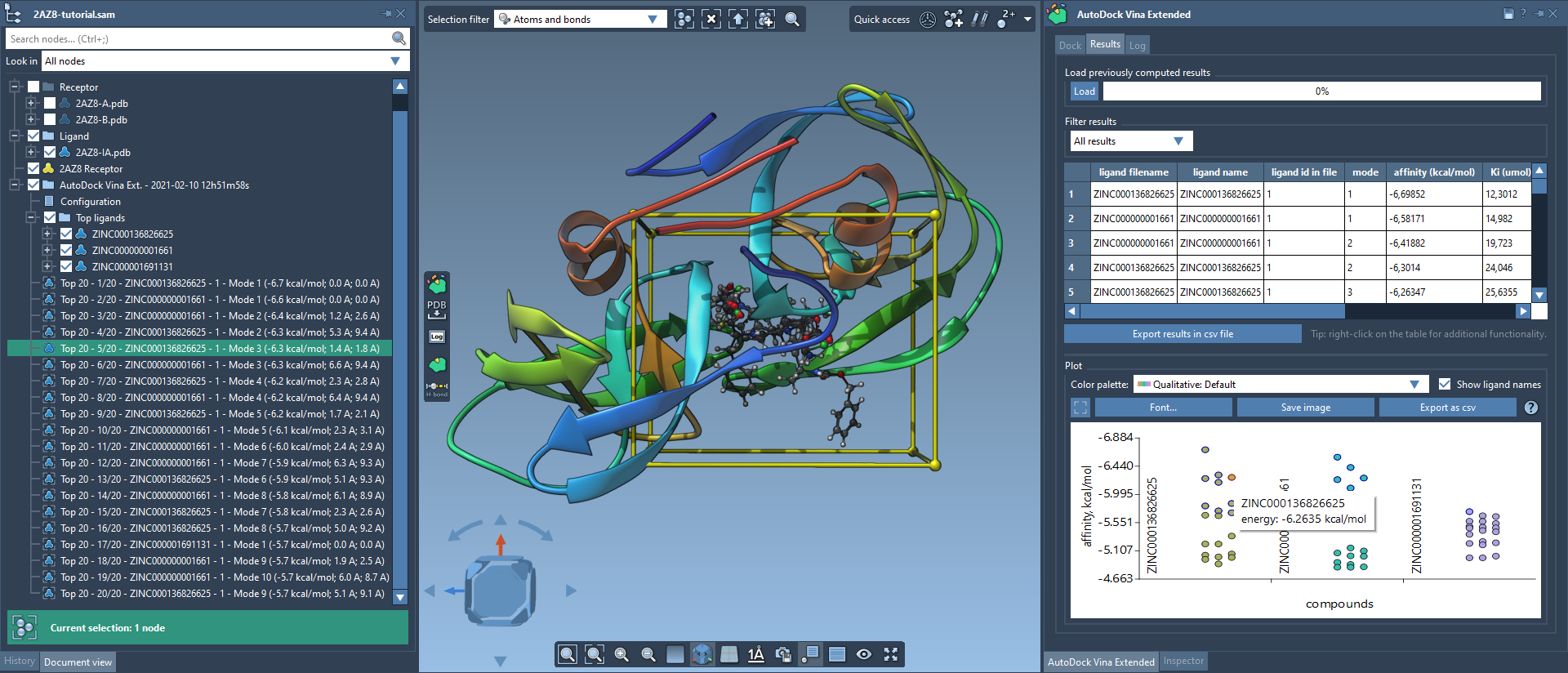
Finally, treat docking scores as a way to prioritize poses for further study—not as experimental confirmation that a ligand binds. Inspect the pose in its pocket and, where useful, analyze contacts and hydrogen bonds with SAMSON tools such as the Protein-Ligand Interaction Analyzer or Hydrogen Bond Finder. A shortlist becomes more informative when the ranking is paired with structural context.
For the complete step-by-step workflow, including setup and loading saved results, see the AutoDock Vina Extended docking tutorial.
Note: SAMSON and all SAMSON Extensions are free for non-commercial use. Get SAMSON.