



When refining protein structures, one recurring challenge for modelers is ensuring that all residues adopt conformations that are sterically and energetically reasonable. Outliers in dihedral angles can lead to instability in simulations or incorrect biological interpretations. While tools like structure validation services can indicate problematic regions, editing these conformations interactively and seeing the impact in real time is another matter entirely.
This is where the Interactive Ramachandran Plot in SAMSON offers a practical advantage. Let’s explore two intuitive ways to explore and correct backbone conformations directly from the plot itself.
Interactive Editing with Drag-and-Drop Controls
Once you’ve opened your protein of choice (for example, 1YRF) in SAMSON and opened the Ramachandran Plot App (Home > Apps > Biology > Ramachandran plot), you can click Update to view the conformation of each residue in the φ/ψ space.
Dots correspond to individual residues, and their positions tell you whether their conformations are favorable (yellow regions) or disallowed (white regions).
To fix any outliers:
- Click a residue on the plot.
- Drag its corresponding dot to a more favorable region.
- SAMSON instantly updates the 3D model so you can evaluate the effect visually.
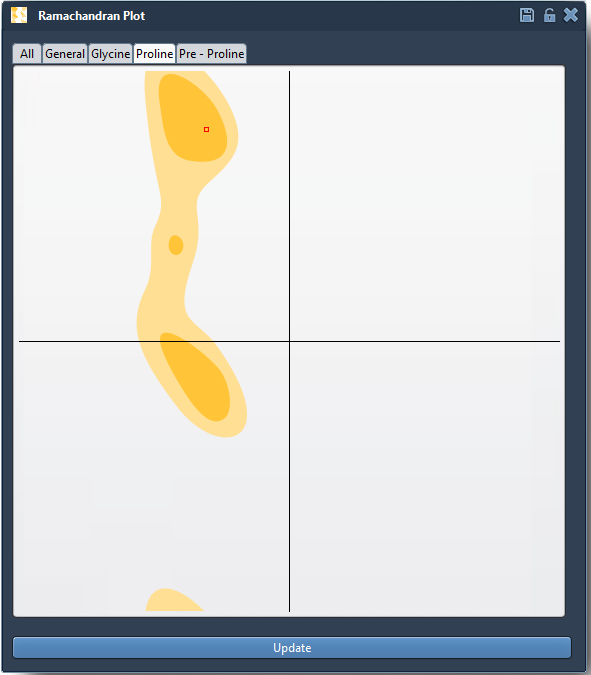
Undoing is easy — just press Ctrl/Cmd + Z. This method is straightforward and particularly useful when performing fine-grained adjustments on specific problematic residues.
Using the Twister Editor for 3D Tuning
If you prefer rotating bonds within the 3D viewport, the Twister editor may be even more useful. Located on the left-hand toolbar, this editor lets you twist the φ/ψ dihedrals interactively while observing real-time changes in both the 3D model and the Ramachandran plot.

This bi-directional interaction helps you navigate the energetic landscape more intuitively, especially when fine-tuning residues within active or binding sites. The Twister editor is particularly handy for adjusting context-aware conformations, for instance, keeping side chains out of clash-prone zones while refining the backbone.
Why It Matters
Valid conformations are not just academic — they are critical for the reliability of downstream simulations, energy minimizations, and structure-based design tasks. Identifying and editing outliers manually often requires switching between tools or scripting, which is time-consuming and error-prone.
With the Interactive Ramachandran Plot in SAMSON, this process is visual, interactive, and synchronized across 2D and 3D views. Whether you are studying conformational flexibility or refining a homology model, this tool fits neatly into your workflow without requiring extra file exports, plugins, or coding.
To dive deeper into how this fits into larger workflows including normal mode analysis and simulation preparation, visit the full documentation page: https://documentation.samson-connect.net/tutorials/ramachandran/ramachandran-plot/
SAMSON and all SAMSON Extensions are free for non-commercial use. You can download SAMSON at https://www.samson-connect.net.