



Many molecular modelers working with large biological assemblies—such as viral capsids or homo-oligomeric protein complexes—find themselves asking the same question: What is the correct symmetry group governing my system?
This is a common challenge, especially when automatic symmetry detection tools return multiple results. Choosing the right symmetry group can reduce your simulation workload, highlight biologically relevant features, and guide the design of symmetric nanomaterials. But how do you judge between equivalent-looking options?
Automatic Detection vs. Manual Selection
The Symmetry Detection extension in SAMSON is able to detect multiple possible symmetry groups in large molecular systems. This is especially true for complex assemblies like PDB 1B4B where overlying symmetry elements might lead to several plausible assignments.
When multiple symmetry groups are proposed, SAMSON offers tools to help you evaluate the most relevant one for your purpose:
- Higher-order groups represent more symmetrical systems. Start by considering those.
- Low RMSD values indicate a better fit between detected symmetry and the actual structural units. RMSD is the root-mean-square deviation between an asymmetric unit and its symmetric copies.
You can visually compare symmetry groups in SAMSON:
- Click on a group to highlight its primary axis in the viewport.
- Expand groups to view all axes and their individual RMSD scores.
Practical Example: PDB 1B4B
Let’s take a look at 1B4B, a system with a dihedral symmetry of order 3 (D3). You can immediately see how selecting the correct group sharpens your understanding of the structure:
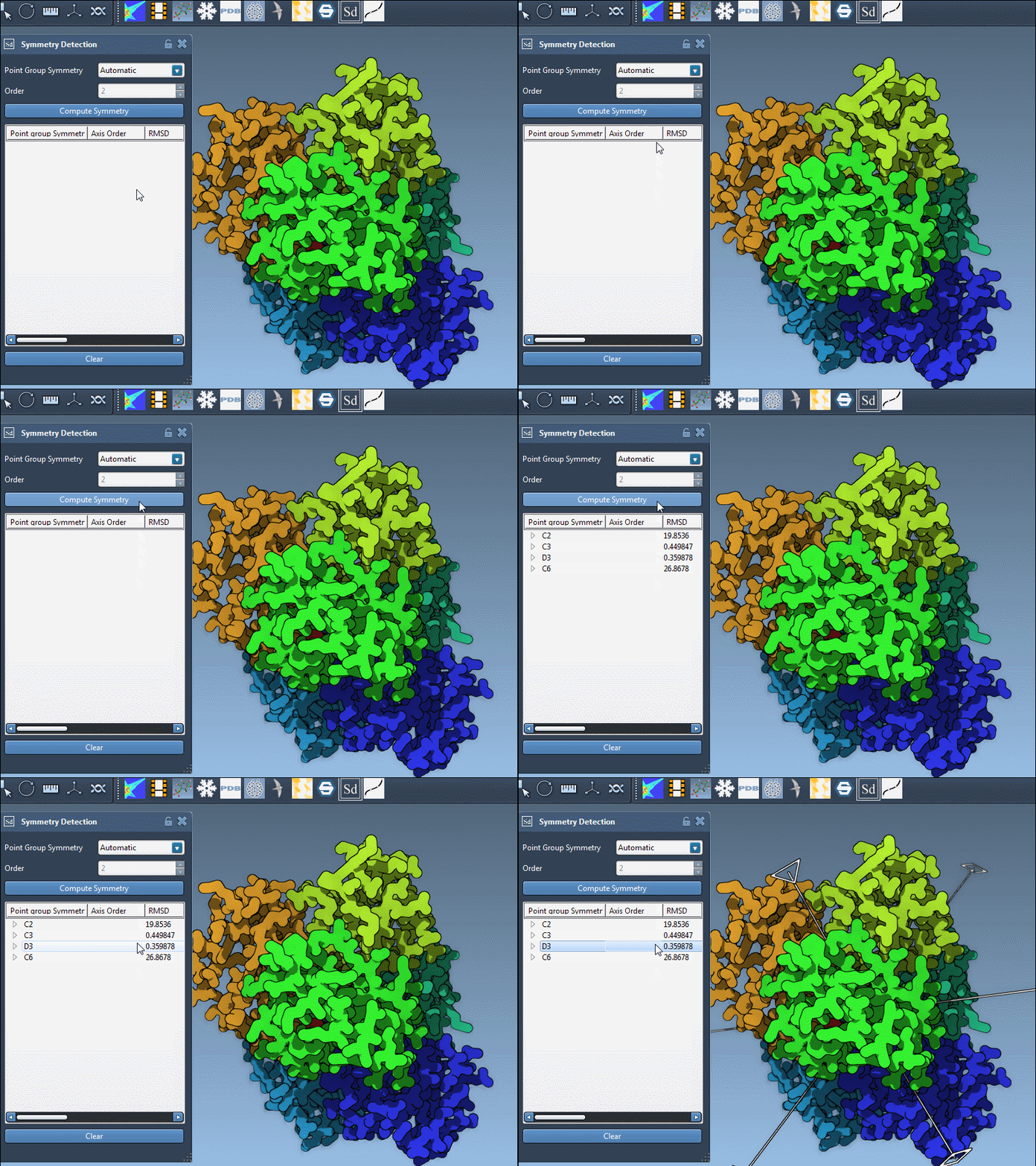
After computing symmetry, SAMSON shows that D3 fits well. Its axes appear cleanly, with low RMSD values – a good indication this group matches the actual molecular symmetry. Once selected, you can rotate and visualize each axis individually:
- Single-click to emphasize an axis visually
- Double-click to reorient the camera to look directly down an axis
This can greatly simplify downstream work, such as coarse-grained modeling or mutagenesis design.
Know Your Symmetry
If you already know the expected symmetry, you can also manually specify the group from within the extension. This is helpful when experimental data or prior biological knowledge informs your model:
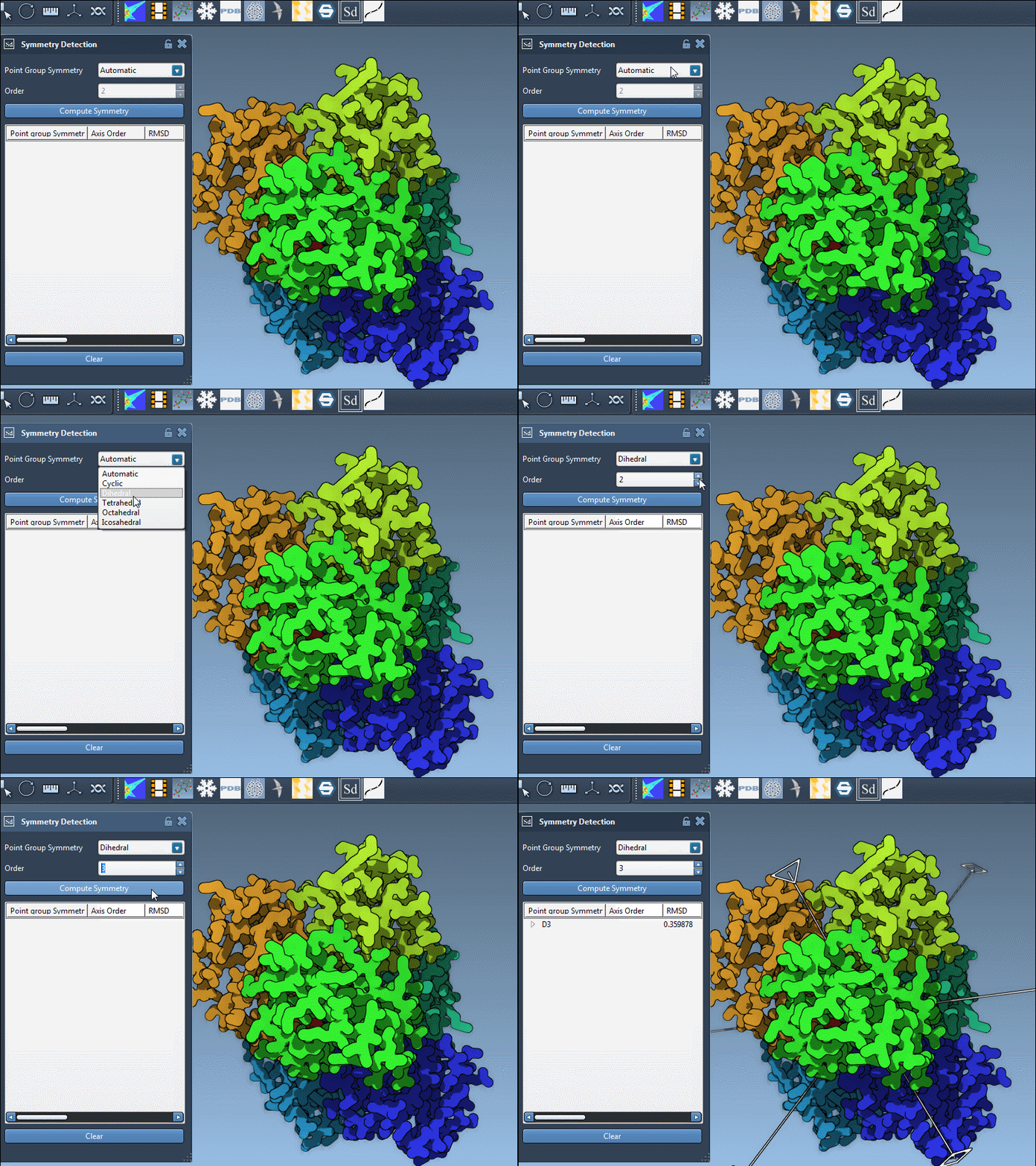
This flexibility avoids mistakes and enables reproducible workflows. You can select any order or group type using dropdown lists inside the Symmetry Detection app.
Tips for Confidence
The best way to decide whether a symmetry group is meaningful?
- Look for biologically interpretable patterns.
- Use visual feedback from SAMSON’s viewport to judge overall symmetry clarity.
- Compare RMSD values across groups and axes.
When working with very large complexes, multiple plausible grouping options aren’t unusual. The key is to integrate this analysis with your biological goals—whether that’s modeling viral assembly or studying oligomerization interfaces.
To learn more about how symmetry detection works and explore other useful options in SAMSON, visit the full documentation page: Symmetry Detection in Biological Assemblies.
SAMSON and all SAMSON Extensions are free for non-commercial use. You can get SAMSON at https://www.samson-connect.net.