



Geometry optimization is one of the most crucial steps in molecular modeling. Whether you’re preparing a structure for dynamics, adjusting imported experimental data, or simply trying to understand molecular conformations better, a good cleanup process can save you both time and confusion down the road.
Yet many modelers still rely on basic steepest descent methods, which may be slow or inefficient, especially for large molecules or complex conformational changes. If you’ve ever faced slow convergence, unnecessary simulation crashes, or subtle artifacts in your starting structures, you’re not alone.
This is where the FIRE Minimizer in SAMSON can make a big difference. Based on the Fast Inertial Relaxation Engine (FIRE) algorithm, this extension provides a much faster route to structural relaxation, especially for systems with collective or large-scale motions.
Why Pre-Simulation Cleanup Matters
Let’s say you’ve just downloaded a PDB structure. It looks okay on inspection, but there are bond strain issues, overlapping atoms, or odd torsion angles. Running a simulation directly on such a system can lead to wasted hours—or days—fixing things that could have been resolved in seconds through proper optimization.
What Makes FIRE Different?
- Speed: FIRE is significantly faster than steepest descent methods, especially when optimizing global conformational changes.
- Flexibility: It works with any SAMSON interaction model, so you’re not limited to specific force fields.
- Simplicity: Integration into SAMSON workflows is unobtrusive and beginner-friendly.
Visualizing the Difference
Still deciding? Here’s a quick comparison between the FIRE algorithm and steepest descent, optimizing the same molecular system:

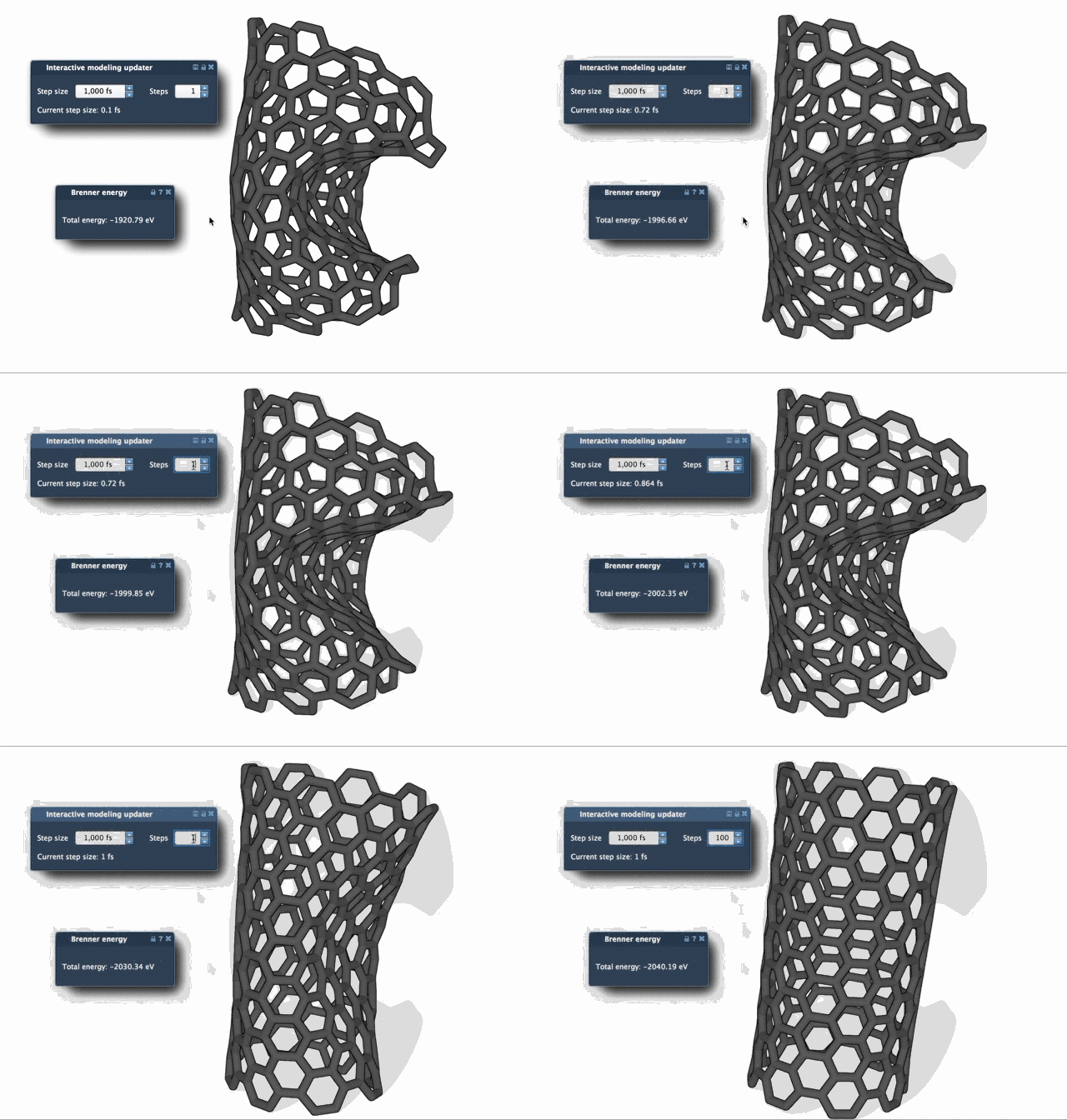
Notice how FIRE converges much more efficiently, reducing the overall structural stress in fewer steps.
Tips Before You Start
- Load a clean molecular structure: PDB, MOL2, and other formats are supported. You can find the full list here.
- Choose a simulator wisely: Go to Edit > Add Simulator and pick the interaction model and State Updater as FIRE.
- Adjust key parameters: Tweak the step size, number of FIRE steps per viewport update, and whether the step size stays fixed.
Bonus: Resetting History
If you’ve manually tweaked your structure during or after optimization, you may want to reset the history so that the algorithm doesn’t persist past momentum. Simply press Reset to clear any saved internal state.
In short, using the FIRE Minimizer before diving into simulations helps you reduce potential energy faster and reach more realistic geometries right from the start—all within a few clicks.
To learn more, visit the full guide: Ready, Set, FIRE!
SAMSON and all SAMSON Extensions are free for non-commercial use. You can get SAMSON at www.samson-connect.net.