



One of the first tasks after building or importing a molecular structure is preparing it for simulation. But here’s a common dilemma faced by many molecular modelers: the geometry looks mostly correct, there are only subtle non-idealities, but running a full energy minimization using the steepest descent algorithm takes much longer than expected—and progress is slow.
If that sounds familiar, the FIRE (Fast Inertial Relaxation Engine) minimizer in SAMSON might be just what you need.
Faster Relaxation for Collective Motions
While steepest descent is conceptually simple and often sufficient for small adjustments, it struggles when the system requires significant but smooth displacements—such as coaxing overlapping atoms apart or relaxing entire domains of large molecules. That’s where FIRE helps: it accelerates convergence through inertia, making it especially suited for large-scale, collective geometry shifts while remaining numerically stable.
How It Works in Practice
Within SAMSON, setting up the FIRE Minimizer is straightforward. Once you’ve loaded your molecular system and added a simulator, select FIRE as the state updater. You’ll find FIRE available in the Edit > Add Simulator panel, working seamlessly with all SAMSON interaction models.
You can also adjust a few key settings to fit your needs:
- Step size: Controls the initial integration step.
- Steps: Set how many FIRE updates occur between viewport refreshes—great for visual clarity.
- Fixed: Optionally holds the step size constant for more predictable iteration behavior.
Visualizing the Difference
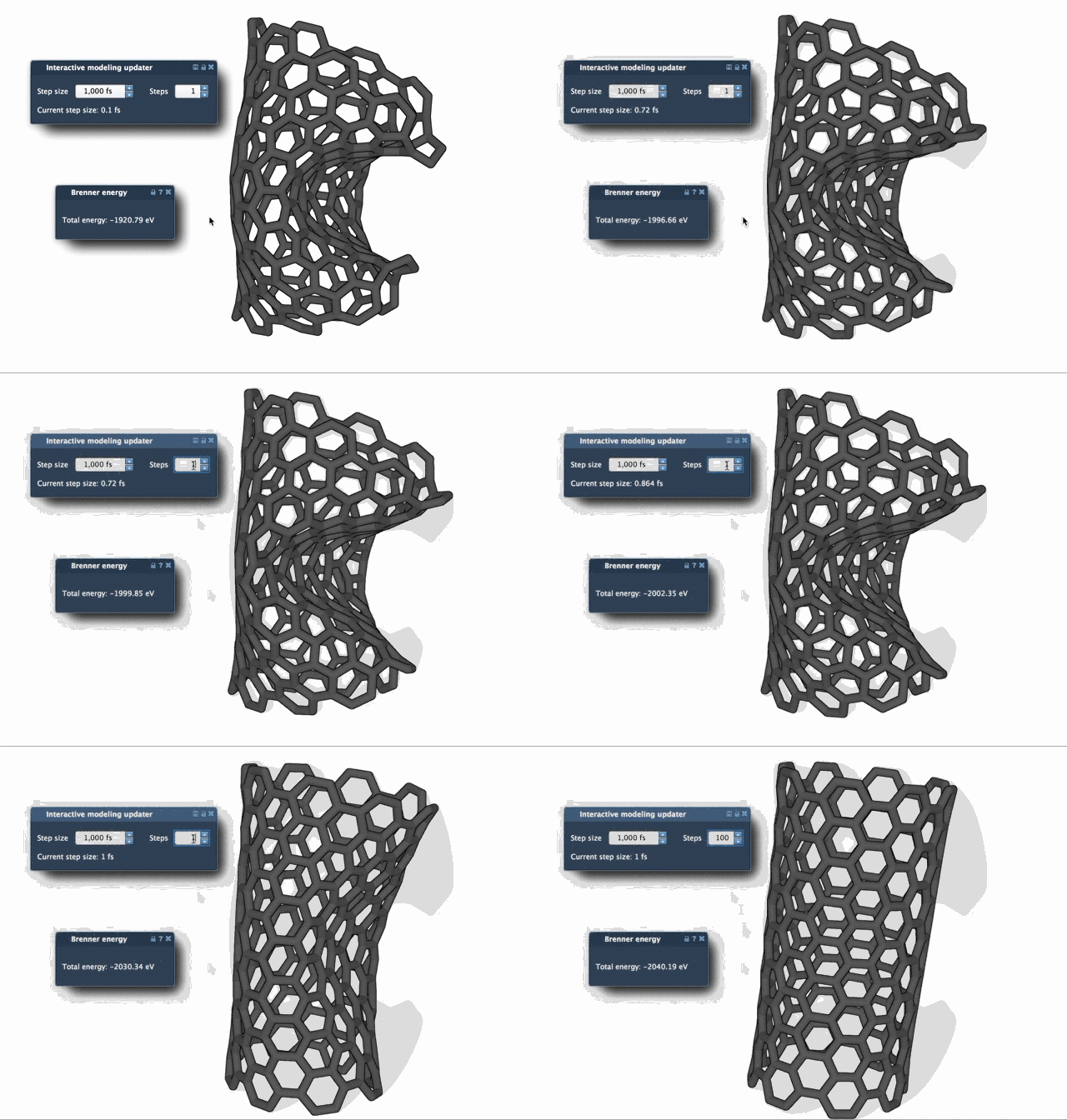
The benefits of the FIRE approach become clear when watching it in action. Compare the two animations below. Even when both algorithms reduce the potential energy similarly, FIRE reaches a relaxed geometry with noticeably fewer steps in systems requiring significant atom rearrangements.

Who Benefits Most?
FIRE will likely benefit you if you:
- Import structures from public databases (e.g., PDB) where hydrogen bonds or steric clashes require minor but widespread corrections.
- Work on large biomolecular assemblies and need to relax global conformations with minimal fuss.
- Want a quick pre-simulation cleanup that doesn’t compromise geometry but saves time.
A Few Extra Tips
- If you manually move atoms during minimization, click Reset to reset FIRE’s adaptive history to ensure clean convergence.
- Increase the Steps parameter to reduce frequent graphical updates for a smoother visual experience during minimization.
In summary, FIRE provides a balance between speed and stability, making routine energy minimization simpler and faster—especially for systems that don’t need atomic-level brute force, but coordinated refinement instead.
Learn more in the full FIRE Minimizer tutorial from the SAMSON documentation.
SAMSON and all SAMSON Extensions are free for non-commercial use. You can download SAMSON at https://www.samson-connect.net.