



When preparing molecular systems for simulations, one of the most common frustrations is dealing with unstable or unrealistic geometries. Whether you’re importing experimental structures, constructing molecules by hand, or assembling biomolecular complexes, chances are that your atomic coordinates aren’t immediately simulation-ready.
Energy minimization—or geometry optimization—is a necessary step to remove steric clashes and bring your system to a local energy minimum. But here’s the issue: traditional minimizers like steepest descent can be slow, especially for molecules with many degrees of freedom or when large-scale structural relaxation is needed.
The FIRE Minimizer—short for Fast Inertial Relaxation Engine—offers an effective alternative that speeds up this cleanup process, particularly in SAMSON, the integrative platform for molecular modeling and simulations.
Who Is This For?
If you’re a molecular modeler looking for a fast, user-friendly way to pre-optimize structures before starting simulations, this post highlights how FIRE can save you time and improve your modeling workflow.
Why FIRE Makes a Difference
- Faster convergence, especially in systems with collective motions.
- Plug-and-play: it works with any SAMSON interaction model.
- Integrated: use it everywhere you use simulators in SAMSON.
Let’s compare FIRE and steepest descent in action to illustrate why FIRE can be preferable for many cases:

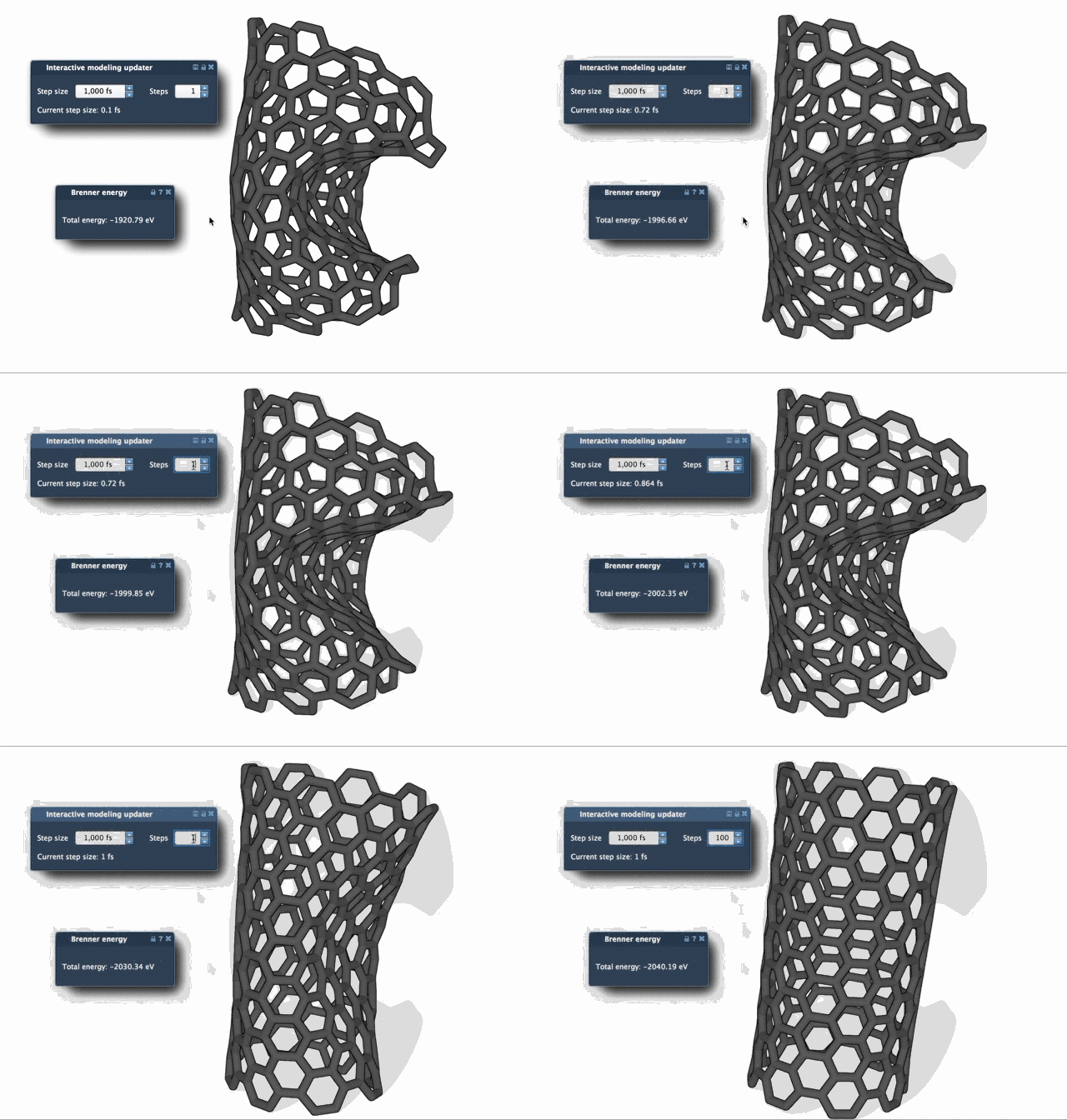
Notice how the FIRE algorithm progresses more rapidly, with wider, more efficient steps across the energy landscape. This becomes particularly helpful when dealing with biomolecular systems with internal flexibility or multiple domains.
How to Use FIRE in SAMSON
- Start by logging into SAMSON Connect and adding the FIRE Minimizer extension to your environment.
- In the SAMSON Desktop, load your molecular structure. Supported formats include PDB, MOL2, and others.
- Select Edit > Add Simulator. Choose your interaction model, then select FIRE from the list of state updaters.
- Tune FIRE parameters if needed, including step size, number of steps per viewport update, and whether to fix the step size.
Tips for Best Results
- Use a larger number of steps to create smoother relaxation animations and better monitor structural progress.
- If you manually interrupt or move atoms during optimization, use the Reset button to clear the internal memory and avoid convergence issues.
As part of the SAMSON simulation ecosystem, FIRE integrates in complex workflow pipelines. For example, it’s used within the Molecular Restrainer extension to relax NMR-derived structures.
For more technical details and implementation references, refer to Bitzek et al., Phys. Rev. Lett. (2006).
Learn more about how to use FIRE in your modeling workflows.
SAMSON and all SAMSON Extensions are free for non-commercial use. You can download SAMSON at https://www.samson-connect.net.