



Running umbrella sampling simulations is a key method for exploring complex molecular processes and reaction coordinates—whether you’re studying ligand unbinding, ion transport, or protein conformational changes. But analysis can be tricky: how do you go from multiple biased simulations to a reliable free energy profile?
This is where the Potential of Mean Force (PMF) and the Weighted Histogram Analysis Method (WHAM) come in. If you already performed umbrella sampling using the GROMACS Wizard in SAMSON, you can now interpret the results easily through the WHAM Analysis tab—with built-in automation that helps you focus on the science instead of technical overhead.
Why WHAM?
WHAM combines histograms from your biased simulations to reconstruct the unbiased free energy profile along the chosen reaction coordinate. This is critical for interpreting the energetics of molecular processes and identifying key transition states, binding affinities, or barriers. However, implementing WHAM correctly requires attention to details like folder structure, metadata extraction, and parameter consistency.
Good news: GROMACS Wizard handles these details for you, directly inside SAMSON.
Get Started with WHAM in SAMSON
After switching to the WHAM Analysis tab, you can:
- Choose your project path—or let SAMSON do it by clicking the auto-fill button.
- The tool will automatically load your umbrella sampling data: simulation time, temperature, and reaction coordinate info (names and bounds).
Once you’ve picked the appropriate reaction coordinate, you can tweak options like custom bounds, time window, and energy units. Then, with a simple click on Compute, the WHAM engine gets to work. If your simulations are long, the processing can take a bit, but it’s fully automated and visualized immediately.
Visualizing Insights
SAMSON provides two output graphs: a PMF plot and a histogram. Together, they paint a clear picture:
- The PMF plot shows your estimated free energy profile along the selected reaction coordinate.
- The histogram indicates how well the reaction coordinate space was sampled in your umbrella windows.
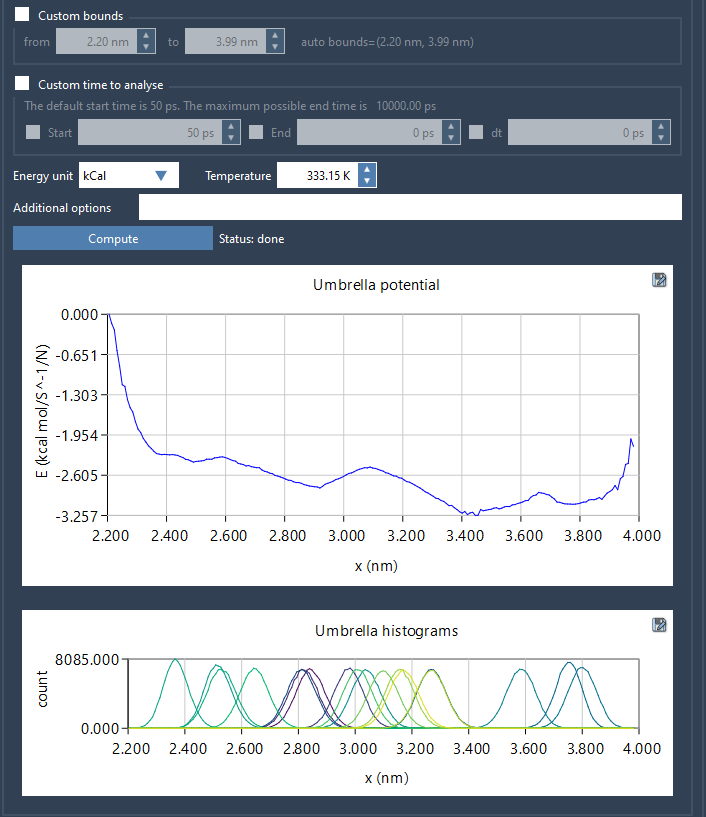
This histogram is more than a visual aid—it’s a diagnostic tool. If you notice under-sampled regions, you’ll know exactly where to gather more data. That means fewer guesswork iterations and more efficient simulations.
Reusability and Automation
As a final touch, results are stored in the wham_results subfolder of your project. If you switch to another coordinate, the Wizard checks for previous computations and reloads cached data—no need to recompute unless essential parameters changed.
This makes it easy to repeat or extend your analysis without duplicating effort.
To learn more, check out the full tutorial at https://documentation.samson-connect.net/tutorials/gromacs-wizard/pmf-analysis/.
SAMSON and all SAMSON Extensions are free for non-commercial use. You can download SAMSON at https://www.samson-connect.net.