



In polymer design, starting with the right building blocks can make all the difference. If you’re creating custom polymers in SAMSON, one of the first steps is often registering monomers—your fundamental repeat units. But many modelers don’t realize just how flexible and precise this step can be with the Polymer Builder extension.
Whether you’re modeling synthetic chains, designing biopolymer mimics, or creating specialized materials, Polymer Builder lets you register virtually any structure as a monomer and define exactly how it connects to others. This blog post walks through this process and shows how to make the most of it.
Why Register Custom Monomers?
By default, polymer builders often rely on preset libraries of fragments. But real projects rarely fit into fixed templates. Whether you’re modeling non-standard amino acids, novel organic molecules, or entirely new motifs, you need the freedom to use your own monomers—and SAMSON’s Polymer Builder gives you that flexibility.
Step-by-Step: Turning a Molecule into a Monomer
- Select your molecule in the Document view or directly in the Viewport in SAMSON. This will serve as the base for your new monomer.
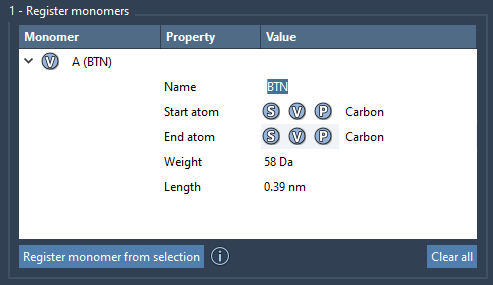
- Click Register monomer from selection within the Polymer Builder app. The system will automatically detect two atoms at opposite ends of the structure to serve as connection points. These are called the start and end atoms.
Manual Control Over Connection Points
If you’re not satisfied with the automatically chosen atoms, you can override them using simple commands:
- S: Sets start or end atom based on your current selection (select a single atom first).
- P: Lets you pick an atom from a list of atoms in the molecule.
- V: Highlights the atoms or structure you’re working with.
Each registered monomer is given a unique ID (like A, B, C…), which is later used in sequence definitions.
Review and Edit
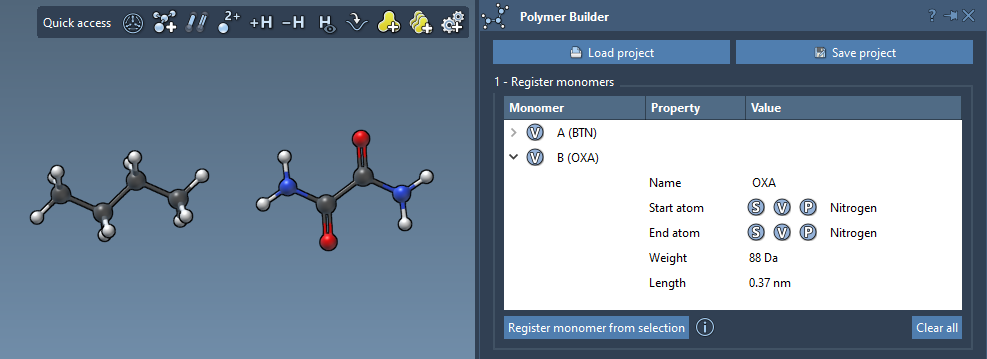
Your monomers appear in a table showing molecular weights, connection distances, and more. You can edit entries, and even expand them if needed. If the underlying structure is modified, the monomer will be deregistered automatically for consistency. You can also delete individual monomers or clear all at once.
Naming and Structure Groups
By default, a monomer’s name comes from the molecule’s residue or structural group. If there’s none, or you’d like to organize results differently, you can assign a name to group monomers separately in the final polymer.
A Note on Flexibility
The real power here is the ability to create your own molecular alphabet. Once your units are registered, you can mix, modify, and merge them into sophisticated polymers. And unlike black-box systems, SAMSON gives you control and feedback at every step.
Want to see how this fits into the whole polymer-building process? Check out the full documentation here.
SAMSON and all SAMSON Extensions are free for non-commercial use. To get started, download SAMSON from https://www.samson-connect.net.