



Building polymers in molecular modeling often starts off fine—until you hit the roadblock of customization. Maybe you’re designing a novel material, exploring backbone flexibility, or preparing conjugated architectures. But when it’s time to define your own monomers, many existing tools impose fixed building blocks or confusing interfaces. If that sounds familiar, here’s a focused solution worth exploring.
The Polymer Builder extension in SAMSON offers a straightforward way to register new monomers—graphical fragments of molecules you define—providing flexibility and control without scripting or prior fragment libraries.
Start with Your Structure
In SAMSON, select a single molecule from the Document view or Viewport. This will serve as your monomer. You can draw or import it, depending on your project.
Click to Register
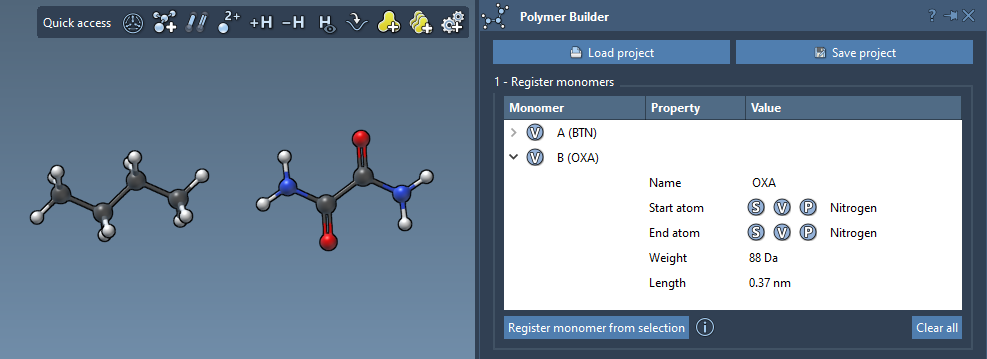
With the molecule selected, click Register monomer from selection. The Polymer Builder will:
- Automatically identify start and end atoms at opposite sides of your fragment
- Assign a unique monomer ID (like A, B, C…)
- Display a table of your registered monomers with corresponding molecular weights and end-to-end distances
Customize if Needed
Sometimes automatic detection of start and end atoms isn’t quite right for your design goals. You can override it by using keyboard shortcuts:
- S — use selection as start or end atom
- P — pick an atom from a list
- V — visually highlight structure or atoms
This makes it easy to fine-tune 3D polymer topology, whether you’re building linear, branched, or complex sequences.
Keep Track and Edit
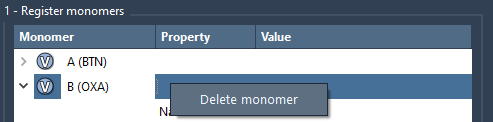
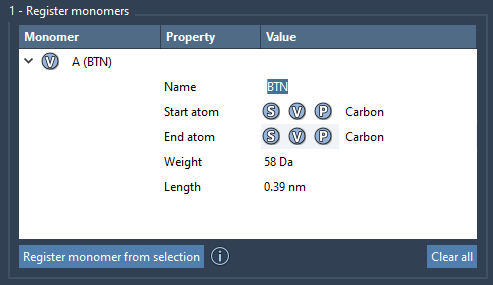
All your monomers appear in a table, which you can edit directly. Rename monomers, view their properties, or expand the view. You can delete specific monomers from the table via right-click or clear the full collection with a single click:
Good to Know
- If your monomer is a single residue or structural group, the Polymer Builder will use its name.
- If you modify the monomer structure later (adding or deleting atoms), the monomer becomes deregistered to protect against inconsistencies.
Why This Helps
For modelers working on synthetic biomaterials, functional coatings, or nanoarchitectures, quickly defining reusable building blocks is key. The monomer registration workflow lets you start with your chemistry, not someone else’s template. And because it keeps surface-level complexity low, you can focus more on what your polymer does than on how to build it digitally.
Once defined, your monomers become the foundation for defining sequences, customizing bond types, and eventually generating full macromolecular chains.
To dive deeper into polymer design using SAMSON’s Polymer Builder, visit the full documentation page: https://documentation.samson-connect.net/tutorials/polymer-builder/polymer-builder/
SAMSON and all SAMSON Extensions are free for non-commercial use. You can get SAMSON at https://www.samson-connect.net.