



For molecular modelers, a common challenge is to make quick, interactive changes to a molecular system while a simulation is running—without having to restart the setup process from scratch. In SAMSON, the molecular design platform, this challenge is addressed directly with its support for dynamically adding and deleting atoms during a UFF simulation.
This blog post walks you through how to edit your system on the fly when using the Universal Force Field (UFF) interaction model in SAMSON. Whether you’re tweaking your structure or testing different configurations, making interactive adjustments lets you stay focused on optimization, not setup.
Why This Matters
Traditional force field simulations require all atoms and bonds to be defined before a run begins. Any adjustment usually means stopping, re-editing, and reinitializing the system. But real-time modeling calls for flexibility, especially when experimenting with structure modifications or training new users.
SAMSON provides a responsive simulation environment where small structural changes offer immediate feedback—without needing to restart everything.
Deleting Atoms Mid-Simulation
Want to simplify a model or test stability by removing atoms?
- Select the eraser editor (look for a rubber icon in the interface).
- Click on the atoms you wish to delete.
The simulation updates automatically. The UFF model re-typizes the structure, recomputing the molecular typing and potentially adjusting energy values in real time.
Adding Atoms On the Fly
Need to extend a molecule or create a new bond? Adding atoms during the simulation is just as intuitive:
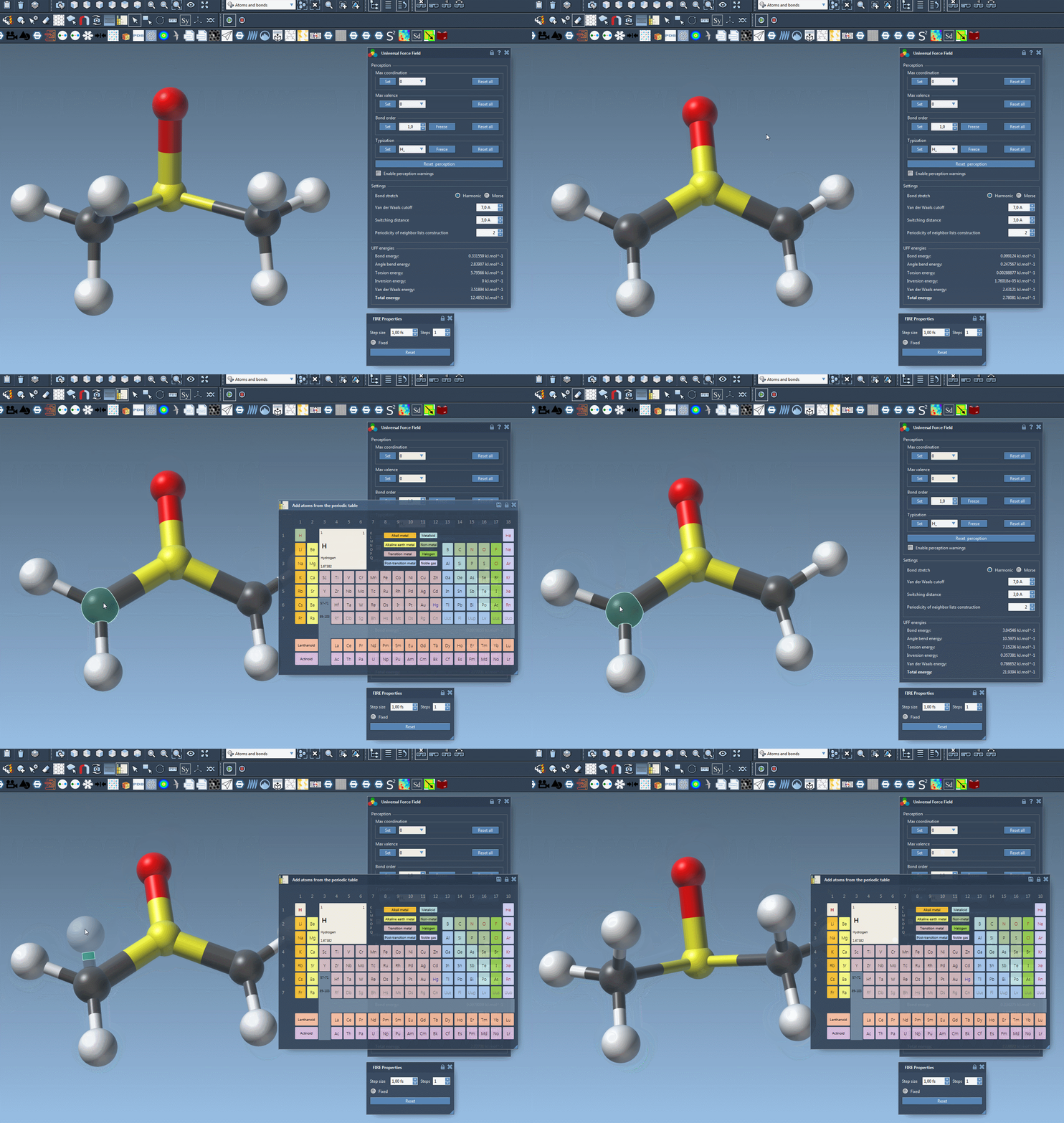
- Select the desired atomic element in the periodic table editor.
- Click on an existing atom in the simulation window.
- As you move your mouse, a transparent preview appears showing how the new atom will bond to the structure.
- Release the mouse button to add the atom into the system.
Once added, SAMSON automatically determines suitable bond lengths, bond orders, and updates typization based on the UFF model. You’re ready to continue the simulation with the new configuration instantly.
A Note of Caution
While SAMSON handles these updates automatically, bear in mind that large structural changes can introduce inconsistencies. Keep an eye on error or warning messages if the system detects that something doesn’t match molecular norms (e.g., too many bonds, unexpected valences).
Visual Demo
Final Thoughts
This real-time editing capability is particularly valuable for educators, R&D teams, and anyone prototyping molecular systems. Instead of constant stop-start cycles, SAMSON allows you to explore, adjust, and learn more intuitively through direct experimentation.
To learn more about the UFF implementation in SAMSON, and other advanced customization options, visit the full documentation at https://documentation.samson-connect.net/tutorials/uff/uff/.
SAMSON and all SAMSON Extensions are free for non-commercial use. You can download SAMSON at https://www.samson-connect.net.