



Running umbrella sampling simulations to determine the Potential of Mean Force (PMF) is a common and powerful approach in molecular modeling. But once trajectories are produced, a recurring challenge is understanding how well the reaction coordinate space is sampled. Poor sampling affects the final PMF, leading to inaccurate or misleading results.
If you’ve ever run multiple windows in an umbrella sampling setup and wondered, “Do I need more simulations in a particular region?”, then this post is for you.
The GROMACS Wizard in SAMSON offers a simple interface to carry out WHAM (Weighted Histogram Analysis Method) post-processing from umbrella sampling, but it also does something crucial: it helps you visualize histogram overlays of the sampled regions, letting you assess at a glance if the reaction coordinate space is well-covered.
Histogram Insights Without Scripts
No need to export files, write custom Python scripts, or dig into text logs. Once you point the GROMACS Wizard to the directory containing your umbrella sampling results (organized in numbered subfolders), it loads everything automatically.
After selecting the reaction coordinate from the interface, click Compute. This generates two plots: the PMF curve and a histogram.
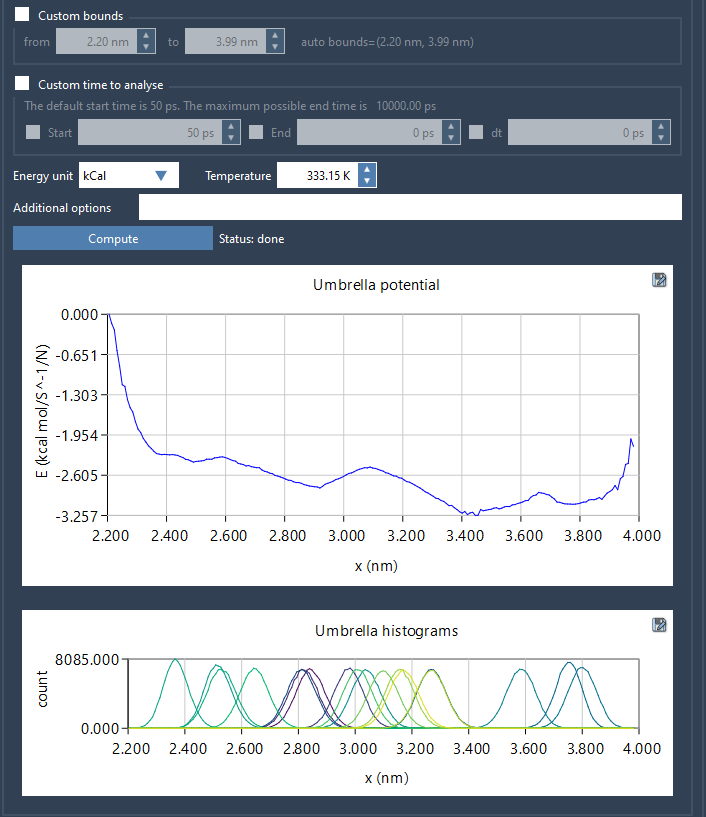
The histogram plot shows how many snapshots fell into each bin along your reaction coordinate. This allows for a quick assessment of whether some regions are overrepresented, underrepresented, or completely empty.
Why This Matters
WHAM relies on overlapping histograms between umbrella sampling windows. Without sufficient overlap, the estimation of the PMF can break down in specific regions. This can be hard to diagnose with just the PMF plot itself.
The histogram functionality provided by the GROMACS Wizard solves this problem elegantly. By quickly visualizing coverage, you can make data-driven decisions on whether to run additional simulations, extend certain windows, or rebalance your sampling strategy.
Profiles Saved Automatically
As a bonus, all results—numerical profiles, plots, histograms—are automatically saved in a wham_results subfolder. Switching between different reaction coordinates uses cached analyses, making it easy to iterate.
Getting Started
If your previous simulation was an umbrella sampling one, GROMACS Wizard can even auto-fill the project path with the click of a button:

This small feature can save time—especially if you’re managing multiple simulation projects.
Conclusion
Being able to visualize sampling distributions across reaction coordinates can be the difference between a trusted free energy profile and a misleading result. The WHAM tab in GROMACS Wizard helps you make that call—visually, quickly, and without leaving the application.
Learn more in the documentation.
SAMSON and all SAMSON Extensions are free for non-commercial use. You can download SAMSON here.