



Molecular modelers often encounter situations where automated force field parameters don’t perfectly match their specific chemical systems. Default atom types or bond orders might not reflect the intended structure, especially in complex or unusual molecules. In SAMSON, this is addressed with a highly customizable implementation of the Universal Force Field (UFF)—but these powerful features often remain overlooked.
If you’ve ever felt constrained by automated force field assignment, this guide to customizing UFF typization might offer the control you’ve been looking for. Advanced users can now finetune bond orders, atom types, and even override default coordination values—directly from within the SAMSON UFF simulation interface.
Why Customize UFF Typization?
Most force field engines, including UFF, assign parameters based on heuristics like atomic positions and known coordination patterns. But sometimes, you may:
- Work with metal complexes or nonstandard organic molecules
- Design systems with resonance structures or non-integer bond orders
- Create molecules with deliberate tautomeric or reactive flexibility
- Simulate transient or intermediate states where bond orders are ambiguous
For these cases, SAMSON lets you manually intervene without disabling the rest of the automated machinery. Let’s see how.
Controlling Atom Typization
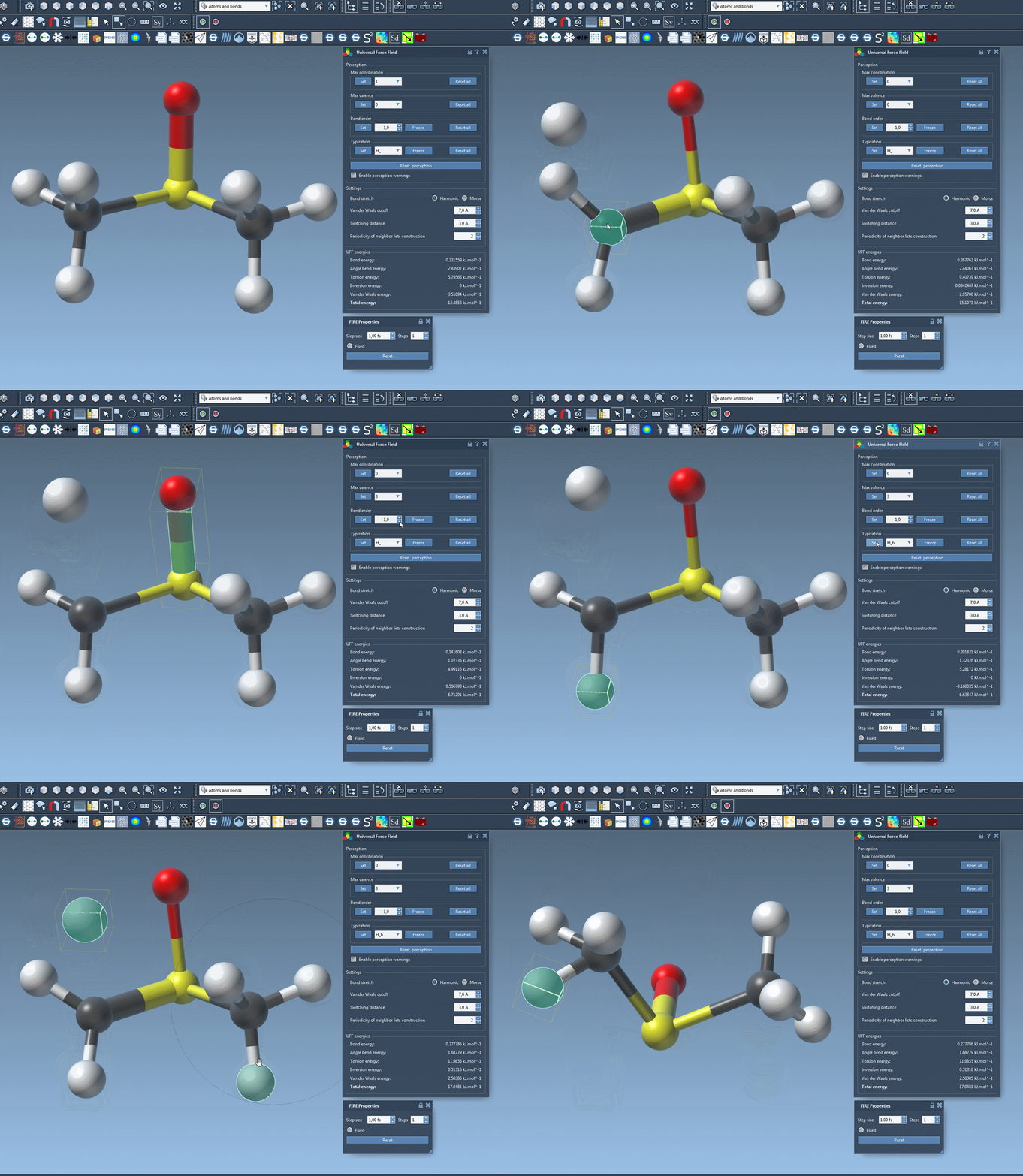
To manually assign or force a specific UFF atom type:
- Select one or more atoms in your system.
- In the UFF parameter window, choose the desired atom type from the typization group dropdown.
- Click Set to enforce the new type.
You can also prevent future automatic perception from changing this type by clicking Freeze. This guarantees your choice remains effective across new typization rounds.
Forcing Bond Orders
Non-integer bond orders (e.g., 1.5 for aromatic bonds) or special interactions can be set manually:
- Select the bond(s) to modify.
- Choose a bond order value between 0.1 and 3.9.
- Click Set in the bond order group.
As with atom types, you can lock these values by clicking Freeze—keeping them safe from automatic overrides.
Adjusting Coordination Limits
Each atom has default limits for maximum coordination and valence. In SAMSON, you can:
- Select an atom and edit its values from corresponding dropdown menus.
- Click Set to apply new limits.
This feature is helpful when dealing with steric hindrance, d-orbital coordination, or extensive conjugation patterns not covered by default rules.
Resetting and Updating Typization
Made a change you regret? You can:
- Press Reset all to remove all customizations.
- Click Reset perception to re-run automatic typization, taking your current manual settings and spatial configuration into account.
And perhaps best of all, you don’t have to prepare your entire model from scratch—SAMSON supports dynamic manipulation. Delete or add atoms on the fly, and watch the typization logic adapt in real-time.
For Whom Is This?
This customization system is intended for users who already have a good understanding of molecular structure and force field principles. When used responsibly, it opens up the UFF engine to a much wider range of systems while maintaining a structured, interactive interface.
Learn more about the rest of UFF’s capabilities in SAMSON, including simulation set-up and editing tools, in the full documentation: UFF in SAMSON.
SAMSON and all SAMSON Extensions are free for non-commercial use. You can download SAMSON at https://www.samson-connect.net.