



Before diving into simulations, molecular modelers often face an all-too-familiar problem: starting with a messy structure. Whether importing from experimental data like NMR or public databases, your molecule might contain steric clashes, unrelaxed bond lengths, or awkward conformations. Running a simulation without addressing these issues can lead to poor convergence, distorted dynamics, or even simulation failure.
This is where the FIRE Minimizer in SAMSON can help streamline your workflow. It’s a fast geometry optimization tool based on the Fast Inertial Relaxation Engine technique (developed by Bitzek et al.) that efficiently relaxes 3D molecular geometries before simulation begins.
When and Why to Use the FIRE Minimizer
The FIRE Minimizer is ideal for pre-simulation cleanup. Traditional geometry optimization methods like steepest descent tend to be slow, especially when collective or large-scale atomic motions are involved. FIRE, on the other hand, converges more quickly in such cases, making it well-suited for initial preprocessing steps.
- Speed: Converges faster than steepest descent for collective motions.
- Versatility: Compatible with any SAMSON interaction model.
- Simplicity: Easy setup and interaction through intuitive GUI.
Quick Setup: Getting Started in SAMSON
- First, log into your account on SAMSON Connect.
- Go to the FIRE Minimizer Extension page and click Add.
- Restart SAMSON to complete the installation.
How to Use It
Once installed, optimization is straightforward:
- Load your molecule (PDB, MOL2, etc.). You can consult the Loading Molecules Guide if needed.
- Go to
Edit > Add Simulatorin the menu bar. - Select your interaction model of choice (e.g., force field).
- In the State Updaters list, choose FIRE.
Settings You Can Tweak
Customization is available through a few simple parameters:
| Setting | Description |
|---|---|
| Step size | Controls the initial integration step – smaller steps give finer relaxation. |
| Steps | Defines the interval between visual updates – use larger values for smoother animations. |
| Fixed | Locks the step size, which can be useful in certain stability-sensitive cases. |
If you manually manipulate atoms during minimization, click Reset to clear the FIRE history and restart cleanly.
Visual Comparison: Is FIRE Really Faster?
Here’s a direct comparison of FIRE vs. steepest descent:

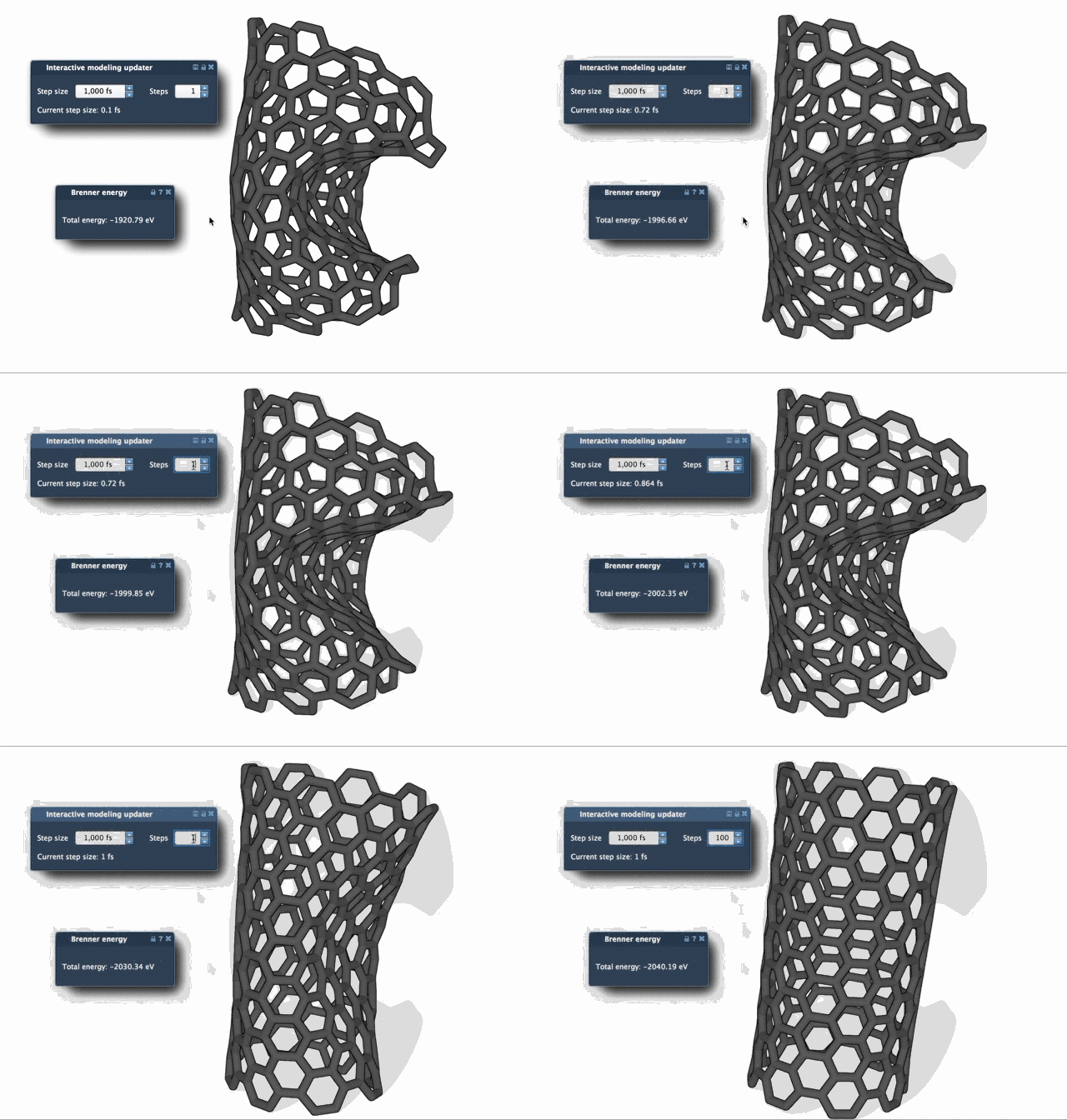
As you can see, FIRE can save significant time during the preprocessing phase of your workflow, especially when working with large or complex biomolecular systems.
FIRE is also used internally by other tools within SAMSON, like the Molecular Restrainer Extension, making it a trusted component of more advanced workflows.
Summary
If you routinely prepare molecular systems for simulation, integrating the FIRE Minimizer into your workflow can reduce frustration and save time. It offers speed, flexibility, and simple integration into any SAMSON project.
Learn more in the official documentation.
SAMSON and all SAMSON Extensions are free for non-commercial use. You can get SAMSON here.