



If you’ve ever tried to interpolate between two protein structures for applications like conformational analysis or pathway generation, you know that things can go wrong quickly if the input isn’t just right. One common frustration? Getting errors during structure alignment or interpolation because of “non-connected components” or inconsistent atom selections. Luckily, there’s a systematic way to avoid this by properly preparing structures in SAMSON before starting the interpolation process.
Let’s focus on the crucial first step of generating a transition path between two protein conformations: preparing protein structures to ensure compatibility for ARAP (As-Rigid-As-Possible) interpolation. This often-overlooked step can determine the success or failure of your entire workflow.
Why Preparing Structures Matters
The ARAP interpolator in SAMSON creates a morphing path between two protein conformations. Although the tool is efficient, it assumes the input structures are compatible: same atom types, well-aligned, and connected. If water molecules, ions, ligands, or alternate atom locations are present, the software may flag the input as consisting of multiple disconnected components—making the interpolation impossible.
Fetching and Cleaning Protein Structures
To demonstrate, let’s walk through using two conformations of the Diphtheria Toxin, PDB IDs 1DDT and 1MDT. Here’s what to do in SAMSON:
- Go to Home > Fetch.
- Input
1DDT 1MDTand click Load.
The structure 1MDT includes two chains (A and B), but for this example we only want to interpolate chain A. So next:
- Expand
1MDTin the Document view. - Delete chain
B(either hit Del or click the erase tool).
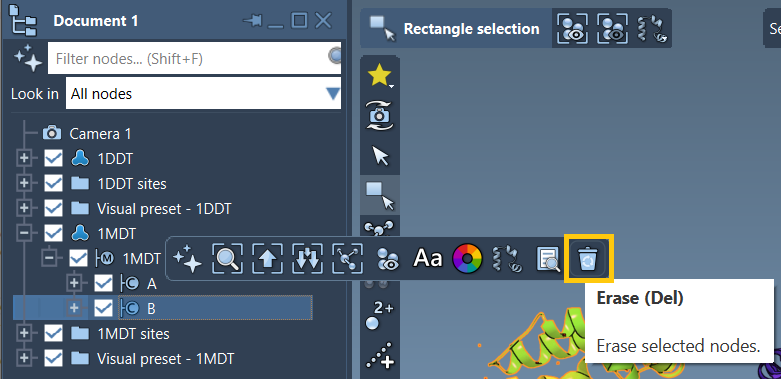
Now that both protein structures have their chain A selected, the next task is to clean them:
- Use Home > Prepare.
- This tool will remove water molecules, ligands, ions, and alternate atom positions—leaving only the primary protein backbone and necessary side chains.
This cleanup ensures that the structures are topologically connected and suitable for matching atoms during conformational interpolation.
Need Help?
If you’re unsure how to remove specific components, check the Protein Preparation & Validation tutorial for step-by-step guidance.
Why It’s Worth the Effort
Preparing the structures might seem like a small part of the process, but it solves several problems:
- Prevents interpolation errors due to disconnected atoms.
- Enables more accurate geometric alignment.
- Ensures matching atom selections during ARAP vertex creation.
It also helps when using downstream tools like umbrella sampling in GROMACS or parallel nudged elastic band (P-NEB) refinement, both of which rely on realistic, continuous transition paths.
By starting from a clean slate, your pipeline becomes reproducible and clear, especially when you’re sharing your work with collaborators or preparing animations or sampling trajectories.
Conclusion
Taking the time to properly fetch, trim, and clean your protein structures in SAMSON sets the stage for successful conformational interpolation with ARAP. It isn’t just a housekeeping step—it’s the foundation for everything that follows.
To explore the entire workflow, including running the interpolation and analyzing results, visit the full tutorial at this page.
SAMSON and all SAMSON Extensions are free for non-commercial use. You can get SAMSON at samson-connect.net.