



For researchers and molecular modelers working with protein-ligand interactions, visualizing and exploring molecular interactions effectively is essential yet often challenging. The SAMSON Interaction Designer offers a user-friendly way to bridge the gap between 3D and 2D molecular modeling, enabling researchers to create and edit 2D interaction diagrams while synchronizing seamlessly with the 3D viewport. If you’re seeking an optimized solution to investigate binding pockets, analyze accessibility, or diagram protein-ligand interactions, the Interaction Designer might be exactly what you need.
Create Insightful Interaction Diagrams with One Click
Crafting accurate 2D molecular interaction diagrams can sometimes feel daunting. With the Interaction Designer, you can now automatically create a comprehensive interaction diagram by selecting the Home > Diagram command. Whether you wish to analyze the entire molecular structure or focus on a section, this feature adapts to your selection and generates insights effortlessly.
Here’s what makes this process particularly effective:
- Tightly integrated 2D-3D interface: Select and zoom directly on structures or atoms in 3D while viewing interactive elements in the generated 2D diagram.
- Binding pocket and interaction details: Highlighting protein-ligand binding pockets and associated structural groups provides tangible insights into molecular relationships.
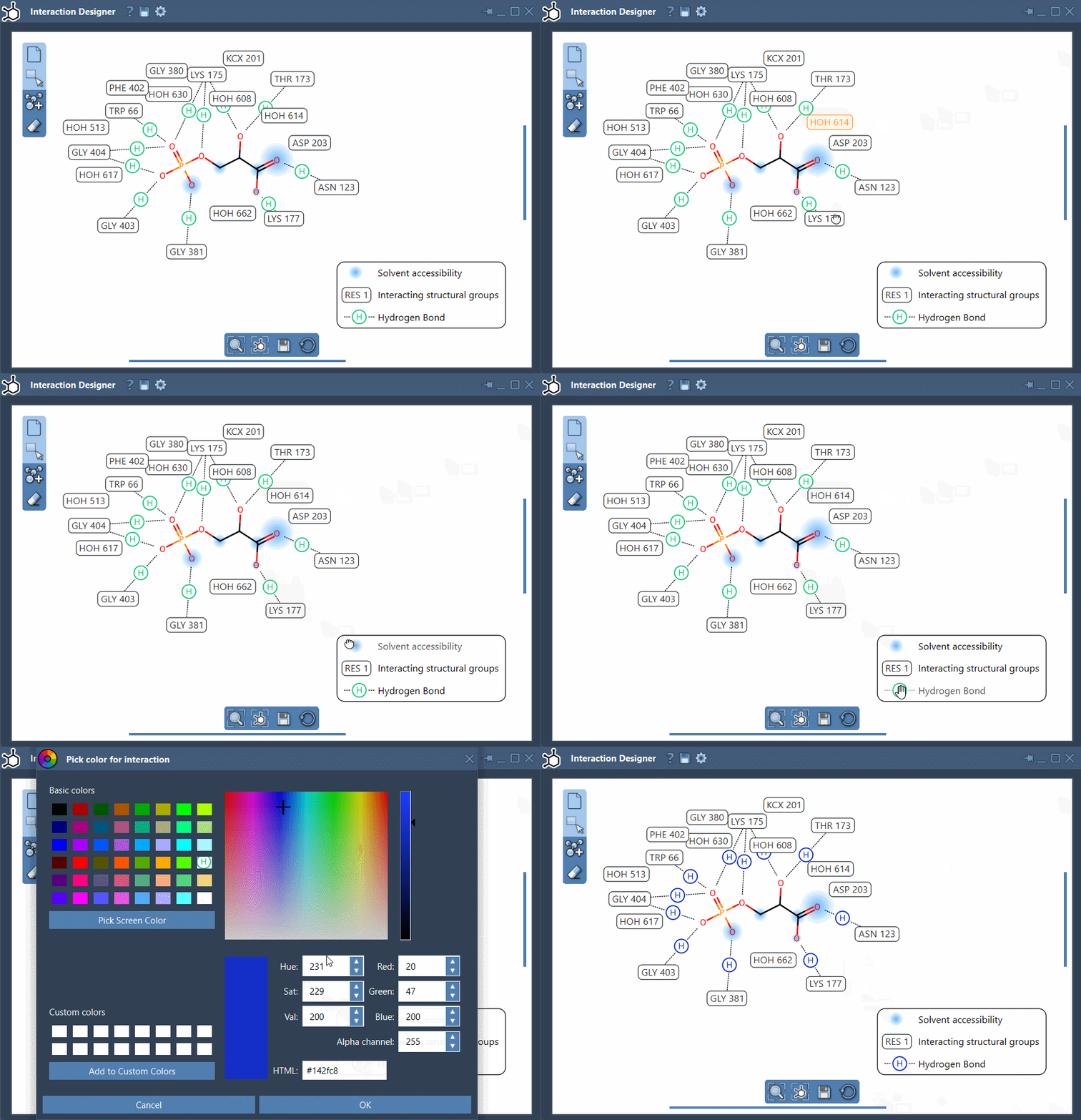
- Easily editable diagrams: You can move labels, show/hide interactions, or even change their colors simply through the legend or by double-clicking elements. Restore defaults via the Interaction Designer settings.
Below is an example of a generated interaction diagram showcasing its clarity and precision:

Key Features for a Tailored Experience
The Interaction Designer provides intuitive customization options to suit your project needs. Highlight key interaction types such as hydrogen bonds, van der Waals interactions, and hydrophobic effects. Double-click atoms to zoom or customize interaction colors to align with your presentation requirements.
Need to adjust the layout? Labels, captions, and symbols can be seamlessly repositioned for better spatial alignment in your diagram. Simply use your mouse to translate the diagram, or hold Ctrl/Cmd and scroll to zoom in or out.
Additional Tips for Enhanced Usage
To improve your workflow further, the Interaction Designer offers several practical enhancements:
- Use the bottom menu to align the molecular views in 2D and 3D effectively.
- Easily update solvent accessibility display, showing ligand atoms and residues within flexible diagrams.
- Export your diagrams in multiple formats (e.g., PNG, SVG) for publishing or reporting.
These features not only save time but also help streamline communication and analysis by delivering professional-grade, visually organized data.
Ready to Transform Your Workflow?
The SAMSON Interaction Designer stands out as an intuitive tool for molecular modelers handling protein-ligand interactions. Create automatically generated, customizable 2D diagrams synchronized to your 3D models. To explore more and enhance your modeling projects, refer to the full documentation at SAMSON’s Interaction Designer page.
Note: SAMSON and all SAMSON Extensions are free for non-commercial use. Download SAMSON today at https://www.samson-connect.net.