



For molecular modelers, visualizing and understanding complex interactions between molecules is a vital part of the design process. However, it can be challenging to bridge the gap between 2D representations and 3D structures in an efficient and intuitive manner. The Interaction Designer in SAMSON aims to solve this pain point by enabling users to create and edit 2D interaction diagrams with seamless integration into a 3D design environment.
Why Use 2D Interaction Diagrams?
When analyzing molecular interactions such as protein-ligand binding, 2D diagrams are indispensable. They simplify the representation of crucial interactions like hydrogen bonds, van der Waals contacts, and hydrophobic effects. Without these diagrams, identifying and modifying molecule structures can feel cumbersome.
The Interaction Designer takes this process one step further with its ability to maintain a synchronized view between the 2D diagram and the 3D structure. This ensures users can explore and manipulate their molecular models intuitively, saving time and effort.
How to Automatically Create Interaction Diagrams
Creating a 2D interaction diagram in SAMSON is a straightforward process:
- Use the command Home > Diagram to automatically generate an interaction diagram for the selected molecule or for the entire document if no selection is made.
- The generated diagram highlights critical structural and interaction features, providing an analytical overview.
For example, below is an illustration of an automatically created interaction diagram:

Exploring Features of Interaction Diagrams
The Interaction Designer is packed with tools to enrich interaction diagrams:
- 3D Integration: Simply select, add, or modify structures in the 2D diagram, and the changes will instantly reflect in the 3D viewport. Click or double-click structures to select or zoom on specific atoms.
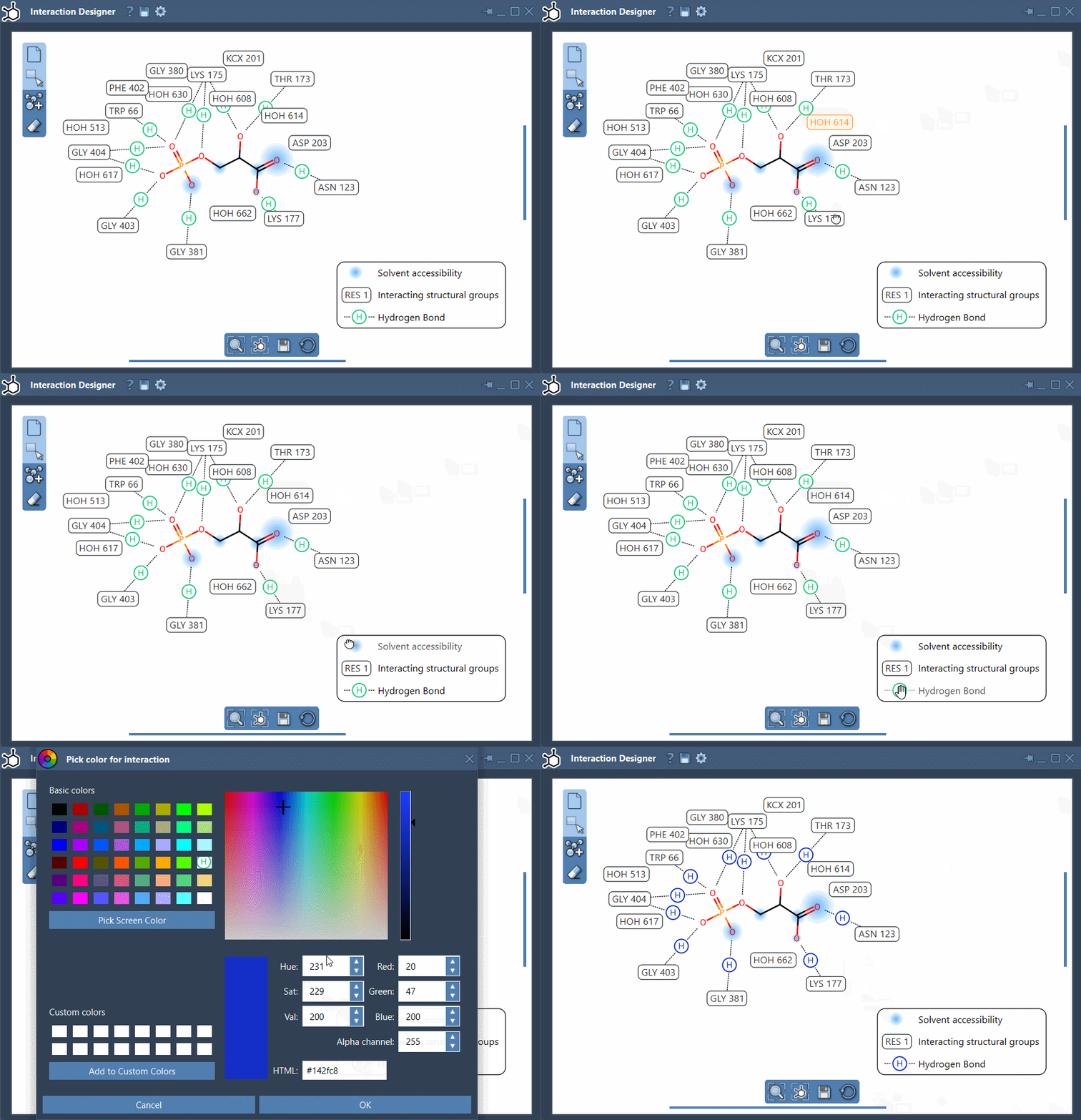
- Annotation Customization: Rearrange labels and interaction symbols to manage layout. Customize colors by double-clicking legend items, or hide interactions you don’t need.
- Binding Pocket Representation: Understand protein-ligand interactions better with clear visualization of binding pockets and solvent accessibility patterns.
Here’s an animated example showcasing the customization of interaction diagrams:
Maximizing Visualization and Synchronization
The bottom menu of the Interaction Designer helps users align 2D and 3D views for better visualization. Use the following tips to maximize your efficiency:
- Zoom in/out with Ctrl/Cmd and your mouse scroll wheel.
- Translate diagrams by holding the middle and right mouse buttons while moving the mouse.
Final Thoughts
With its ability to automatically generate, integrate, and customize 2D interaction diagrams, the Interaction Designer transforms how molecular modeling is approached. This functionality not only saves time but also bridges the gap between 2D analysis and 3D clarification. To learn more about the Interaction Designer, visit the official SAMSON documentation page.
SAMSON and all SAMSON Extensions are free for non-commercial use. You can download SAMSON at https://www.samson-connect.net.