



Molecular modeling often involves identifying specific patterns within molecules, a task that can become quite complex as the number of molecules increases. The SMILES Manager extension in SAMSON simplifies this process with its advanced substructure search capabilities, saving time and ensuring precision.
One of the core pains of cheminformatics is sifting through large datasets to find molecules that match specific patterns. For instance, how do you quickly filter molecules containing both fluorine and nitrogen atoms from a dataset of hundreds? Doing this manually or with basic tools can be highly time-consuming and error-prone. Thankfully, the enhanced substructure search feature in the SMILES Manager is designed to address this challenge.
How It Works
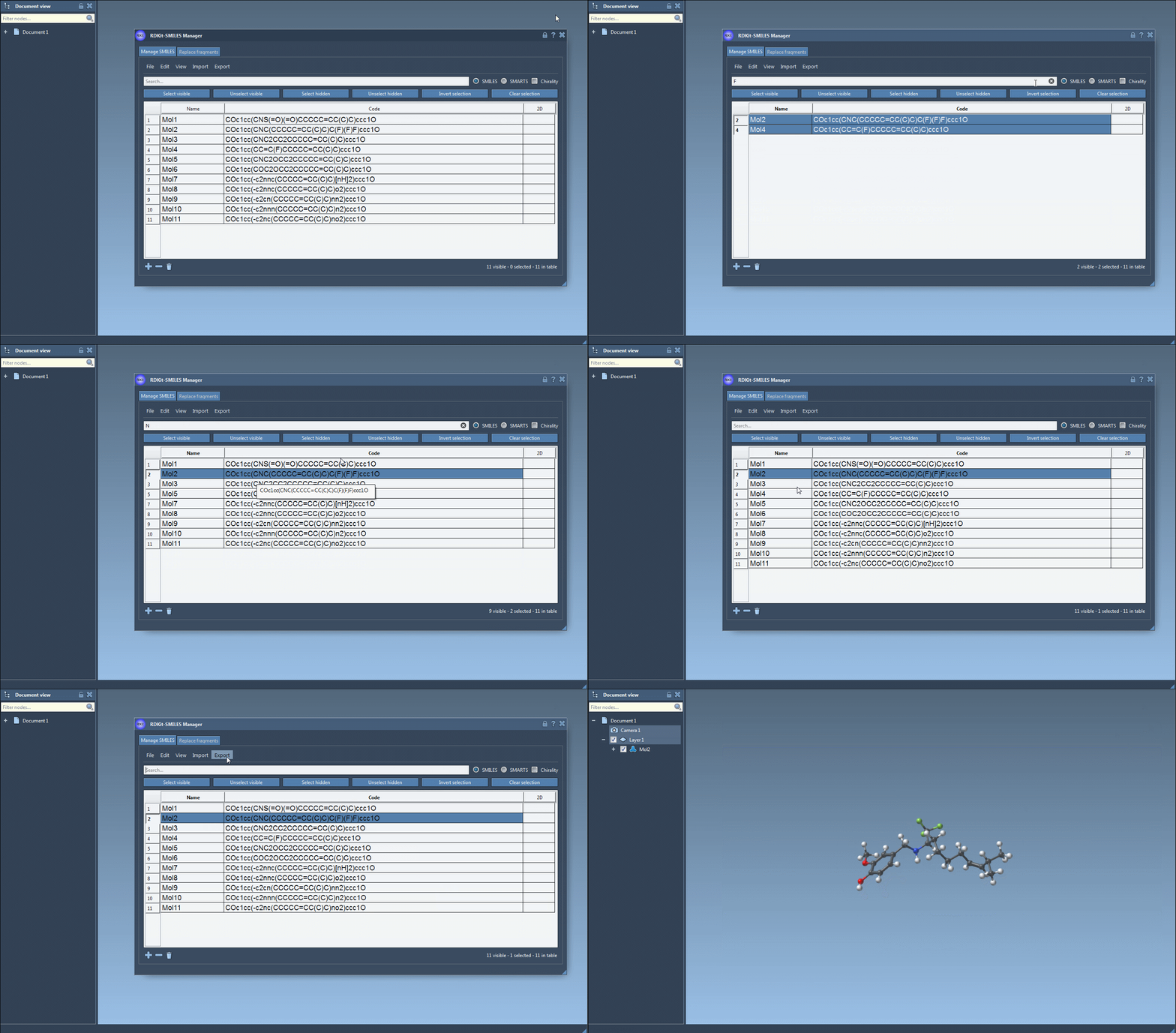
Here’s how the advanced substructure search works in the SMILES Manager:
- You start by using the Search bar to input the first pattern. For instance, typing
Fwill identify all SMILES strings containing a fluorine atom. Once the results appear, click Select visible to ensure that the matching rows are selected. - Clear the search bar, and this selection will remain intact. Now, enter the next pattern—in this case,
N, for nitrogen. The interface will display only rows matching the new search criteria. - To emphasize the molecules with both fluorine and nitrogen, hit the Unselect hidden button to remove those outside your criteria.
Below is a visual representation of this workflow:
Why This Feature Stands Out
Unlike traditional substructure search tools, the SMILES Manager allows users to combine search patterns logically. This refinement ensures you can pinpoint molecules with specific structural properties while efficiently handling large datasets. Moreover, searches are adaptable, with the ability to toggle stereochemistry considerations when required. It’s a solution that both streamlines workflows and minimizes the potential for oversight during molecule selection.
As an added bonus, the feedback mechanism of the SMILES Manager highlights invalid entries, prompting you to correct any potential errors in the SMILES strings.
Applications in Molecular Design
The power of advanced substructure searches extends to various applications in molecular modeling, such as:
- Identifying lead candidates for drug discovery by narrowing down molecules based on known structural motifs.
- Finding substituents that may enhance the properties of existing molecules.
- Filtering molecules with potentially similar reactivity profiles using specific functional group patterns.
With these capabilities, researchers and chemists can tackle projects more confidently, transforming a previously tedious process into something manageable and even intuitive.
Ready to Get Started?
To fully explore the substructure search feature and optimize your molecular modeling workflows, dive into the official documentation page for the SMILES Manager. The page offers further insights, illustrations, and tips to maximize this tool’s potential.
Note: SAMSON and all SAMSON Extensions are free for non-commercial use. Discover more and download SAMSON at SAMSON Connect.