



Optimizing molecular geometry is a critical, time-intensive task for molecular modelers, enabling stable and realistic molecular structures that are essential for simulations and structural studies. Traditional methods like the steepest descent algorithm can sometimes fall short, particularly when dealing with intricate, large-scale molecular motions. This is where the FIRE Minimizer (Fast Inertial Relaxation Engine) becomes an invaluable tool. Here, we’ll explore how the FIRE Minimizer accelerates this process, why it’s advantageous, and how you can integrate it into your workflows with SAMSON.
What Makes FIRE Unique?
For molecular modelers, achieving a balance between speed and precision during geometry optimization can be challenging. The FIRE Minimizer is specifically designed to address these challenges:
- Efficiency for large-scale motions: FIRE is considerably faster than the steepest descent method, especially when molecular motions involve coordinated, collective movements. This efficiency is valuable when energy changes are subtle, yet geometrical adjustments are substantial.
- Compatibility: FIRE works seamlessly with any SAMSON interaction model, ensuring flexibility across various modeling scenarios.
- Prefatory cleanup: It is ideal for pre-simulation structural refinements, allowing you to polish geometries before diving into more computationally intensive tasks.
How to Set Up the FIRE Minimizer in SAMSON
Setting up the FIRE Minimizer in SAMSON is a straightforward process. Follow these steps to streamline your molecular modeling workflows:
- Log into SAMSON Connect: Visit SAMSON Connect and ensure you have your account ready.
- Add the FIRE Minimizer Extension: Navigate to the FIRE Minimizer Extension page and click Add to integrate it into your SAMSON environment.
- Restart SAMSON: After installation, restart the platform to enable the FIRE Minimizer.
Understanding FIRE Minimizer Settings
Fine-tuning the Minimizer’s settings can significantly influence results:
| Setting | Description |
|---|---|
| Step size: | Defines the initial integration step used during minimization. |
| Steps: | Specifies the number of FIRE steps taken between viewport updates. Increasing this value makes updates less frequent but provides a clearer view of the minimization progress. |
| Fixed: | Optionally forces the step size to remain constant, providing more predictable behavior. |
If you need to reset the FIRE history after manually adjusting atom positions during a minimization process, simply click the Reset button.
Performance: FIRE vs. Steepest Descent
One of FIRE’s standout advantages is its ability to converge faster than the steepest descent algorithm. This is particularly evident during scenarios involving small changes in potential energy accompanied by significant molecular rearrangements. The images below illustrate the differences:

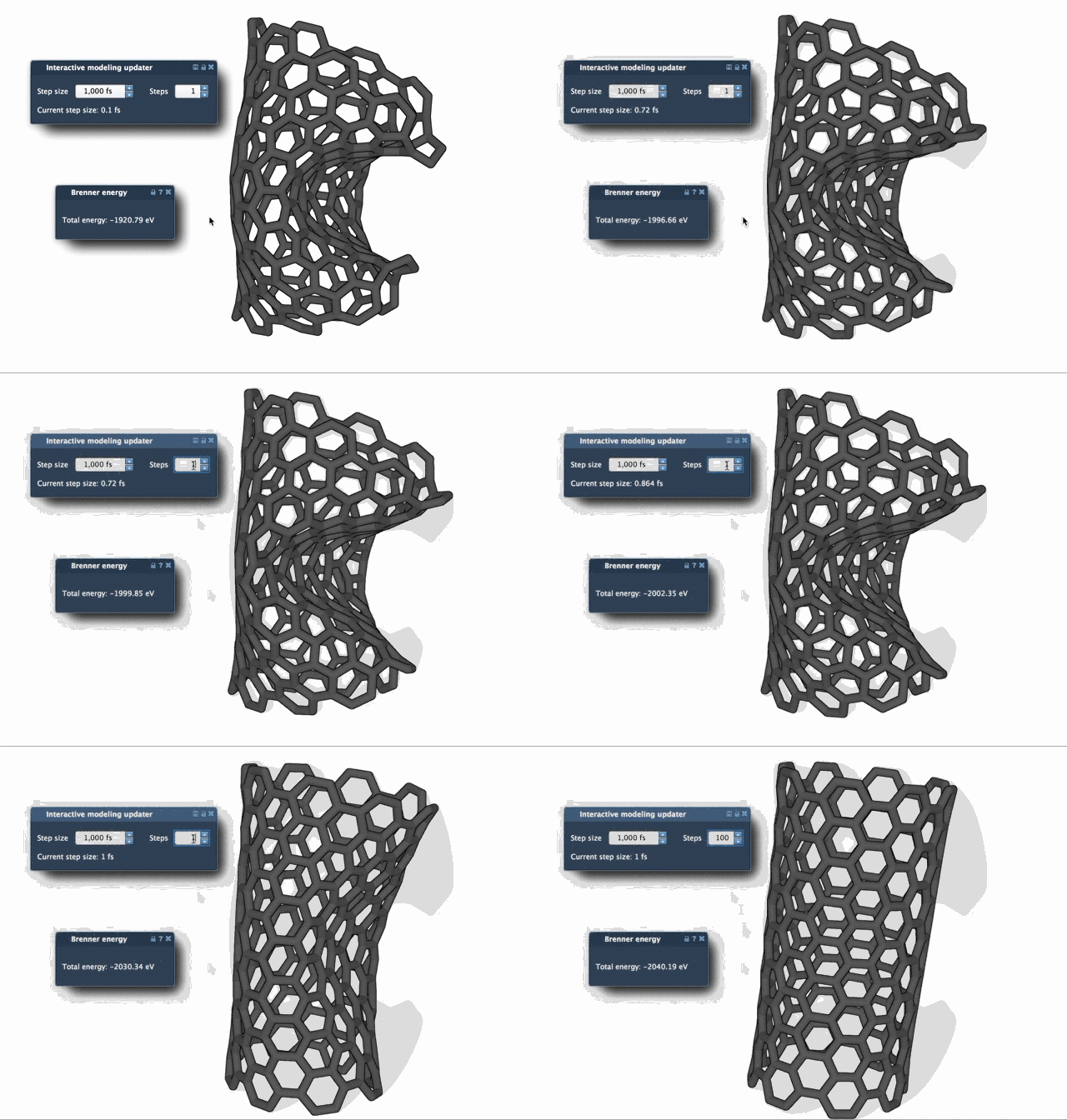
Clearly, FIRE offers a smoother pathway to stable geometries with fewer iterations, even when molecular dynamics become complex.
Integration into Broader Workflows
The FIRE Minimizer is implemented as a State Updater in SAMSON, making it accessible across numerous applications and extensions. For instance, it is widely used in the Molecular Restrainer Extension, providing efficient energy minimization of NMR-derived structures.
To optimize your modeling processes further and explore the potential of FIRE, visit the official tutorial: Fast Geometry Optimization with FIRE Minimizer.
Please note: SAMSON and all SAMSON Extensions are free for non-commercial use. Download SAMSON at https://www.samson-connect.net.