



One of the challenges faced by molecular modelers is the efficient creation of custom polymers for simulation or design. The Polymer Builder extension in SAMSON provides an intuitive solution to this problem through its monomer registration feature. This feature allows users to create and customize polymer building blocks seamlessly, paving the way for rapid polymer construction. Let’s dive into how this functionality addresses the needs of modelers and the steps to get started.
Why Customize Monomers?
In molecular modeling, not all tasks involve off-the-shelf fragments. Many workflows require modelers to create unique polymers with precise structural properties. By registering custom molecules as monomers, you gain the flexibility to:
- Create specialized synthetic polymers, tailored to your research or application needs.
- Specify connection atoms to ensure structural accuracy.
- Combine different monomers in customized sequences for advanced simulations or material design.
Polymer Builder simplifies these steps through its intuitive registration interface and robust customization options.
How to Register Monomers
Let’s break down the process of registering custom monomers in Polymer Builder:
- Select your monomer molecule: You can choose a molecule (or monomer unit) directly from the Document view or the Viewport.
-
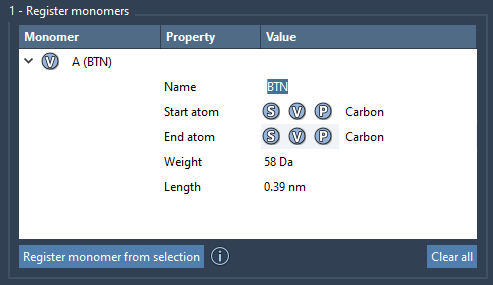
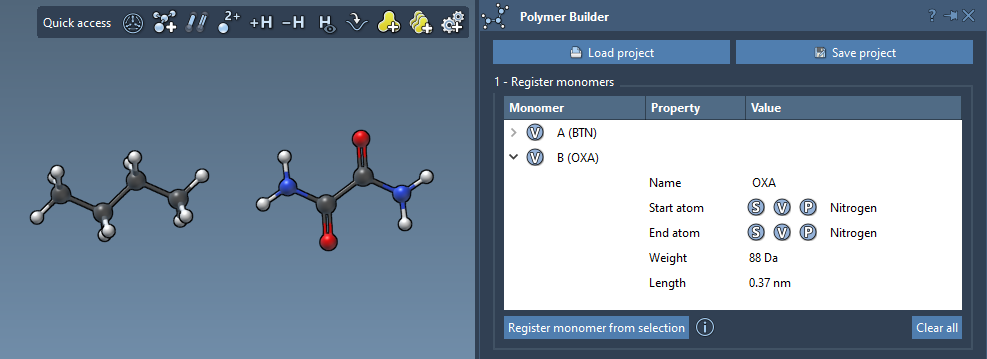
Register the monomer: Use the Register monomer from selection option to add the currently selected molecule as a new monomer. The monomer receives a unique letter identifier (e.g., A, B, C) automatically.
- The tool intelligently detects start and end atoms for connections.
- Need more control? Override the selection by manually designating atoms:
- S: Set an atom by selecting it in the Document view or Viewport.
- P: Pick an atom from a structural list.
- V: Visually highlight atoms or structures.
Monomer Management Made Easy
Once a monomer is registered, it’s listed in an editable table with detailed properties:
- Molecular weight: Displayed in Daltons for quick assessment.
- Start-to-end distance: A key parameter for structural analysis.
You can modify registered monomers directly within the table or even remove them:
- Right-click on a monomer: Select Delete monomer to remove it.
- Clear the table: Use the Clear all option for a fresh start.
Smart Handling of Structural Changes
What happens if you modify a registered monomer in SAMSON? For instance, if you add or remove an atom, the monomer is automatically deregistered to maintain consistency in the table. This ensures that your polymer remains structurally accurate throughout its development.
Tips for Names and Groups
If the monomer belongs to a single residue or group, its name will be derived automatically. For more granular control, you can provide a custom name to organize each monomer into separate structural groups in your polymer.
The Benefits of Custom Monomers
Whether you’re modeling advanced synthetic chains, drug-polymer conjugates, or electronic materials, custom monomer registration in Polymer Builder offers precision and control. With a clear, straightforward approach, you can streamline polymer design and prepare your structures for cutting-edge simulations.
Ready to learn more about monomer registration and other Polymer Builder features? Visit the official documentation page.
Note: SAMSON and all SAMSON Extensions are free for non-commercial use. Download SAMSON at https://www.samson-connect.net.