



When analyzing protein-ligand complexes, understanding non-covalent interactions—like hydrogen bonds, van der Waals contacts, and pi-stacking—can feel overwhelming in 3D alone. That’s where 2D interaction diagrams make a difference: they simplify complexity and help researchers interpret molecular details more clearly.
Interaction Designer in SAMSON provides exactly this capability: it creates detailed 2D interaction diagrams from 3D structures, synchronized in real time. For scientists involved in drug discovery, binding site analysis, or molecular education, this tool helps decode molecular relationships with simplicity.
Why care about 2D interaction diagrams?
Visualizing molecular interactions in 3D can be insightful, but cumbersome. Ligand orientation, overlapping residues, and solvent accessibility are often difficult to interpret from a single viewpoint. 2D interaction diagrams remove spatial ambiguity by flattening interactions into clear, editable visualizations—perfect for presentations, reports, or publications.
Creating a 2D interaction diagram
Within Interaction Designer, generating 2D diagrams is straightforward. Use:
|
1 |
Home > Diagram |
This will automatically generate a 2D interaction diagram for the current selection (or the entire scene if nothing is selected).

Interactive features worth knowing
- Click on atoms or residues to select them, double-click to zoom.
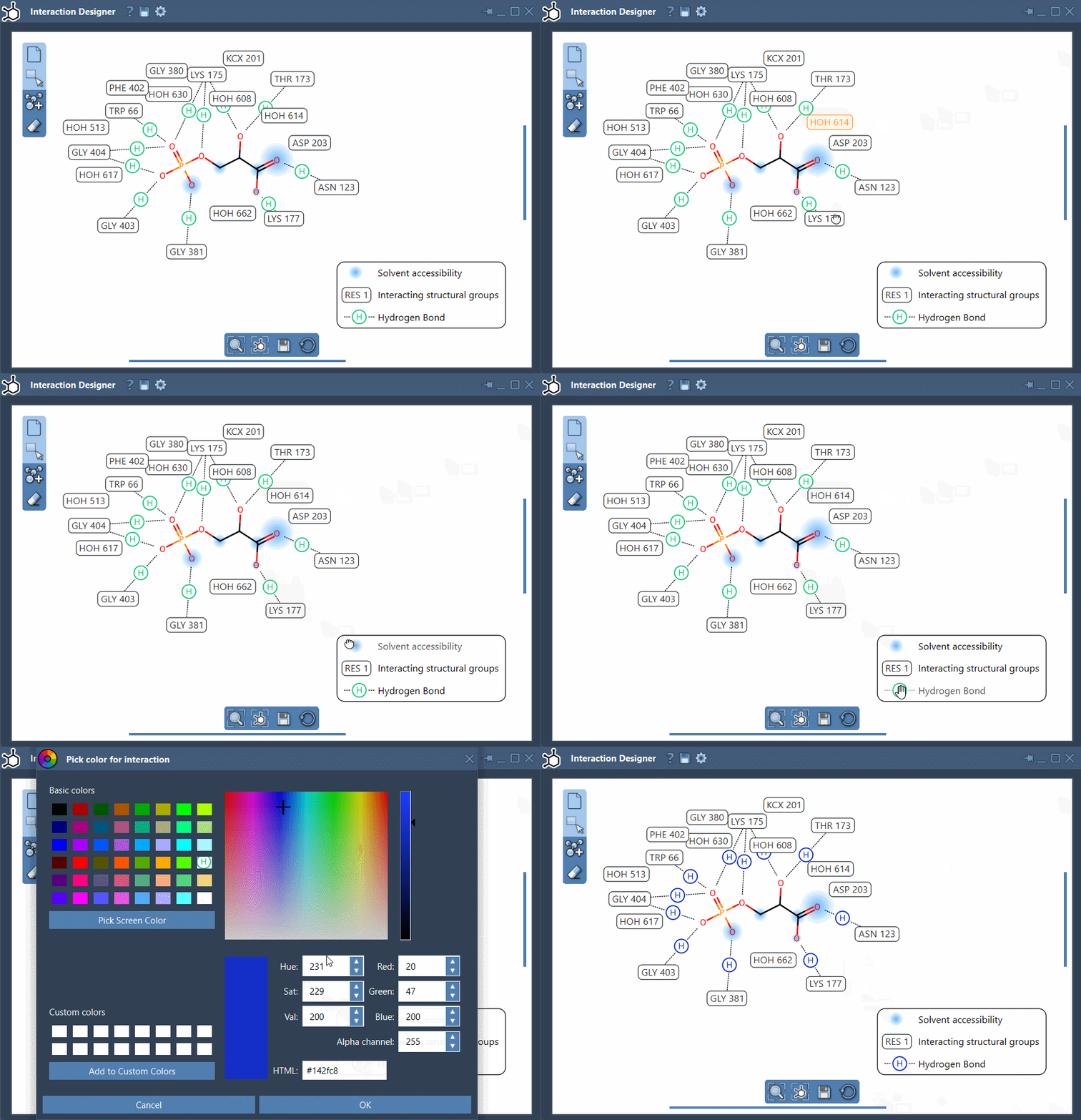
- Show or hide interaction types from the legend for cleaner visuals.
- Change interaction colors directly in the legend with a double-click.
- Manually move captions, labels, and interaction symbols for clarity.
Everything is linked: changes you make in the 2D view are reflected in the 3D viewport, keeping your spatial model always in sync.
Supported interaction types
Interaction Designer recognizes a wide range of interatomic contacts validated against well-known tools like Arpeggio. Among the supported interactions are:
- Hydrogen bonds, van der Waals contacts, and halogen bonds
- Aromatic π-stacking
- Electrostatic interactions, metal complexes, and more
This level of resolution helps when evaluating new binding poses or analyzing differences between active and inactive compounds.
Tips for smoother editing
- Use the scroll wheel with Ctrl/Cmd to zoom, and mouse buttons to pan.
- Align 2D and 3D views from the bottom menu.
Once finalized, you can export your diagrams in multiple formats (PNG, SVG, JPG, etc.), ready to be shared or included in scientific communications.
To learn more about Interaction Designer and explore other features (like designing new molecules in 2D), visit the official documentation.
SAMSON and all SAMSON Extensions are free for non-commercial use. You can download SAMSON here.