



When it comes to molecular docking, a major hurdle for modelers is setting up the search domain effectively. AutoDock Vina Extended for SAMSON simplifies this process, allowing users to optimize docking efficiency and accuracy by focusing on specific binding sites or regions of interest. In this post, you’ll learn practical approaches to configuring and refining the search domain, a crucial step that can save computation time without compromising results.
What Is the Search Domain?
The search domain in docking refers to the 3D space where the algorithm searches for potential ligand poses. Defining this domain accurately ensures the docking process focuses on relevant regions, such as active binding sites, and avoids extraneous computations on unnecessary spaces in the receptor structure.
Steps to Set Up Your Search Domain
Default Search Domain
When a receptor is set, AutoDock Vina Extended automatically configures a default search domain based on the receptor’s total structure. This might be sufficient for exploring general interaction areas but could lead to wasted computational resources. Refining the domain to a known or suspected binding site usually yields better-targeted results.
Customizing the Search Domain
Here are some ways you can adjust and optimize the search domain:
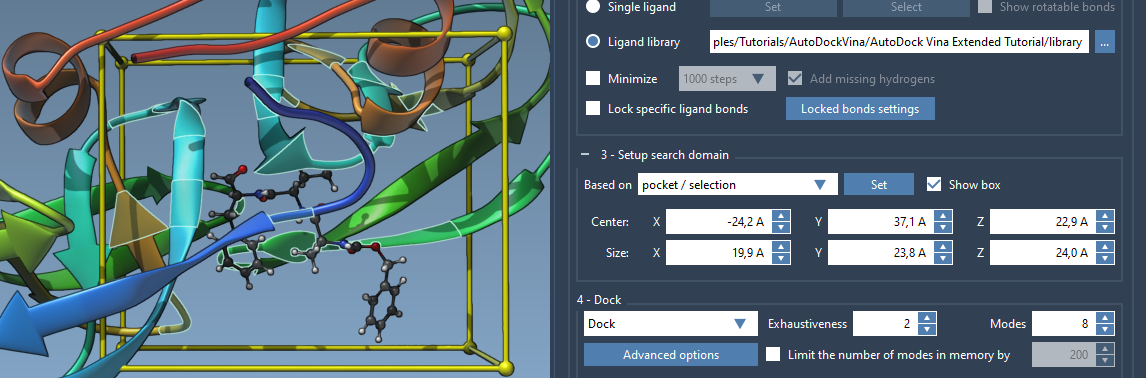
- Manual Adjustment in the Interface: You can modify the domain’s center and size directly through the interface. Adjust the dimensions to better align with target regions of your receptor.
- Viewport Controllers: Use the controllers in the Viewport to interactively drag and resize the yellow search domain box. This is especially useful for visually aligning the box with specific pockets or regions.
- Based on Selection: Select residues or regions of interest in the receptor structure and configure the search domain to focus on this selection. This is done by choosing the “Based on pocket/selection” option and clicking “Set.”
- Binding Site Approach: If you have a bound ligand or suspect a binding pocket, select the bound ligand and configure the search domain accordingly. For this, follow these simple steps:
- Select the bound ligand in the Document view.
- Go to Select > Biology > Binding sites.
- Specify the binding site parameters and click OK.
The search grid will now encompass the binding site domain accurately.
By refining the search domain, you narrow the docking algorithm’s focus to critical regions, significantly improving the relevance and reliability of the results.
Visual Feedback for the Search Domain
The ability to visualize the search domain makes the setup process intuitive. The yellow box representation in the Viewport helps modelers understand spatial parameters in real time. If needed, you can toggle the visibility of this box using the “Show box” option.
Conclusion
Optimizing the search domain in docking tasks enhances both the speed and accuracy of your computations. Whether you rely on manual adjustments or binding site-based setups, tools in SAMSON’s AutoDock Vina Extended make the process seamless. Clear visualization and interactive controls simplify the process even for beginners.
For a more detailed step-by-step guide, visit the official documentation page.
Note: SAMSON and all SAMSON Extensions are free for non-commercial use. Download SAMSON at https://www.samson-connect.net.