



Understanding the free energy landscape of a biomolecular system is key to gaining insights into processes like binding, folding, and conformational changes. One widely used approach for this is Potential of Mean Force (PMF) analysis using the Weighted Histogram Analysis Method (WHAM). But if you’ve ever found yourself struggling with scripts, scattered data files, and complex folder structures, you’re not alone.
Let’s take a closer look at how the GROMACS Wizard in SAMSON can help streamline PMF analysis with WHAM. If you’ve already used umbrella sampling as your precursor step, the analysis becomes even more straightforward.
From Simulations to PMF in a Few Steps
Start by switching to the WHAM Analysis tab in GROMACS Wizard. If you’ve just completed your umbrella sampling simulation using the same extension, you can simply click the Auto-fill button  to automatically populate the project path. This removes the pain of tracking file paths manually—one of those things no one misses.
Make sure your input project folder is organized with numbered subfolders containing simulation results for each window. The structure should resemble this:
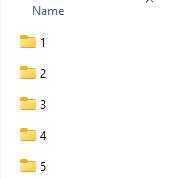
Each subfolder holds data for a particular value of the reaction coordinate, and GROMACS Wizard scans them to gather time, temperature, and coordinate information automatically. You simply choose the reaction coordinate of interest, optionally adjust details like bounds, time ranges, or energy units, and click Compute.
Interpreting the Results
In a few moments (depending on the size of your trajectories), GROMACS Wizard generates two plots: the PMF profile and the histogram. These visuals provide essential feedback:
- PMF Graph: Reveals the free energy variation along the reaction coordinate.
- Histogram: Shows sampling density — indicating if some windows need more data.
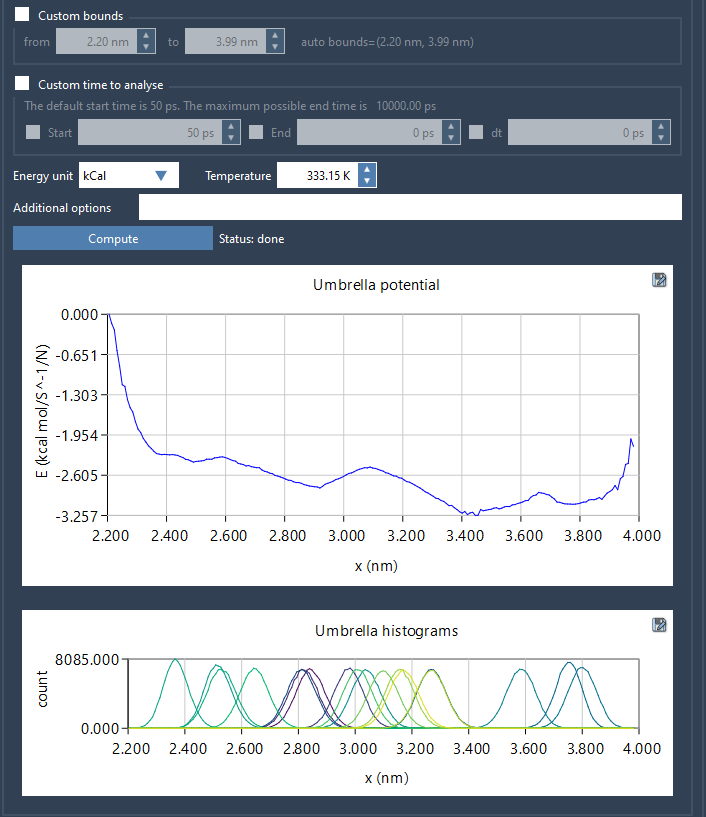
What’s especially helpful is that computed data are saved to a wham_results subfolder. This means if you switch to another coordinate later on, the Wizard can quickly reuse already processed information rather than starting over. It makes comparative analysis much lighter.
Why It Matters
By integrating WHAM analysis into a visual, guided workflow, this tool saves time and avoids errors. You don’t need to piece together scripts from old GitHub issues or parse logs by hand. Everything from selecting your data to storing and comparing results is built into the interface.
If you regularly run umbrella sampling and dread the analysis step—or if you’ve avoided PMF because of its reputation as tedious—this might be your invite back.
To learn more, visit the original documentation page: https://documentation.samson-connect.net/tutorials/gromacs-wizard/pmf-analysis/
SAMSON and all SAMSON Extensions are free for non-commercial use. Get SAMSON at https://www.samson-connect.net.