



A molecular transition path can look convincing in a viewer and still contain awkward intermediate structures. That is a common frustration when studying a ligand moving into or out of a binding site: you may have a sequence of conformations, but the route between them is uneven or physically unhelpful. The Parallel Nudged Elastic Band method, or P-NEB, offers a way to refine a candidate path rather than treating the first guess as the final result.
The key distinction is that P-NEB improves an existing path; it does not create the initial route for you. Start with a path or a sequence of conformations connecting the states you care about. Those states are often structures corresponding to local energy minima, obtained, for example, through energy minimization. If you still need to generate a candidate route, use a path-generation method first, then refine it.
What the method changes
NEB optimizes the intermediate images along a transition path. In addition to the forces from the selected interaction model, spring forces connect neighboring images and help keep them distributed along the route. In practical terms, the method works on the path between your starting and ending structures, instead of simply minimizing each structure independently. The P-NEB app also implements the climbing image strategy, which can be enabled to help locate the saddle point along the path.
This is useful when an existing trajectory is a reasonable guess but needs refinement. For example, the SAMSON tutorial demonstrates applying P-NEB to ligand unbinding paths. The point is not that every candidate path will become correct automatically: the method refines the input you give it, so the quality and relevance of that initial path still matter.
A practical workflow
- Load a candidate path. In SAMSON, use Home > Download to load a sample document, or bring in your own path or conformations. The tutorial includes a smaller zinc-ligand example and a protein–ligand example involving lactose permease and thiodigalactoside.
- Open P-NEB. Find it under Home > Apps > All > P-NEB, or use the Find everything… search box. The P-NEB extension and the FIRE state updater are listed as requirements.
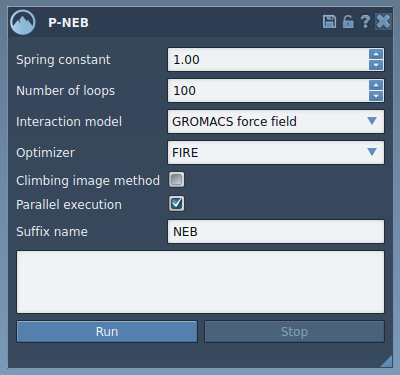
- Set the calculation options. The tutorial’s example uses a spring constant of 1.00, 100 loops, Universal Force Field (UFF), and FIRE as the optimizer. It leaves the climbing image option off for the first run and enables parallel execution. These are example settings to reproduce the tutorial, not a universal recipe for every system.
- Select the path and run. Choose the path node in the Document view, then click Run. When UFF asks whether to use existing bonds, choose to use them and confirm. Progress is shown in the status bar.
- Inspect the result. When the calculation finishes, a new path appears in the Document view. Select it to examine it with the Inspector, or double-click it to start and stop its animation.

Use a path when you can
P-NEB can also work on a set of conformations, but the tutorial notes that this takes longer than applying it to a path with the same steps. If your conformations are separate nodes, select them and use Conformation > Create path from conformations in the context menu to combine them before running P-NEB. The optimized conformations can also be returned as a set, and double-clicking one restores the corresponding atom positions.
After optimization, treat the result as a refined candidate to inspect, not as a substitute for judging whether the path answers your scientific question. Review the structures and the path behavior, and continue with an appropriate simulation or free-energy workflow if that is the next step.
For the complete tutorial and additional details, learn more about optimizing transition paths with P-NEB.
Note: SAMSON and all SAMSON Extensions are free for non-commercial use. Get SAMSON.