



A candidate molecular pathway can look smooth and still be a poor description of how a system moves between two states. Perhaps it was generated by interpolation, or by a path-finding tool: useful for proposing a route, but not yet relaxed according to the system’s energy and forces. The practical challenge is knowing what to do next. In SAMSON, the Parallel Nudged Elastic Band (P-NEB) app can refine an existing path rather than asking you to generate one from scratch.
This distinction matters: P-NEB is for improving a pathway you already have. It optimizes intermediate images, using the system’s forces and spring forces between neighboring states to relax the route. It can also apply a climbing-image strategy to search for a saddle point. The result is a more physically meaningful candidate to inspect—not a substitute for checking whether the input, interaction model, and scientific assumptions fit your problem.
Start with a pathway, not a blank slate
Before opening the app, load a sample path or prepare a set of conformations. A path stores a trajectory for a selected group of atoms; conformations store saved positions for selected atoms. If you have conformations rather than a path, P-NEB can use them directly. However, for the same system and number of steps, the tutorial recommends using a path because optimizing a set of conformations takes longer. You can combine conformations into a path through the document’s context menu: Conformation > Create path from conformations.
If you have only two relaxed endpoint structures, you still need to create intermediate states first. Linear interpolation is one option; path-generating extensions such as Ligand Path Finder are another. P-NEB refines a candidate route—it does not create that initial route for you.
A practical first run
Add the P-NEB extension and the FIRE state updater, then open P-NEB from Home > Apps > All, or find it using the Find everything… search box. The sample documents in the tutorial include a smaller Zinc ligand unbinding example for tests and a lactose permease–thiodigalactoside system with unbinding paths.
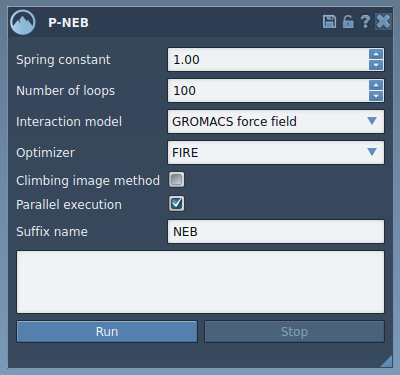
For the tutorial’s example, set the spring constant to 1.00, the number of loops to 100, select Universal Force Field as the interaction model, and choose FIRE as the optimizer. Enable parallel execution to run one thread per conformation. Leave the climbing image option unchecked for the first run; you can repeat the workflow with it enabled if you want to try the climbing-image strategy for locating the saddle point. Give the output a suffix such as NEB so you can distinguish the result from the input.
Run, then inspect
Select the path in the Document view and click Run. When the Universal Force Field setup asks whether to use existing bonds, the tutorial’s instruction is to choose that option and confirm. You can follow the computation in the status bar. When it finishes, SAMSON adds a new path to the document and presents a computation summary in the P-NEB interface.


Keep the original and optimized paths conceptually separate: the new path is the output to examine, not a reason to assume the proposed mechanism is proven. Select it and use the Inspector to review it. Double-clicking a path starts or stops its animation, which can make changes along the route easier to observe. You can also right-click the path to access options under Path.
For a set of conformations, the basic workflow is similar: select the conformations in the Document view and click Run. The optimized conformations appear in the document and can be double-clicked to restore their corresponding atom positions. If you have the choice, converting them into a path first is the more efficient route described by the tutorial.
The useful takeaway is simple: generate a plausible route with an appropriate method, then use P-NEB to relax it and inspect what changed. For the complete walkthrough and related path-generation tutorials, read the original P-NEB documentation.
Note: SAMSON and all SAMSON Extensions are free for non-commercial use. Get SAMSON.