



For molecular modelers, optimizing the geometry of molecular systems is a common need—and often a challenge. Stable molecular structures are essential, but traditional methods such as steepest descent might not always meet the speed and efficiency requirements for large-scale systems or motions. Enter the Fast Inertial Relaxation Engine (FIRE) minimizer, a powerful tool within SAMSON designed to streamline this process efficiently.
Why Optimize Molecular Geometry?
Before diving into the specifics of the FIRE method, let’s understand why geometry optimization is so critical. By minimizing the potential energy of a molecular system, you can ensure that the structure is realistic, stable, and ready for further simulations. Poorly minimized molecular geometries can lead to inaccuracies in simulations, wasted computational resources, and potential frustration.
How FIRE Minimizer Makes a Difference
The FIRE minimizer provides a significant advantage over conventional steepest descent methods. It is built to handle large-scale molecular motions with faster convergence. This makes it an ideal method for pre-simulation cleanups and for preparing systems for interactive molecular design workflows. If you’ve faced sluggish optimization processes with other methods, FIRE can save time and streamline your workflow.
Key Benefits of the FIRE Minimizer:
- Improved speed: Faster than steepest descent under most conditions, especially where collective atomic motions are involved.
- Flexibility: Compatible with any SAMSON interaction model to ensure smooth integration into your molecular modeling setup.
- Ease of Use: Ideal for quickly optimizing a system and achieving structural relaxation before diving into simulations.
Practical Steps to Use the FIRE Minimizer
Getting started with the FIRE minimizer is straightforward. Here’s how you can quickly set it up in SAMSON:
Step 1: Install the FIRE Minimizer Extension
- Log into SAMSON Connect.
- Visit the FIRE Minimizer Extension page and click on Add.
- Restart SAMSON, and the extension will be ready to use.
Step 2: Load Your Molecular System
The FIRE minimizer works with a variety of molecular formats like PDB or MOL2. This makes it simple to load your structure and prepare it for optimization. If you’re new to loading molecules, check out the dedicated Loading Molecules Guide in SAMSON’s documentation.
Step 3: Add a Simulator
- Go to Edit > Add Simulator.
- Select the preferred interaction model, depending on your system requirements.
- In the State Updaters list, choose FIRE to activate the optimization process.
Customization: FIRE Minimizer Settings
The FIRE minimizer offers several settings to let you fine-tune the process:
| Setting | Description |
|---|---|
| Step size | Controls the initial integration step for the minimization. |
| Steps | Defines how many steps are performed between viewport updates—larger values provide clearer visualization of progress. |
| Fixed | Option to enforce a constant step size, useful for specific systems. |
If you’ve manually adjusted atoms mid-optimization, you can also reset the FIRE history by pressing the Reset button, ensuring the system recalibrates properly.
FIRE vs. Steepest Descent: Why It’s Faster
The uniqueness of FIRE lies in its handling of changes in potential energy. Unlike steepest descent, which may slow down significantly as the system approaches an energy minimum, the FIRE algorithm maintains efficiency even for systems with small potential energy changes but large geometry transformations. Below is a visual representation of how the relaxation process compares:

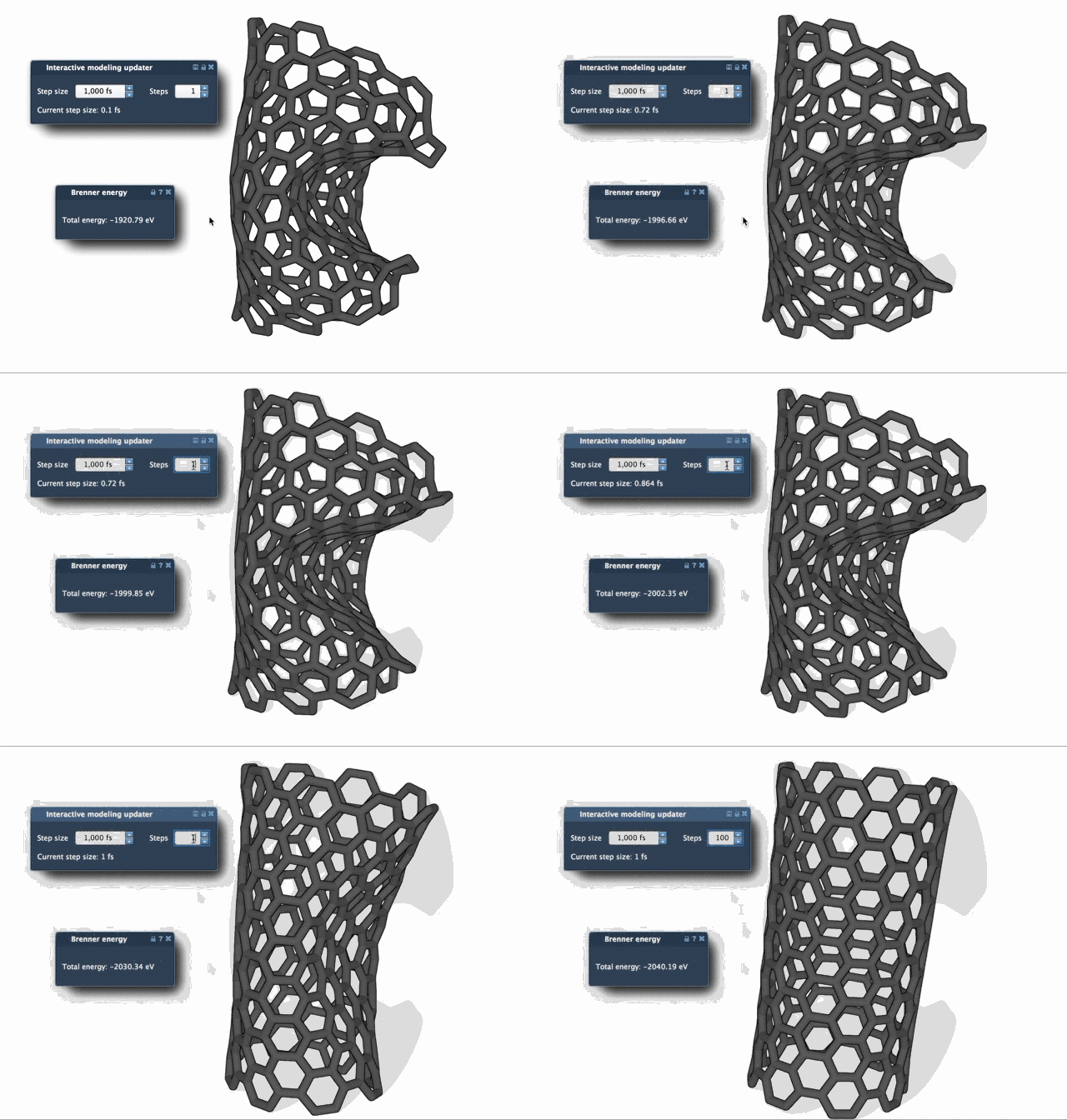
By using FIRE, modelers can significantly reduce the time spent preparing structures for simulations while achieving high-quality results.
Next Steps
If you’re ready to integrate FIRE into your workflows, visit the full documentation at https://documentation.samson-connect.net/tutorials/fire/ready-set-fire/ to learn more about advanced settings and complementary tutorials.
SAMSON and all SAMSON Extensions are free for non-commercial use. Get SAMSON today at https://www.samson-connect.net.