



For molecular modelers, understanding the nuances of protein functions often hinges on comparing sequences and structures. Whether you’re investigating conserved residues or studying conformational changes, protein alignment is a crucial step. SAMSON’s Protein Aligner offers an intuitive and efficient workflow to align protein sequences and superimpose structures—all from within the integrated SAMSON platform.
The Challenge of Protein Alignment
Molecular modelers often encounter the challenge of identifying conserved regions that contribute to protein function, ligand binding, or structural stability. Traditional tools for protein alignment may provide sequence matching but fail to integrate into streamlined structural workflows. SAMSON’s Protein Aligner addresses this pain by combining sequence alignment and structural superimposition in a single interface.
How Protein Aligner in SAMSON Makes It Simple
SAMSON’s Protein Aligner is specifically designed for researchers who value ease and integration. Here’s how you can get started with an example workflow:
Step 1: Load the Proteins
The first step in alignment is obtaining the proteins you want to compare. SAMSON simplifies this through its Home > Fetch feature, allowing you to load proteins directly using their PDB codes. For instance, let’s compare two hemoglobins from different species using PDB codes 1DLW and 1RTX. Input those codes and click the appropriate Load button to fetch and prepare the structures:

Before aligning, consider using Protein Preparation tools to clean the system by removing extra solvent, ligands, or alternate locations.
Step 2: Align Sequences
Sequence alignment is key to understanding relationships between proteins. In the Protein Aligner, you can align sequences either by structure (entire models) or by chain (for oligomers). Select the appropriate alignment mode by clicking Align sequences. The result offers a clear visualization of conserved residues and their biochemical properties:

Step 3: Leverage Visual Tools
Use the Highlight residues feature to toggle amino acid property options such as similarity and polarity. This helps identify functionally significant residues at a glance:

Hover over residues to inspect their name and ID, or select them for deeper examination. You can also interact with sequences to highlight corresponding regions on the 3D structure.
Step 4: Superimpose Protein Structures
Structural alignment reveals spatial relationships between proteins. Begin by ensuring no residues are selected, then click Align to this on one of the models to superimpose the structures:
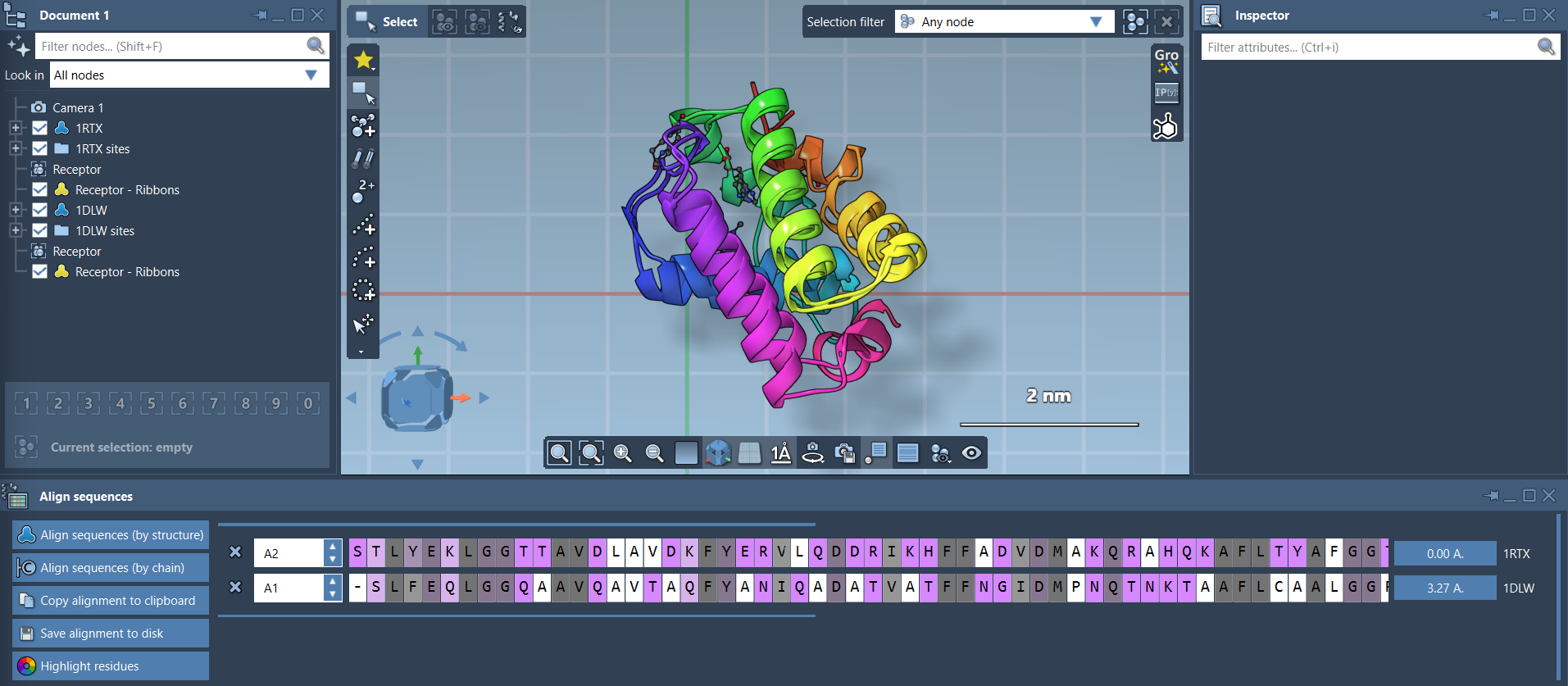
The software calculates and displays the root-mean-square deviation (RMSD), helping you evaluate alignment quality.
Step 5: Align Specific Regions
If specific regions of the protein are of interest, SAMSON allows region-specific alignment. Simply select the residues you want to align and click the alignment button next to the selection. This is especially helpful for comparing conserved structural motifs like alpha-helices and beta-sheets:

Streamlining Molecular Design
SAMSON’s Protein Aligner integrates seamlessly with other tools within the platform, making it easier to move from analysis to design. You can export alignments for homology modeling, map conserved residues to ligand-binding sites, or repeat the alignment process with additional chains or protein complexes. Combined with rich visualization options, your workflows become faster and more insightful.
Explore the full documentation and learn more about Protein Aligner workflows here.
Note: SAMSON and all SAMSON Extensions are free for non-commercial use. Access SAMSON now at this link.