



A large molecular assembly can be difficult to interpret at a glance. Repeated subunits may hide the structure’s organizing pattern, and choosing the wrong part of the assembly for analysis can make a modeling workflow more complicated than it needs to be. Symmetry detection offers a practical first step: identify the axes that relate repeated copies, inspect how convincing the candidate symmetry is, and use that information to decide what to examine next.
In SAMSON, the Symmetry Detection extension can detect and visualize symmetry in protein complexes, viral capsids, and other biological assemblies. This is useful not only for understanding a structure’s overall organization, but also for checking expected symmetry, investigating repeated interfaces, and preparing a system for a symmetry-aware modeling workflow.
Start with the biological assembly
Before computing symmetry, make sure you have the intended biological assembly or multimeric complex open in SAMSON. Fetch a structure or load a file, and check the importer settings: depending on the importer, you may need to enable biological-assembly import. This matters because symmetry analysis can only describe the structure you actually loaded. If the assembly is incomplete, the detected pattern may not match the symmetry you expected.
Once the assembly is open, launch Home > Apps > Biology > Symmetry Detection and click Compute symmetry. The extension supports cyclic groups such as C2 and C3, dihedral groups such as D2 and D3, and the cubic groups tetrahedral, octahedral, and icosahedral. A structure may have more than one plausible symmetry group, so treat the results as candidates to inspect rather than assuming that the first result is automatically the right one.
Use the axes to understand the assembly
For an icosahedral capsid such as PDB 3NQ4, the detected symmetry can show the 2-, 3-, and 5-fold axes together. Seeing these axes in the context of the molecular structure makes the repeated organization easier to interpret and can help when selecting a unique asymmetric unit for a focused simulation.
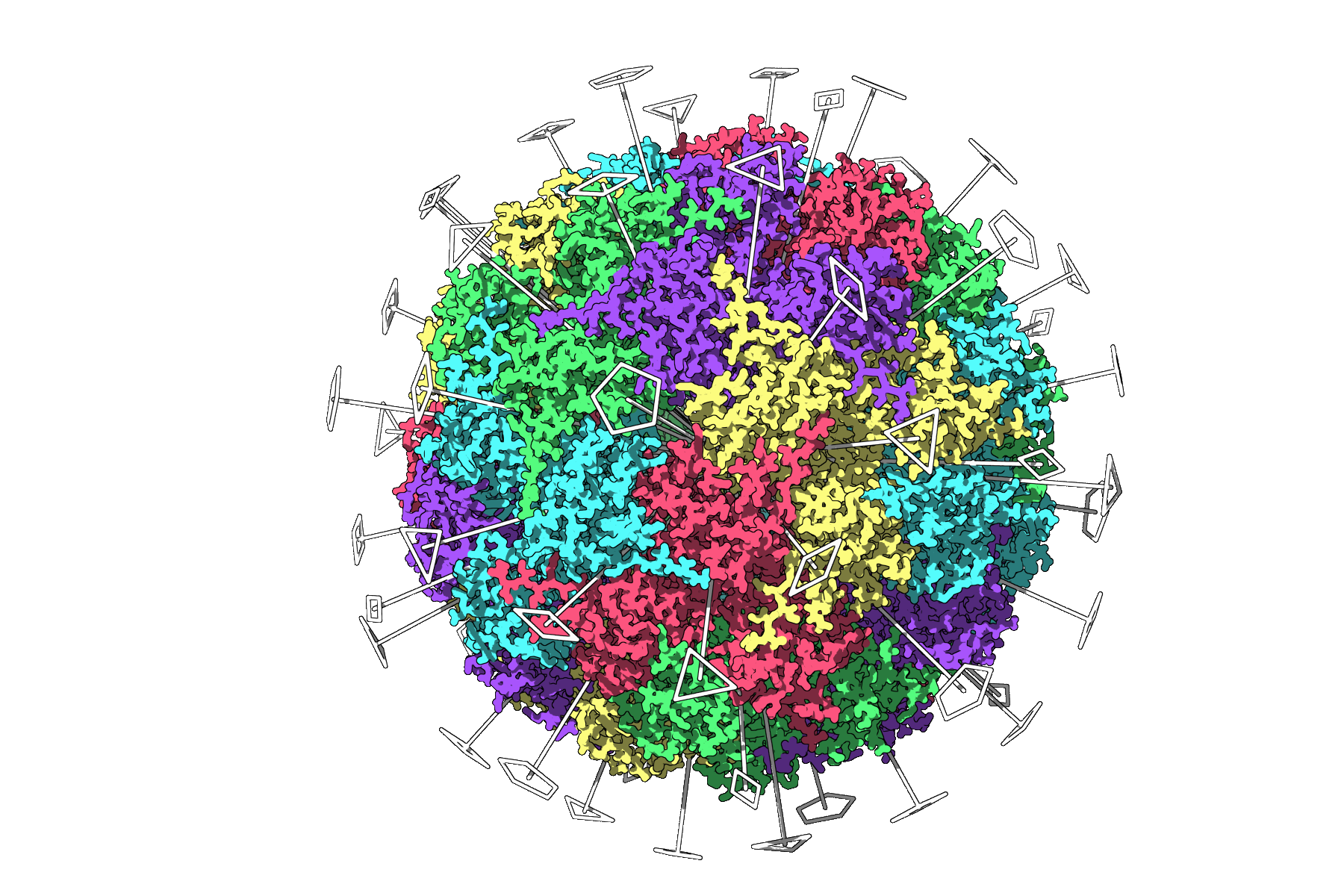
The visualization is more than a decorative overlay: it gives you a way to connect a proposed symmetry group to the actual assembly. Use it to see which copies are related and where the axes pass relative to the structure. This can help turn an abstract label, such as icosahedral symmetry, into a concrete view of the assembly’s repeated organization.
When there are several answers, compare them
Large complexes may produce multiple candidate groups. To choose between them, consider both the order of the group and its RMSD values. The tutorial recommends preferring higher-order groups with small RMSD values, while still checking that the result makes sense for the structure you are studying. RMSD gives you a way to compare the candidate fits; it is not a substitute for looking at the assembly and deciding whether the proposed symmetry is relevant to your question.
For example, the 1B4B system has a dihedral symmetry of order 3, or D3. If you already know the expected group, you can specify it using the symmetry-group and order drop-down lists instead of relying only on automatic detection.
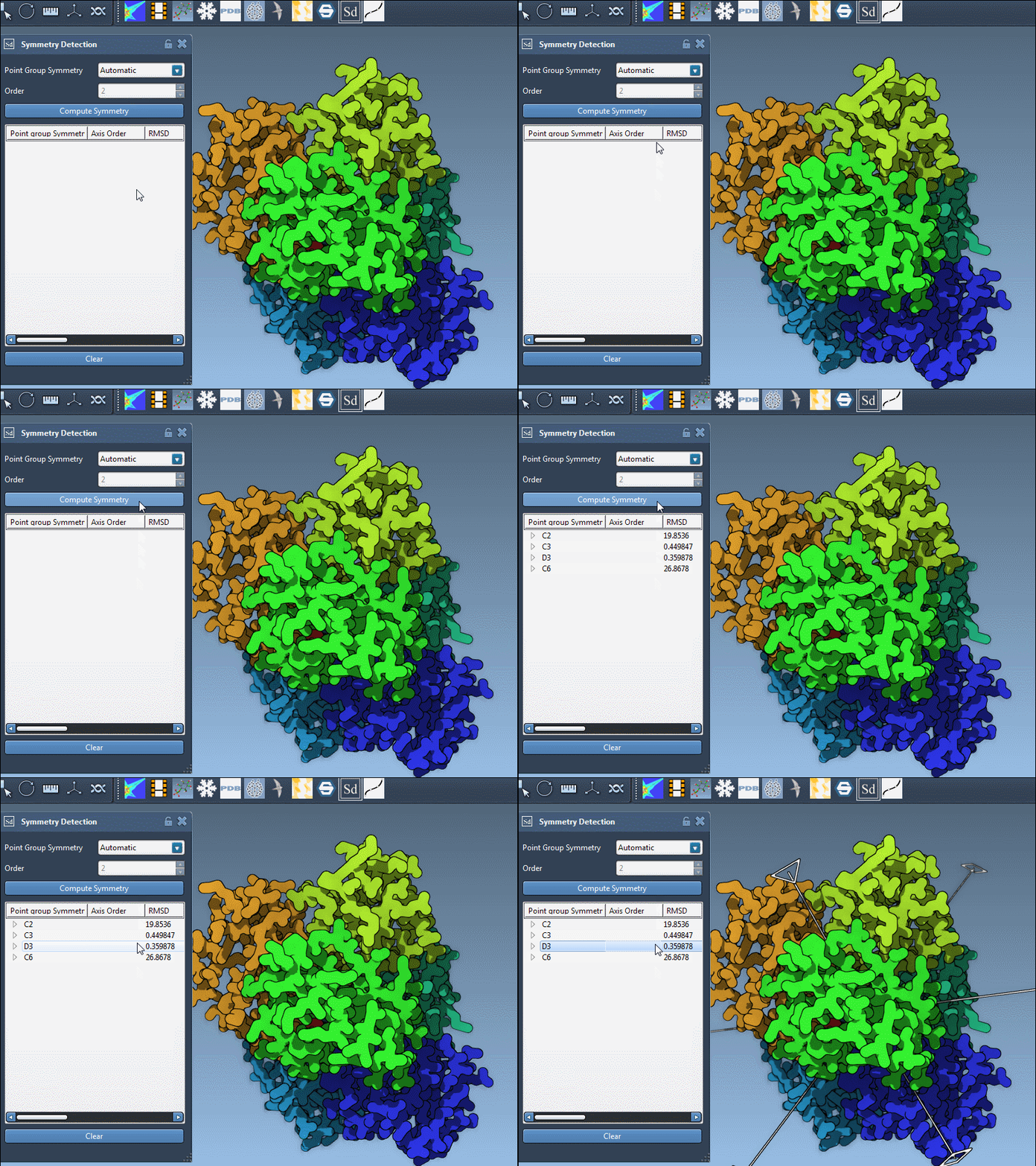
After selecting a group, expand it to inspect its individual axes and their RMSD scores. A single-click highlights an axis in the viewport; a double-click aligns the camera so you look down that axis. This makes it easier to compare axes and examine how each one relates to the assembly, without losing the molecular context.
Make the result useful for your next step
Once you have identified a group and explored its axes, decide what the analysis is meant to support. Symmetry can help reveal interfaces repeated across copies, provide a check against expected structural organization, and guide the selection of an asymmetric unit when preparing a simulation. For clearer inspection, combine the axes with Ribbons or Surface visual models, or colorize chains to make repeated units easier to distinguish. Viewport snapshots can help preserve a view for a presentation or publication.
The key is to use symmetry as a way to ask better questions about the assembly: Which copies repeat? Which axis is relevant to the feature I am studying? Does the candidate group fit the structure and the intended workflow? A brief inspection at this stage can help you choose a sensible focus before moving on to more detailed modeling.
For the full walkthrough and additional examples, see the SAMSON symmetry-detection tutorial.
Note: SAMSON and all SAMSON Extensions are free for non-commercial use. Get SAMSON at samson-connect.net.