



Docking a ligand library can quickly become frustrating when the input structures are unprepared, the search box is too broad, or the results are difficult to revisit. A reliable workflow is not just “press Dock”: it starts with a clean receptor, a search region tied to the binding site, and a plan for saving and inspecting the poses.
This walkthrough focuses on those practical decisions using AutoDock Vina Extended in SAMSON. The example tutorial uses the 2AZ8 protein system and a small sample ligand library, but the checks are useful whenever you are preparing a docking run.
Start with the receptor, not the docking button
Before setting up the project, inspect the receptor structure. Remove alternate-location atoms and unnecessary ligands or small molecules. Water and monatomic ions can be removed; Vina Extended does not consider them. Check hydrogens carefully: polar hydrogens matter for hydrogen-bond detection, but if hydrogens were already added using a chosen protonation state, avoid changing them casually. If residues or heavy atoms are missing, the PDBFixer extension may help repair the protein before docking.
This preparation step prevents a common source of wasted effort: interpreting poses from a structure whose chemistry or completeness was never checked. The SAMSON preparation workflow is available under Home > Prepare.

Make the search box answer a biological question
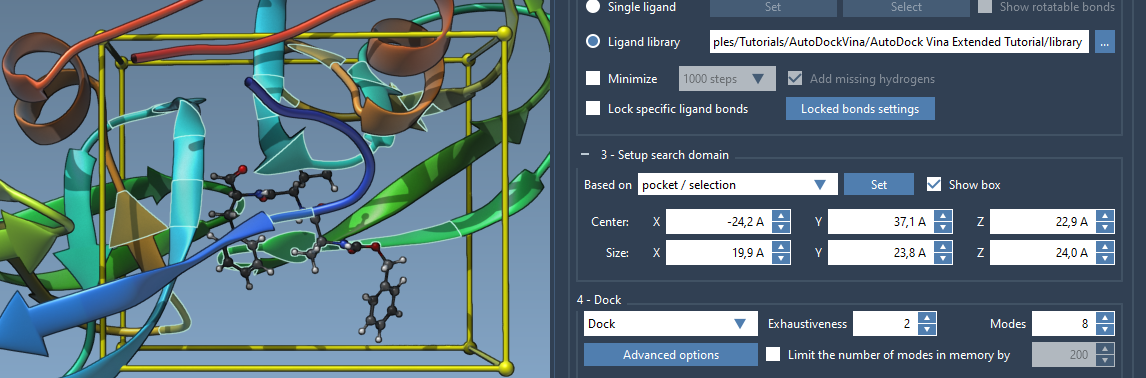
After opening AutoDock Vina Extended and starting a new docking project, set the receptor and ligand library. The search domain is initially based on the receptor, but docking across a large region can mean extra computation and a less focused search. If you know the binding site, select the bound ligand, use Select > Biology > Binding sites to select nearby residues, then set the domain using Based on pocket/selection.
You can also edit the box dimensions and center in the interface or adjust its corner controllers in the Viewport. One detail worth checking before a run: the search domain is defined in global XYZ coordinates. If the system has been rotated or aligned, inspect the box in the Viewport to confirm it still surrounds the intended pocket.
Choose what the library is allowed to do
Ligand libraries can contain multiple molecules and supported formats such as MOL2 and SDF. By default, library ligands are treated as fully flexible, with their rotatable bonds active. Flexibility can make the search more realistic, but it increases computation time. If particular bond types should remain locked, review Locked bonds settings and enable Lock specific ligand bonds.
For a single ligand, rotatable-bond controllers in the Viewport let you switch individual bonds between rotatable and fixed. Remember that locking bonds does not constrain them during minimization. Also, cis-trans isomers are not generated automatically, so include relevant isomers in the library if they matter to your question.
If a ligand is 2D or otherwise needs preparation, enable minimization and choose a preset. Add missing hydrogens when needed; hydrogens help identify bond types during minimization, and polar hydrogens are needed for docking. Minimization is optional, so use it when the input structures call for it rather than assuming every library requires the same treatment.
Make the run easier to reproduce and review
Choose Dock for docking, or use the other modes when appropriate: Score only evaluates current positions without minimization, Local optimization only performs local optimization and scoring, and Generate PDBQT files only prepares files for running Vina on a cluster. In the options, the tutorial sets exhaustiveness to 8 and the maximum number of generated binding modes to 20. These are example settings, not a guarantee that one configuration suits every project.
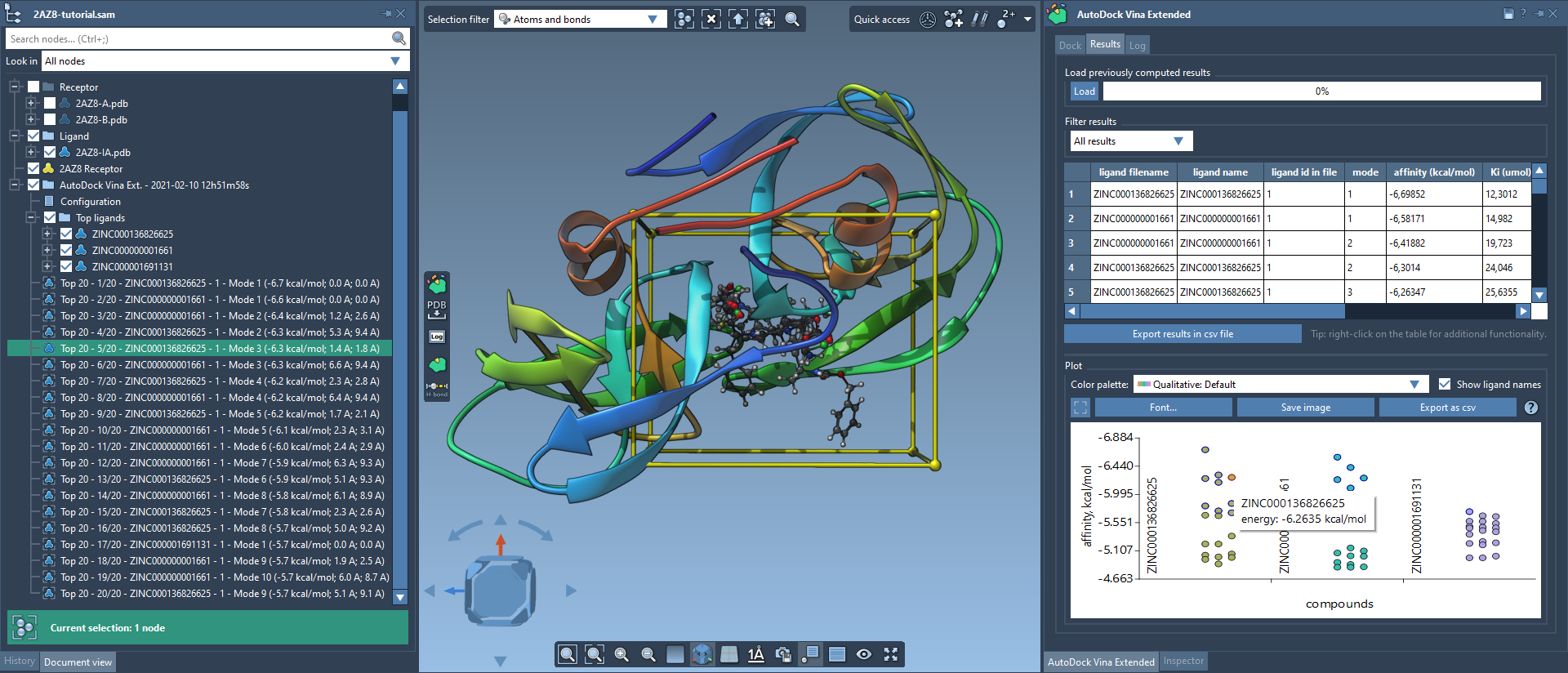
Enable Save results before starting if you want to reload the project later. Keep the generated directory hierarchy intact and do not remove files: the saved project includes input and generated files, docked poses, and MOL2 files for individual modes. For large libraries, loading only the results table or selected top ligands can be more practical than loading every pose at once.
Inspect poses before drawing conclusions
Use the results table and plot to sort, filter, and select candidate poses. Restore a conformation to inspect it in the structure, and compare the ligand’s position with the pocket rather than relying on a score alone. A docking score is a way to prioritize poses for further examination, not experimental confirmation. Visual models, distance measurements, hydrogen-bond visualization, and ligand-receptor interaction analysis can help you investigate what a pose is doing.
For the full step-by-step walkthrough, including loading results and additional analysis, see the AutoDock Vina Extended tutorial.
Note: SAMSON and all SAMSON Extensions are free for non-commercial use. Get SAMSON.