



A molecular structure can look ready for calculation and still produce confusing results: the wrong task is selected, a molecular charge is left at its default, or the first energy reading has not appeared yet. These are easy details to overlook when your real goal is to explore or refine a structure. A short preflight routine can make UMA evaluations in SAMSON easier to set up and interpret.
UMA is a family of machine-learning atomistic models available through the UMA Force Field interaction model. In SAMSON, it can support interactive energy and force evaluation for geometry refinement, exploratory relaxation, and qualitative force analysis. The important distinction is that an interactive result is useful for exploration, but it should not automatically be treated as a final, high-accuracy answer. When the conclusion matters, confirm it with an appropriate reference method.
Start with the system, not the model size
Before opening the setup window, decide what kind of system you are evaluating. UMA offers several tasks, and choosing the one that matches the system is the first useful check:
- OMOL is for molecules.
- OMAT is for inorganic materials.
- ODAC is for MOFs and direct-air-capture-style adsorption workflows.
- OC20 is for catalytic surfaces and adsorbates.
- OMC is for molecular crystals.
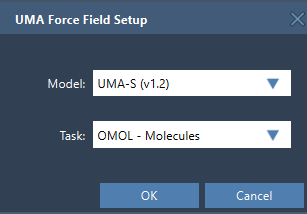
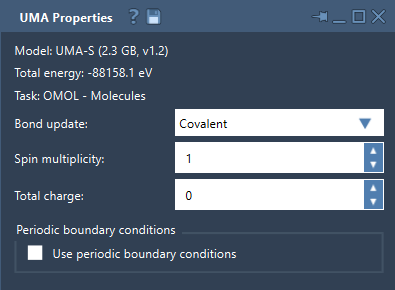
This choice is not just a label: it determines which application domain the evaluation is intended for. For molecular systems using OMOL, total charge and spin multiplicity are part of the UMA request. Check both against the system you mean to model. The setup interface uses these settings only for OMOL.
Choose a model that fits the first question
For a first pass, UMA-S is a sensible starting point. The extension offers UMA-S v1.2 (2.3 GB) as the default fast workflow, UMA-S v1.1 (1.1 GB) as a lighter legacy option, and UMA-M v1.1 (11.7 GB) as a larger model when more capacity is desired. Starting with UMA-S keeps the initial choice straightforward; you can consider another available model when there is a reason to do so.
There is also a setup step that can catch new users by surprise. On first use, UMA prepares a dedicated Python environment and may request access to the models. Follow the instructions shown in SAMSON. The preparation can take some time, and after it completes you may need to create the interaction model again. In other words, a delayed first evaluation does not necessarily mean the molecular structure is the problem.
Make the first run a controlled test
Open the document containing your system, then add a simulator through Edit > Simulate > Add simulator. Select UMA Force Field, choose a state updater such as FIRE, and confirm. In the setup window, select the model and task. Once the environment and model are ready and the UMA Properties window appears, start the simulation using Edit > Simulate > Start.
The energy may initially be unavailable while UMA completes its first evaluation. Wait for that evaluation before interpreting the display. When it succeeds, the total energy appears in the properties window. For a first test, use a small representative system and check that the intended task and, for OMOL, charge and spin settings are correct before moving on to a larger workflow.
Know what the interactive controls mean
The Bond update control changes how the bond graph is handled during simulation. Covalent recomputes covalent bonds from the current structure; Off leaves the existing graph unchanged. The Wiberg and Mayer options estimate bond orders using a deep-learning model. These estimates can help with interactive exploration and visualization, but the documentation cautions against using them alone to establish important conclusions. Confirm those conclusions with your reference method.
For periodic workflows, the properties window includes a control to enable or disable periodic boundary conditions and a 3 × 3 cell matrix in angstroms. Check the cell before interpreting results. A periodic setup is only as useful as the cell information supplied for the system.
A compact preflight checklist
- Match the task to the system type.
- Begin with UMA-S unless you have a reason to select another model.
- For OMOL, verify total charge and spin multiplicity.
- For periodic systems, check that periodic boundary conditions and the cell are appropriate.
- Wait for the first evaluation before reading the energy.
- Use interactive results to screen, refine, and explore; validate important conclusions with a higher-accuracy reference method when needed.
This sequence helps separate setup questions from scientific interpretation. It also makes it easier to notice which choice may need revisiting if the evaluation does not match your expectations.
For the complete setup instructions and interface details, see the UMA Force Field tutorial.
Note: SAMSON and all SAMSON Extensions are free for non-commercial use. Get SAMSON.