



Molecular modelers often face the challenge of working with vast assemblies, from protein complexes to viral capsids. Understanding symmetry in such assemblies isn’t just an intellectual curiosity—it’s a practical tool that can revolutionize workflows. Whether it’s reducing computational costs, guiding nanomaterial design, or validating structures, symmetry detection has a profound impact. In this blog post, we delve into leveraging SAMSON’s Symmetry Detection extension for identifying and visualizing symmetry axes in biological assemblies.
How Symmetry Detection Eases Molecular Modeling
Symmetry can help molecular designers achieve significant efficiency and insight by:
- Identifying functional interfaces: Symmetry reveals repeated structural elements, aiding interface analysis in systems like protein complexes or viral shells.
- Validating experimental structures: Comparing detected symmetry against expected symmetry elements ensures structure reliability.
- Reducing computational costs: When only the unique asymmetric unit is simulated, computational loads can drop dramatically.
- Guiding molecular design: Designing symmetric nanomaterials, creating ligands, or targeting mutagenesis becomes more precise with symmetry insights.
Symmetry Detection Quick-Start in SAMSON
Getting started with SAMSON’s Symmetry Detection extension is straightforward. Below is a step-by-step workflow to kick things off:
- Prepare your system: Open SAMSON and either fetch available assemblies (e.g., PDB entries like
3NQ4or1CHP) or load your own molecule. If the assembly you’re working on supports biological assemblies, check the importer options. - Launch the extension: Navigate to Home > Apps > Biology > Symmetry Detection.
- Compute symmetry: Simply click the Compute symmetry button to detect all potential symmetry groups in your assembly.
- Explore visual results: Axes of symmetry are directly displayed on the structure, allowing you to review and highlight different symmetry groups. Select the most relevant symmetry axis for further analysis or visualization.
Dive Deeper with Example 3NQ4
The symmetry detection feature truly shines when applied to complex systems like the icosahedral capsid 3NQ4. All 2-, 3-, and 5-fold axes are displayed, offering clear visualization for identifying the asymmetric unit. This reduces simulation effort while retaining essential structural information.
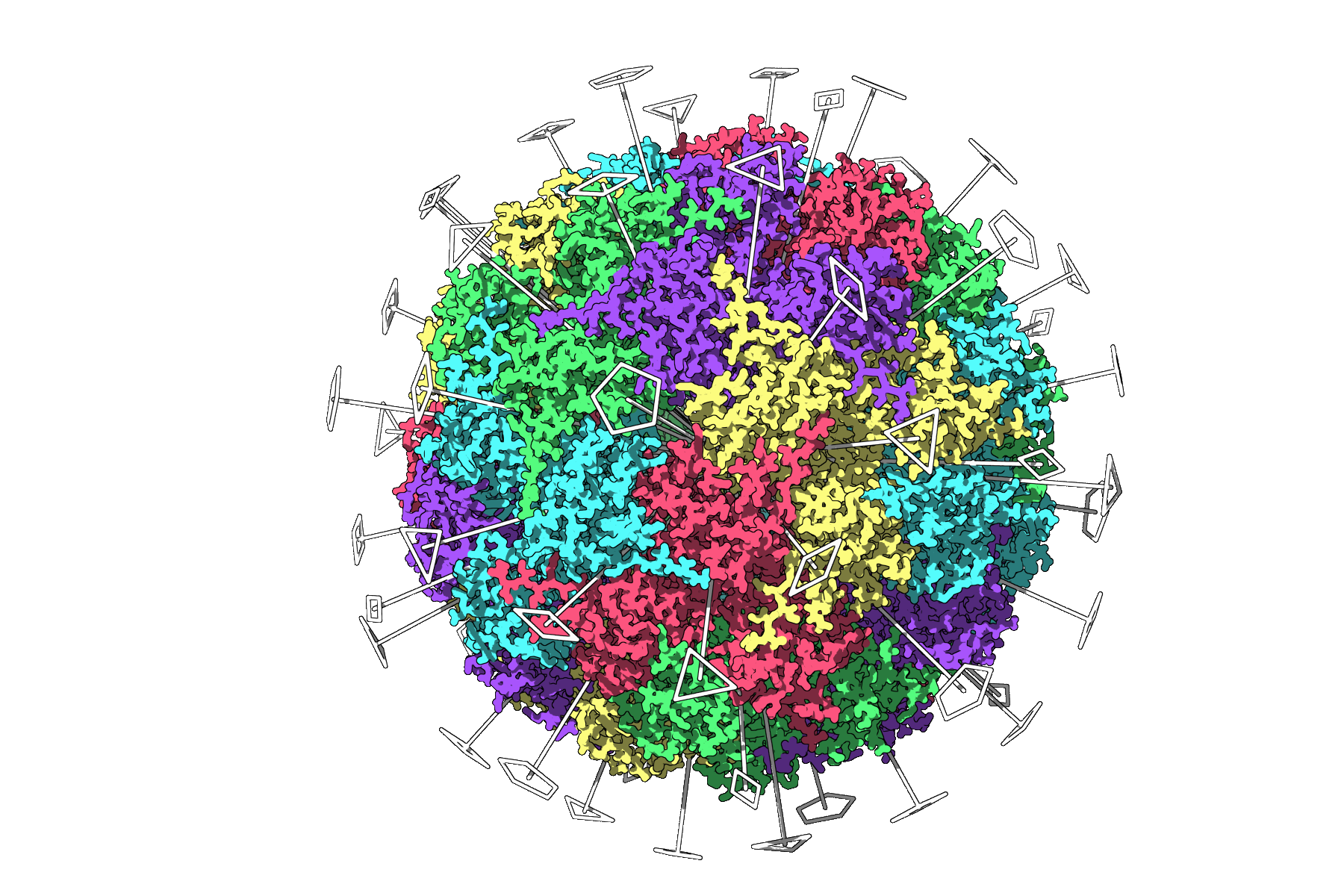
The visualization also enhances communication, whether in team meetings or publications, as it provides a clear geometric representation of symmetry elements.
Optimization Tips for Better Visualization
Here are some tips to further master symmetry visuals in SAMSON:
- Utilize visual models, such as combining symmetry axes with ribbons or surface models, to add clarity and context.
- Color asymmetric units distinctively—for example, coloring chains differently emphasizes repeating elements.
- Take snapshots directly from the viewport to prepare figures for publications or presentations quickly.
Beyond Visualization
Once symmetry axes are identified, you can export the asymmetric unit for focused modeling, symmetrical design, or computational experimentation. The insights gained can extend beyond protein modeling to nanoparticle design and similar studies.
To learn more about SAMSON’s Symmetry Detection extension and explore more advanced workflows, visit the official documentation page: https://documentation.samson-connect.net/tutorials/symmetry/computing-axes-of-symmetry-of-biological-assemblies/.
SAMSON and all SAMSON Extensions are free for non-commercial use. Explore the possibilities by downloading SAMSON at https://www.samson-connect.net.