



Molecular modelers often face the challenge of designing intricate shapes at the nanoscale with precision and flexibility. While molecular structures are fascinating in themselves, finding tools that allow creative and efficient manipulation can be a game-changer. Enter the SAMSON platform’s Simple Script Extension, which provides a powerful scripting environment for directly editing atomic properties. Let’s explore how this extension can help you create a graphene-based model of Batman’s iconic batarang!
Why Use the Simple Script Extension?
Designed specifically for atom-level modifications, the Simple Script Extension enables modelers to control properties such as atom positions, element types, visibility, and more—all through a scripting interface. With predefined variables and mathematical expressions, you can customize atomic arrangements effortlessly. Whether you’re building functional nano-structures or indulging in creative modeling, the possibilities are expansive.
Creating Batman’s Nano-Batarang
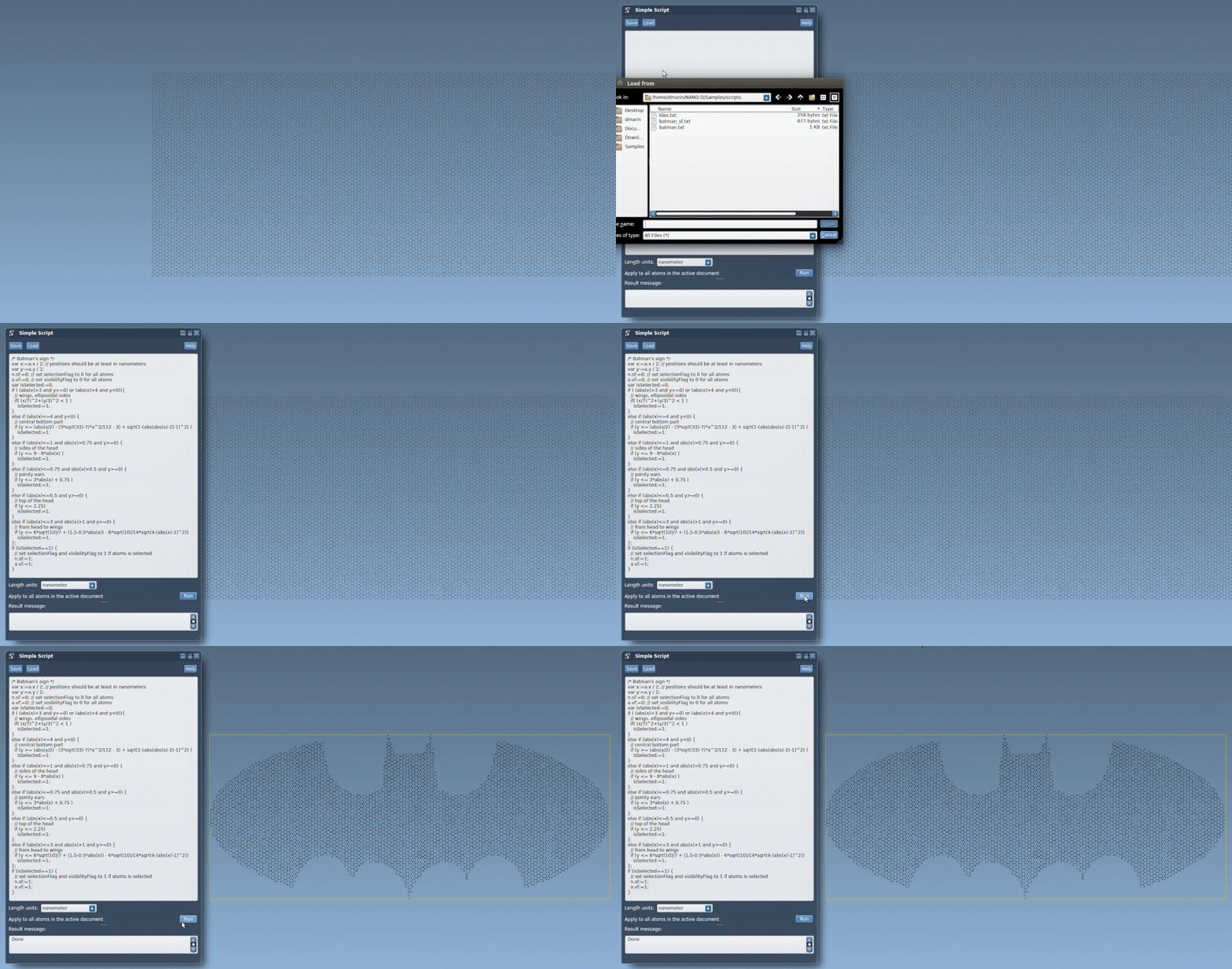
Let’s walk you through the process of designing a miniature graphene-based batarang using just a script. This example employs mathematical expressions to select and shape regions of a graphene sheet into the famous bat symbol.
Here’s the script to get you started:
|
1 2 3 4 5 6 7 8 9 10 11 12 13 14 15 16 |
<span class="cm">/* Batman's sign */</span> <span class="n">var</span> <span class="n">x</span><span class="o">:=</span><span class="n">a</span>.<span class="n">x</span> / <span class="mi">2</span>; <span class="n">var</span> <span class="n">y</span><span class="o">:=</span><span class="n">a</span>.<span class="n">y</span> / <span class="mi">2</span>; <span class="n">var</span> <span class="n">iambatman</span> := <span class="nb">false</span>; <span class="k">if</span> (<span class="n">abs</span>(<span class="n">x</span>) > <span class="mi">3</span> && <span class="n">y</span> >= 0) { <span class="k">if</span> ((<span class="n">x</span> / <span class="mi">7</span>)^<span class="mi">2</span> + (<span class="n">y</span> / <span class="mi">3</span>)^<span class="mi">2</span> < <span class="mi">1</span>) iambatman := <span class="nb">true</span>; } <span class="k">if</span> (<span class="n">iambatman</span>) { n.sf := 1; a.vf := 1; } <span class="k">else</span> { n.sf := 0; a.vf := 0; } |
What does this script do? It:
- Defines a coordinate system for manipulation by dividing the x and y coordinates by 2, scaling the graphene sheet.
- Uses mathematical conditions to select regions of the graphene that shape the bat symbol (e.g., wings, ears, and head).
- Controls the visibility (
a.vf) and selection state (n.sf) of atoms, ensuring non-essential regions are hidden.
Here is what the final result looks like:
Want More Complexity?
This example script can be easily extended or transformed. For instance, you can:
- Add dynamic curvature to the wings using sine functions.
- Explore other geometric transformations, such as rotations or scaling factors.
- Create entirely new shapes like nano-text or custom logos by altering the script parameters!
Learn More
The complete tutorial offers step-by-step examples and additional scripts to help you master the Simple Script Extension. Dive in and unleash your creativity with molecular modeling!
SAMSON and all SAMSON Extensions are free for non-commercial use. You can download SAMSON at https://www.samson-connect.net.