



For molecular modelers and researchers, designing tailored polymers can be an essential part of exploring new materials, modeling complex systems, or simulating biopolymer behaviors. SAMSON’s Polymer Builder provides a versatile solution, especially with its ability to register custom monomers. In this blog post, we’ll discuss how to easily create and register custom monomers, unlocking the potential for unique polymer designs while saving significant time.
Why Custom Monomers Matter
When constructing flexible, synthetic chains, custom molecular scaffolds, or biopolymers, a pre-defined library of monomers may not always meet your requirements. Researchers frequently need specific chemical fragments to accurately reflect their designs. With SAMSON’s Polymer Builder, you can register your own monomers effortlessly, ensuring bespoke configurations for your projects.
How to Register Custom Monomers
The Register New Monomers feature in SAMSON is designed for seamless integration into your workflow. Here’s how you can use it:
- Select a molecule (monomer unit) from the Document view or Viewport.
- Click Register monomer from selection to add the chosen molecule as a new monomer.
The tool intelligently identifies start and end atoms at opposite ends of the selected molecular fragment, simplifying the process. You can, however, override these defaults if necessary:
- S: Set atom from the current selection (first, select a single atom in the workspace).
- P: Pick an atom from a list of atoms within the molecule.
- V: Highlight atoms or the structure for better visualization.
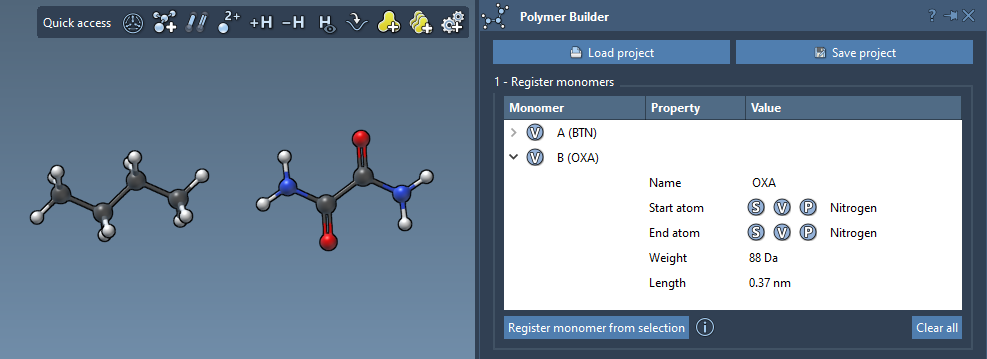
Each registered monomer is assigned a unique identifier (e.g., A, B, C, etc.), and its details—such as molecular weight (in Daltons) and the distance between its start and end atoms—are automatically recorded in an organized table:
Editing, Expanding, or Removing Monomers
A key advantage of the Polymer Builder is its flexibility. You can modify already registered monomers directly within the table. For example, expand their structures or adjust the properties as needed. If you wish to remove a monomer:
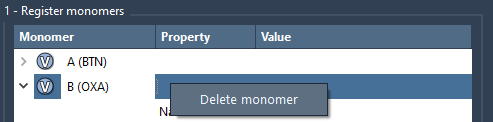
- Right-click on the monomer in the table and select Delete monomer.
- To remove all monomers, simply click Clear all.
Additionally, keep in mind that if a monomer’s structure is modified (e.g., by adding or deleting atoms), it will be automatically deregistered from the monomer list, ensuring your data stays consistent with molecular changes.
Considerations for Registration
If a structure contains only one residue or structural group, the registered monomer’s name will be based on that. However, you can provide a custom name if you’d prefer the monomer to belong to a distinct structural group in the final polymer design. SAMSON also helps you clearly visualize this organization during the process.
Getting Started with Custom Monomer Registration
Want to design a polymer that’s truly unique and reflective of your research needs? Register custom monomers in SAMSON’s Polymer Builder and start building polymers of limitless configurations. By tailoring molecular fragments as monomers, you pave the way for innovative polymer synthesis, whether your focus is in material science, nanotechnology, or beyond.
For further details on registering custom monomers and other exciting features, visit the Polymer Builder documentation.
Note: SAMSON and all SAMSON Extensions are free for non-commercial use. Download SAMSON today at https://www.samson-connect.net.