



Designing and simulating polymers is an essential part of molecular modeling, but the process can be daunting when working with repetitive polymer chains or sequences. What if you could define, register, and reuse these polymer sequences effortlessly? With SAMSON’s Polymer Builder, you can now streamline your workflow and work with custom polymer sequences more efficiently.
Why Define Reusable Sequences?
When dealing with polymers that exhibit repeating sequence patterns, registering these patterns as reusable sequences can save time and reduce repetitive tasks. It ensures accuracy throughout your design process, eliminates manual errors, and enables faster iterations when modifying and regenerating polymers.
How to Register Polymer Sequences
The Polymer Builder in SAMSON allows you to assemble and register custom sequences with ease. Here’s how you can do it:
- Click Add new sequence to open the sequence registration panel.
- Using the unique IDs of registered monomers (e.g.,
A,B,C, …), enter the sequence you want to define. For instance,ABBA.
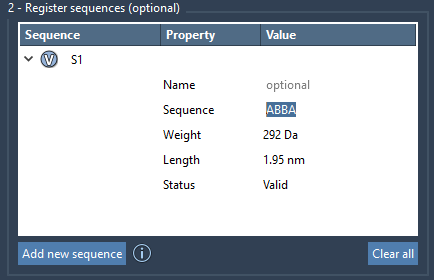
Once registered, each sequence is assigned a unique identifier (e.g., S1, S2, etc.). These sequences are validated automatically, and their properties like molecular weight and length are displayed in the sequence table.
Fine-Tuning Your Polymer Sequences
Polymer Builder lets you further customize your sequences by specifying bond types between the monomers. By default, monomers are connected with single bonds, but you can also use:
=for double bonds#for triple bonds
For example:
A=B: MonomerAconnected by a double bond with monomerB.A#B: MonomerAconnected by a triple bond with monomerB.
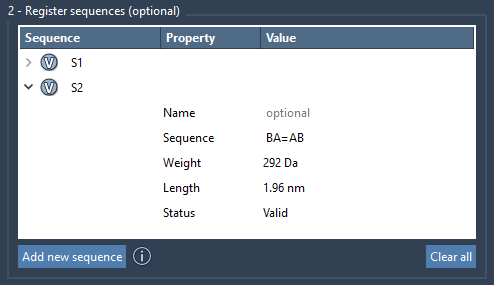
You can also provide a name for each sequence to group monomers into a common structural parent. This is particularly useful when generating larger or more complex polymers.
Editing and Validation
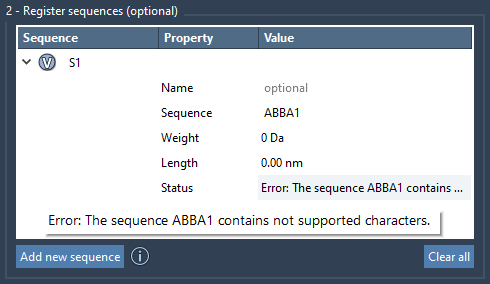
The intuitive interface allows you to edit sequences directly within the sequence table. Click the associated V button to visually highlight the monomers used in the sequence and ensure everything is configured as intended. If any part of the sequence is invalid, an error message will appear under the Status column, allowing you to fix the issue before proceeding.
Leveraging Registered Sequences
Once you’ve defined your sequences, you can incorporate them into larger polymer designs with incredible flexibility. Combine sequences with individual monomers using simple expressions such as:
S1 + 2*S2: Two repeats of sequenceS1, followed by two repeats of sequenceS2.AB=BA: SequenceABconnected to sequenceBAby a double bond.
With this approach, you can generate complex polymers with accurate predictions of molecular weight and structural properties.
Start Simplifying Your Polymer Design
By registering sequences in the Polymer Builder, you’ll not only speed up the process of polymer design but also gain greater control over your workflows. To learn more about the complete features of Polymer Builder, check out the full documentation page.
SAMSON and all SAMSON Extensions are free for non-commercial use. Get SAMSON at samson-connect.net.