



Molecular modelers often face challenges when balancing automated force field adjustments and maintaining interpretability in simulations. SAMSON’s UMA Force Field offers specialized features to address this pain point. One of the key aspects of customizing simulations in UMA is the proper selection of the Bond update mode. Getting it right can save simulation time, improve exploratory workflows, and lead to better results.
Why the Bond Update Mode Matters
Bonds define how atoms interact in your system and directly impact the energy calculations and forces in your simulation. SAMSON’s UMA Force Field allows you to dynamically update bonds to better reflect the system’s current state during a simulation. However, different systems and tasks require different approaches. By choosing the correct bond update mode, you can ensure accuracy without unnecessary computational overhead.
Available Bond Update Modes
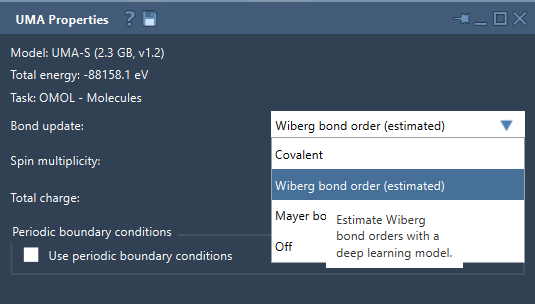
The bond update mode can be configured from the UMA Properties window during a simulation. There are four options available:
- Covalent: This mode recomputes covalent bonds based on the present structure. This is useful for systems where topological changes may occur due to new arrangements during the simulation.
- Wiberg bond order (estimated): In this mode, Wiberg bond orders are estimated using a deep-learning model. This is geared towards interactive exploration and qualitative analysis.
- Mayer bond order (estimated): Similar to the Wiberg mode, this option estimates Mayer bond orders, particularly useful for bond-order visualizations.
- Off: If your system has a predetermined bond graph that does not change during simulations, this option preserves the current bond graph, reducing computational effort.
Note
The Wiberg and Mayer bond-order modes provide estimated results. While they are invaluable for real-time exploration of structures, confirm any significant findings with your reference method.
Key Considerations When Choosing
Here are a few tips to consider when setting your bond update mode:
- For flexible systems, such as molecules undergoing reactions, Covalent mode is generally the safest option.
- For qualitative analysis, especially at the beginning of exploration, Wiberg or Mayer modes can provide quick insights into bonding without full recalculations.
- If you already have a carefully validated bond graph (e.g., via quantum chemistry tools) and want to preserve it, use the Off option to avoid recomputation.
How to Set the Bond Update Mode in UMA
Customizing the bond update mode is straightforward. Once the simulation has started in SAMSON:
- Locate the UMA Properties window.
- Find the Bond update drop-down list.
- Select the mode most appropriate for your workflow: Covalent, Wiberg bond order, Mayer bond order, or Off.
Below is a visual example of how the interface looks when choosing a mode:
Concluding Thoughts
Customizing the bond update mode provides flexibility, speed, and insight for molecular modelers working with UMA Force Fields in SAMSON. Whether you are refining geometries, analyzing bonding patterns, or simply exploring structures, it’s worth investing a moment to choose the correct mode for your specific task. To dive deeper into all the features of UMA Force Fields, check out the official documentation page.
SAMSON and all SAMSON Extensions are free for non-commercial use. You can get SAMSON at samson-connect.net.