



For molecular modelers and researchers, mastering atom manipulation on the nanoscale can often be a challenge, especially when dealing with complex shapes or specific structural designs. What if we told you that creating something as distinctive as Batman’s batarang could help you hone this skill? It might not save Gotham, but it can give you a memorable introduction to scripting with SAMSON’s Simple Script Extension.
The Simple Script Extension in SAMSON introduces a way to select and modify atoms through scripting, empowering you to create custom nanoscale shapes with precision. This kind of capability is key for molecular modelers seeking to explore unique atomic structures or tailor their models for specific applications.
Why Script for Molecular Modeling?
In traditional molecular modeling workflows, selecting and modifying atoms manually can be time-consuming and prone to errors. By using mathematical expressions and scripting, SAMSON allows you to automate and refine these processes, enabling more control over complex designs. The Simple Script Extension is an excellent tool for both learning and applying these techniques.
Imagine designing a graphene-based nano-batarang, step-by-step, using structured commands. This seemingly playful task provides a hands-on way to learn how to:
- Select atoms based on specific conditions (e.g., only selecting carbon atoms).
- Modify properties like position, visibility, and atomic type through mathematical expressions.
- Create intricate nanoscale geometries by combining logical statements and calculations.
How the Simple Script Extension Works
The Simple Script Extension uses a scripting language that is similar to C-like syntax, emphasizing usability for both beginners and seasoned programmers. Built-in variables and operators allow you to interact with atom attributes, such as positions (a.x, a.y, a.z), visibility (a.visibilityFlag), and element type (a.element).
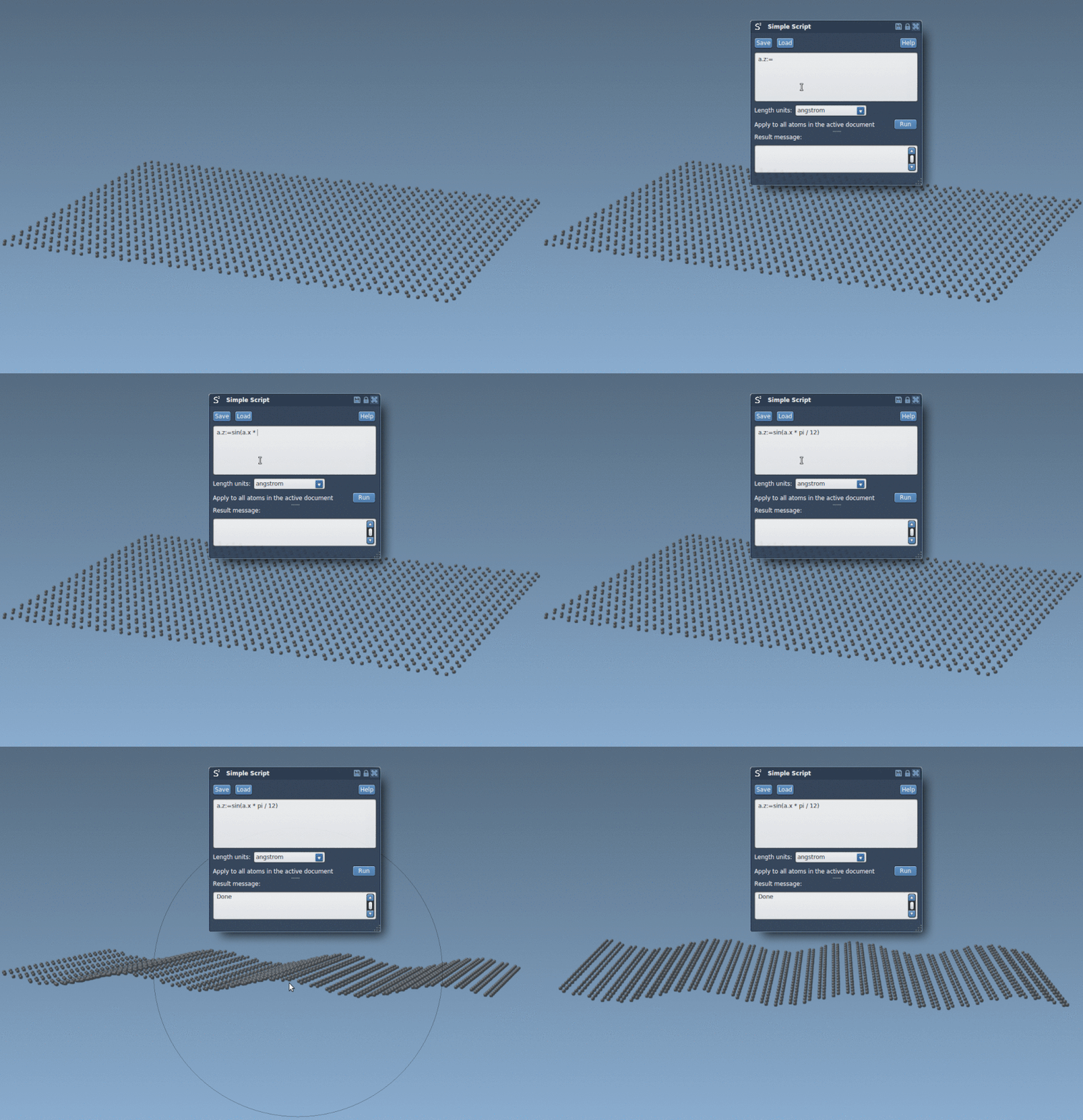
Here’s a simple example of altering atoms along the z-axis using a sinusoidal relationship:
|
1 |
a.z := sin(a.x * pi / 12); |
This script adjusts the z-coordinate of atoms in your structure, producing sinusoidal waves in a graphene sheet. Below is a visual result showcasing this transformation:
A Showcase: Crafting the Nano-Batarang
One of the most distinctive examples in the documentation is crafting a Batman-style nano-batarang from a graphene sheet. This exercise demonstrates how to combine selection criteria and mathematical expressions to sculpt custom shapes:
- Use logical conditions to deselect or retain specific atoms within geometric bounds.
- Apply visibility flags to highlight relevant areas of your model.
- Iterate through atom sets with loop structures to ensure all required specifications are met.
Animating the script results provides insights into how these commands evolve nanoscale shapes. Here’s how the batarang fabrication looks:

The process might sound meticulous, but the exercise solidifies your understanding of powerful selection and modification tools in SAMSON.
Beyond Nano-Batarangs
These same techniques can be deployed for your own molecular modeling projects, whether you are experimenting with new structures or simulating elaborate patterns. Combined with SAMSON’s ecosystem, you’re not just limited to Simple Script—you can expand your workflows to include Python scripting or even build reusable extensions with the SAMSON SDK.
If you’re intrigued by the potential of combining scripting with molecular modeling, you can explore additional functionalities in the original documentation: Read more here.
Note: SAMSON and all SAMSON Extensions are free for non-commercial use. You can get SAMSON at SAMSON Connect.