



For molecular modelers, precision and flexibility in manipulating atoms at an atomic scale are essential. Whether it’s designing a nanoscale structure or crafting custom material geometries, the ability to control every detail can make all the difference. This is where SAMSON’s Simple Script Extension proves invaluable.
In this blog post, we’ll walk you through how you can use the Simple Script Extension in SAMSON to define and modify atom properties, opening up endless possibilities for creating molecule-based nanostructures and designs like the intriguing nano-batarang. 🌟
Why Customize Atomic Models?
Molecular simulations are precise, but it can become tedious for modelers to individually modify atomic-level properties across a structure. Yet, sometimes, such customizations are crucial. Imagine wanting to morph materials into a specific design that reflects your study’s requirements.
The Simple Script Extension resolves this by letting you programmatically modify key properties such as atomic coordinates, visibility, element type, and much more, all using a script.
How Does It Work?
The Simple Script Extension in SAMSON allows you to define scripts using variables, mathematical functions, and logic to control atom-level properties. This scripting functionality borrows designing concepts from languages like C, so even beginners with some programming background can dive in.
1. Supported Atom Properties
The flexibility of the script comes from the variety of atom properties you can access and modify. Here are just a few examples:
a.x, a.y, a.zfor atomic positionsa.visibilityFlag(truefor visible,falsefor invisible)a.formalCharge,a.occupancy,a.partialChargea.elementIDfor changing an atom’s element typea.selectionFlagto highlight specific atoms
Working with these properties allows users to tweak their active molecular models with incredible specificity. For example, you can shift atoms, reassign bonds, and group specific regions of molecules for further analysis.
2. Applying Math and Logic
The scripting language supports a wide range of mathematical operators and logic structures. You can apply functions such as sin, cos, round, and create conditional statements to programmatically implement complex behaviors.
3. Example: Create Waves in Molecular Sheets
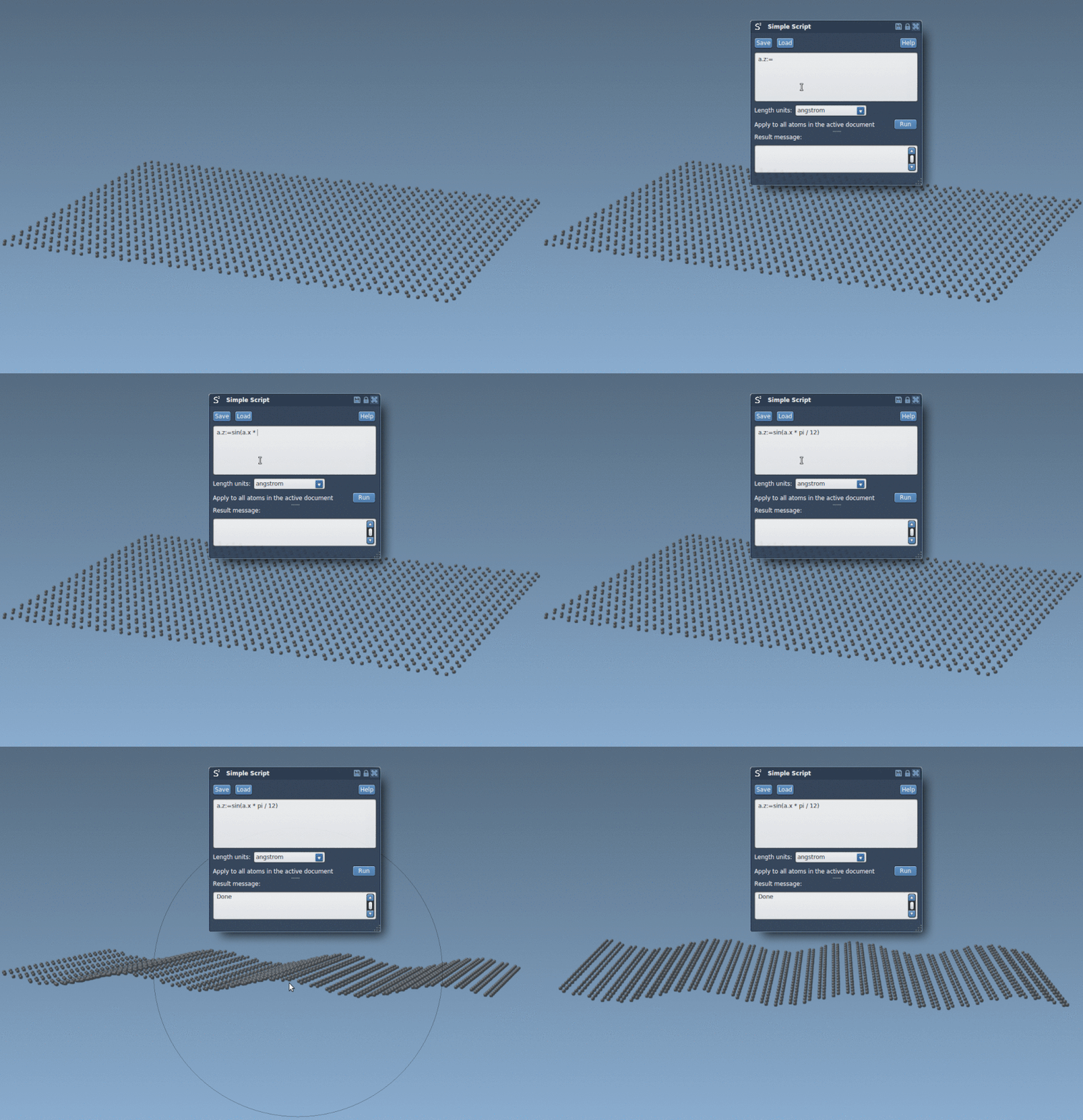
If you need to add design elements like a sinusoidal wave to a molecule, you can use the Simple Script Extension as follows:
|
1 |
a.z := sin(a.x * π / 12); |
The image below demonstrates how this simple script transforms a graphene layer into a sinusoidal shape:
4. Example: Craft a Nano-Batarang
One of the most visually striking uses of the extension is turning a two-dimensional graphene sheet into the shape of Batman’s iconic batarang at the nanoscale. Below is an animation showing how the nano-batarang can be molded using mathematical expressions within the script:

This is achieved through a combination of pre-defined geometrical rules and conditional logic in the script, showing the breadth of possibilities for custom molecular designs.
Start Experimenting
The Simple Script Extension not only enhances your workflow but also encourages creativity in molecular modeling. Whether you’re generating realistic interactions for simulations or exploring innovative designs, this tool can boost your capabilities.
For detailed guidance and examples, visit the documentation page.
SAMSON and all SAMSON Extensions are free for non-commercial use. Get started with innovative molecular modeling today by downloading SAMSON at SAMSON Connect.