



One of the significant challenges faced by molecular modelers is generating smooth, continuous transitions between different protein conformations. Whether you’re conducting conformational analysis, setting up an umbrella sampling study, or visualizing structural transitions, creating accurate and biologically meaningful pathways can be daunting. This is where SAMSON’s ARAP (As-Rigid-As-Possible) Interpolation comes to the rescue, offering a quick and effective way to compute interpolation paths between protein structures.
The Power of ARAP Interpolation
The ARAP Interpolator is a SAMSON Extension designed to generate smooth and realistic transition paths between two conformational states of a protein. By leveraging biologically meaningful geometric models, it allows for the computation of realistic pathways in a matter of seconds. This can be particularly useful in applications such as transition state modeling or setting up free energy simulations.
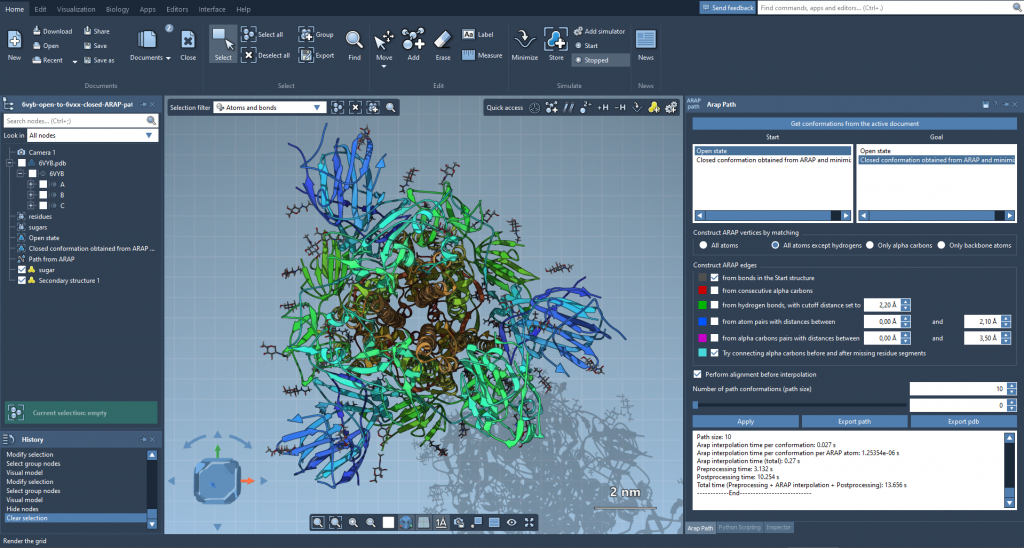
For instance, this method can facilitate workflows like visualizing the structural transition of the SARS-CoV-2 spike protein, helping researchers understand its functional mechanisms. Here’s a preview of ARAP Interpolation pathways:
Steps to Generate a Transition Path
To get started with ARAP Interpolation in SAMSON, follow these steps:
1. Prepare Your Protein Structures
Begin by fetching the protein conformations you wish to interpolate between. For example, you might use 1DDT and 1MDT, two conformations of the diphtheria toxin:
- Fetch these structures in SAMSON by navigating to Home > Fetch.
- Use PDB or PDB (mmCIF) formats and load the structures.
- Clean the structures using Home > Prepare, ensuring any unrelated molecules like water, ions, or ligands are removed.
The aim here is to focus solely on the chains (e.g., Chain A) relevant to your analysis. Preparing clean structures minimizes potential issues downstream.
2. Define Conformations
In SAMSON, you can define conformations for the cleaned structures:
- In the Document view, select the structure (e.g.,
1DDT). - Navigate to Edit > Conformation and assign it a name, such as
1DDT A. - Repeat the same for the other structure (e.g.,
1MDTwith1MDT A).
These conformations serve as the start and goal points for the interpolation.
3. Run the ARAP Interpolation
Once your conformations are ready, launch the ARAP Interpolation app:
- Access Home > Apps > Biology > ARAP Path Interpolation.
- Choose your start (
1DDT A) and goal (1MDT A) conformations.
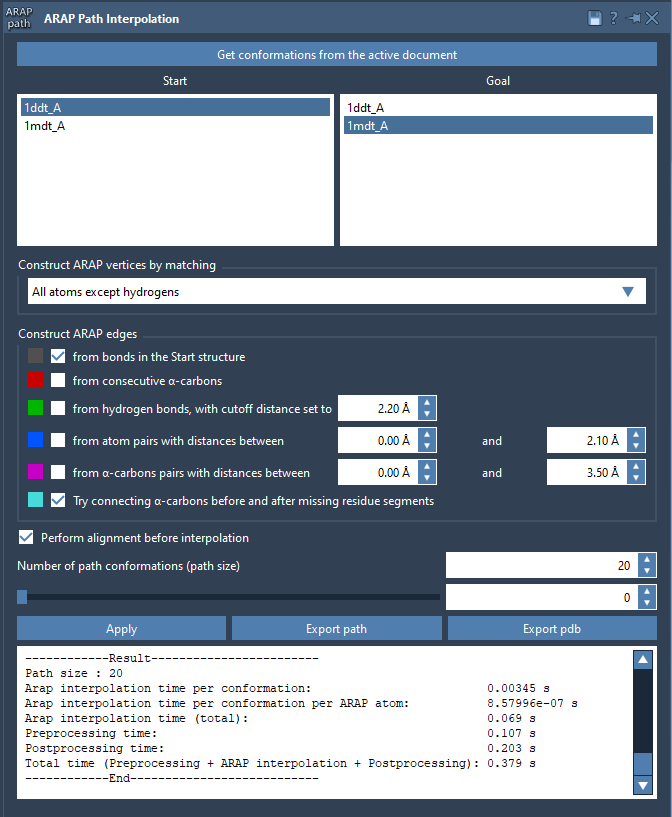
Refinement options allow you to enhance the interpolation by selecting specific atoms (e.g., excluding hydrogens) or connecting missing residues between segments. Make sure to check Perform alignment before interpolation and set the number of path conformations (e.g., 20 for 20 intermediates).
Click Run to generate the pathway!
Analyzing and Exporting Results
After computation, the ARAP Interpolator provides a pathway that you can explore directly within SAMSON. A sliding tool lets you visually scrub through the intermediates to assess the structural transition. To delve deeper, the tool also allows you to visualize the construction of ARAP edges, with color-coded logic for better understanding.
You can export the pathway into various formats, such as PDB files, to integrate with other software for simulations or further analysis. Here’s what the interface looks like during analysis:
Conclusion
Generating smooth, realistic pathways between protein conformations has never been easier. With SAMSON’s ARAP Interpolation, you can address critical modeling challenges efficiently, opening doors to richer insights in structural biology. Ready to get started? Check out the full documentation for a step-by-step guide.
SAMSON and all SAMSON Extensions are free for non-commercial use. You can get SAMSON at https://www.samson-connect.net.