



Designing complex polymers with specific properties often starts with the simplest building block: the monomer. But if you’ve ever needed to go beyond standard monomer libraries to define your own, you know how tedious that process can be in many modeling tools.
The Polymer Builder extension in SAMSON offers a flexible and visual way to register monomers directly from your workspace. Whether you’re modeling synthetic chains, biopolymers, or molecular scaffolds, starting with customized monomers gives you the control you need to build at scale.
Why Register Custom Monomers?
Standard libraries often fall short when working on novel compounds or designing polymers with domain-specific architectures. By registering your own monomers directly from molecules in the SAMSON workspace, you can:
- Ensure structural compatibility during polymer generation
- Define precise connection points (start and end atoms)
- Track molecular weights and connection distances
- Edit and manage monomers visually in a central table
This approach avoids surprises later in the workflow caused by hidden assumptions or missing meta-data on standard fragments.
How to Register a Monomer
- Select a molecule (or fragment) from your document or viewport in SAMSON
- Click Register monomer from selection in the Polymer Builder interface
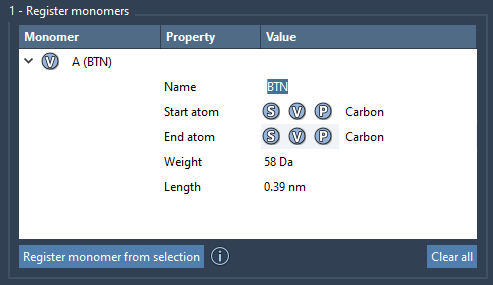
The tool automatically identifies start and end atoms at opposite ends of the fragment. But you can override that easily using keyboard shortcuts:
- S: Select a new atom from the structure
- P: Pick an atom from a list
- V: Visualize your current selection
Each successful registration gets assigned a unique one-letter ID (A, B, etc.), which is then used throughout the Polymer Builder to define sequences and larger structures.
Useful Details for Modeling
Once added to the monomer table, you can see at a glance:
- The molecule’s weight (Daltons)
- Distance between the start and end atoms
- Monomer names (auto-assigned or manually defined)
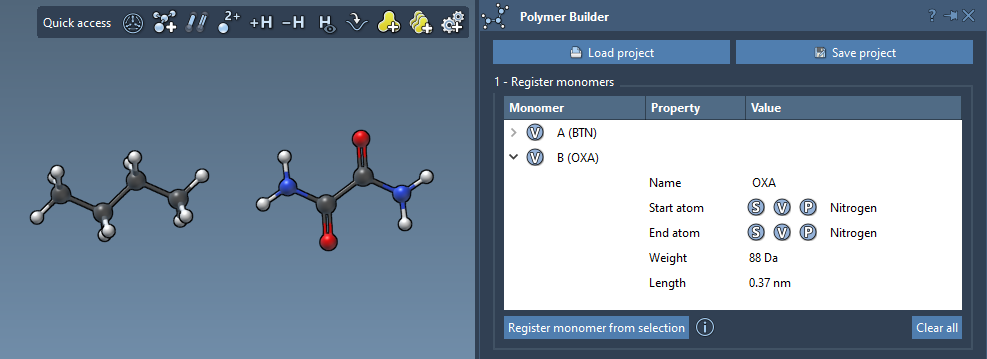
You can also modify monomers in-place or remove them from the table by right-clicking. This makes it quick to iterate through versions when refining fragment geometry or testing different connection strategies. There’s no need to start over every time.
Things to Keep in Mind
Note
If you edit the structure of a registered monomer (e.g., add or delete atoms), it will be automatically deregistered. Make sure to finalize structure edits before registering.
To keep your modeling session organized, monomers can be grouped under specific names, allowing for modular assembly and selective polymer generation downstream.
Conclusion
Defining your own monomers is a simple but powerful step that pays off when building custom polymers. The Polymer Builder in SAMSON makes this task intuitive, visual, and efficient — helping you stay focused on your design goals rather than file management or structural bookkeeping.
Want to learn more or see the full workflow including sequences and polymer generation?
Visit the full Polymer Builder Documentation
SAMSON and all SAMSON Extensions are free for non-commercial use. You can get SAMSON at https://www.samson-connect.net.