



When designing polymers for simulation, modeling, or property prediction, researchers often face a common pain point: how to manage complex monomer sequences easily and accurately. Whether you’re modeling synthetic chains or biopolymers, combining monomers in the right order with precise bond types quickly becomes unwieldy without the right tools.
The Polymer Builder in SAMSON helps you create and manage monomer sequences in a way that feels intuitive and reduces room for error. Here’s how sequence design works, and how it can simplify your polymer construction workflow.
Registering Monomers First
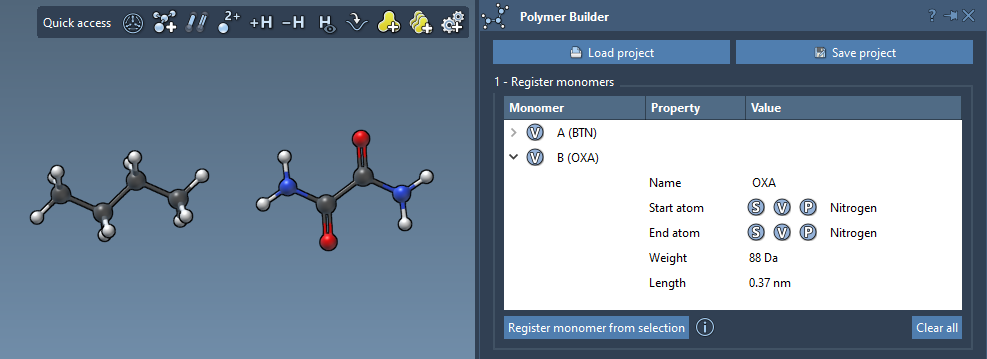
Before you can define sequences, you’ll need to register individual monomers. Select a molecular fragment and use the Register monomer from selection button. SAMSON automatically sets connecting atoms, but you can adjust those manually for finer control by pressing:
- S: Set atom from current selection
- P: Pick atom from a list
- V: Highlight atoms or structure
Each monomer gets a unique ID such as A, B, C… This makes working with sequences much easier later on.
Registering Sequences
Once monomers are in place, you can create sequences—ordered patterns of monomers that repeat or combine in useful ways. This is especially helpful for repetitive chains, block copolymers, or backbone patterns found in biopolymers.
To register a new sequence:
- Click Add new sequence
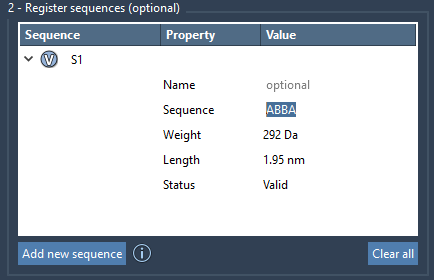
- Enter the sequence using monomer IDs (like
ABBA)
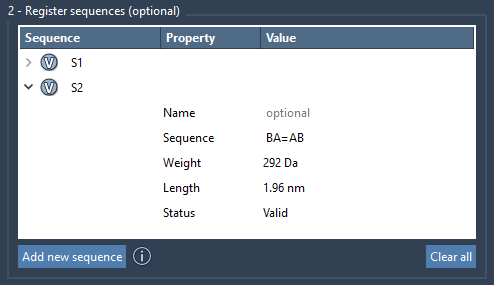
You can customize how monomers are linked by inserting bond type symbols:
=means a double bond (A=B)#means a triple bond (A#B)
These sequences are automatically labeled (S1, S2, etc.) and can be visually previewed using the V button so that you always see what’s being built.
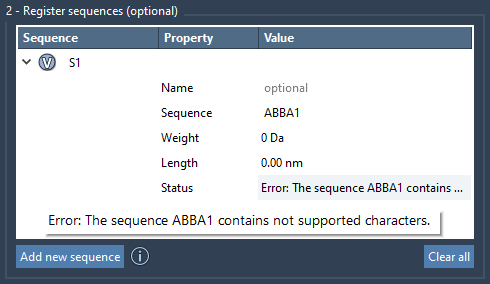
If there’s an issue in the sequence syntax (like an unrecognized monomer ID), the system flags it early with an error message under the Status field. This helps ensure that your designs are valid before polymer generation.
Why Sequence Design Matters
Many polymer design tools focus on full structure generation, but SAMSON allows an extra layer of modularity: you can use sequences themselves as components in larger expressions. That means:
2*S1 + AB#BAis a valid expression to build a polymer with two copies of sequence S1 followed by a triple-bonded combination of AB and BA.- You can update sequences directly in a table without rebuilding them from scratch.
This flexibility is especially useful when modeling block copolymers or testing how small sequence variations affect material properties.
Conclusion
Polymer Builder’s approach to sequence design helps you maintain control over what could otherwise become a tangled construction process. Whether you’re modeling for nanotechnology, soft materials, or drug delivery formulations, efficient sequence management goes a long way toward faster, reproducible results.
Learn more in the full documentation for Polymer Builder here: https://documentation.samson-connect.net/tutorials/polymer-builder/polymer-builder/
SAMSON and all SAMSON Extensions are free for non-commercial use. You can get SAMSON at https://www.samson-connect.net.